After buying a brand-new Windows 10 or 11 computer, double-clicking a video file opens it in Films & TV (or Movies & TV), and the Windows Media Player shortcut is nowhere to be found. This makes one wonder if Windows Media Player has been removed in Windows 10 and 11. The good news is that the classic Windows Media Player program is included in Windows 10 and Windows 11.
Windows Media Player can be accessed by clicking Start, All apps, Windows Media Player. If the Windows Media Player shortcut is not available in the list, check whether the WMPlayer.exe file exists in the Windows Media Player folder in the “Program Files” directory. Or press WinKey + R to bring up the Run dialog, and type:
C:\Program Files\Windows Media Player\wmplayer.exe
If it says “Windows cannot find wmplayer.exe“, the Windows Media Player package may not have been installed.
Install Windows Media Player (legacy) and Media Features
Option 1: Install WMP legacy using the Windows Features dialog (for non N/KN Editions)
This method applies to the regular Windows 10/11 Editions (i.e., not the N or KN editions). In the N and KN editions, the “Media Features” section will be missing from the classic Windows Features dialog.
To install Windows Media Player in regular Windows 10/11 editions, follow these steps:
- Press Win+R to open the Run dialog. Type optionalfeatures.exe and click OK.
- Expand Media Features, enable Windows Media Player, and click OK.
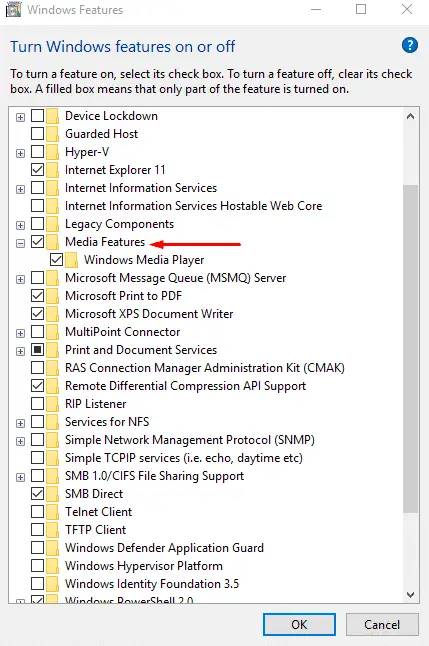
- Restart Windows if prompted.
Windows Media Player not listed in Windows Features?
Windows N and KN editions
If the Optional Features window doesn’t list Media Features/Windows Media Player and the filewmplayer.exedoesn’t exist, then you’re probably using Windows N or KN Edition. Windows N (for Europe) and KN (South Korea) variants don’t include media features by default due to competition law rulings in both countries. As a result, Microsoft had to maintain separate Windows versions for these markets.What exactly is missing in these Editions:
The N and KN editions of Windows 10 include the same functionality as Windows 10, except for media-related technologies (Windows Media Player) and certain preinstalled media apps (Music, Video, Voice Recorder, and Skype). You must install other software from Microsoft or another company for this communication functionality and to play or create audio CDs, media files, and video DVDs, to stream music, and to take and store pictures. New features such as Cortana, Windows Hello, and PDF viewing in the new Edge browser rely on Windows Media files that are not present in these editions.
Option 2: Install Windows Media Player and Media Feature Pack Using Settings
On Windows 10 N & KN editions (v1909 and higher) and Windows 11, there is no direct download link for the Windows Media Feature Pack. You can add or remove Windows Media Player via Windows features in Settings. Follow these steps to install them.
Windows 10
- Open Settings (Win + i), and click System.
- On the left side, click Optional features.
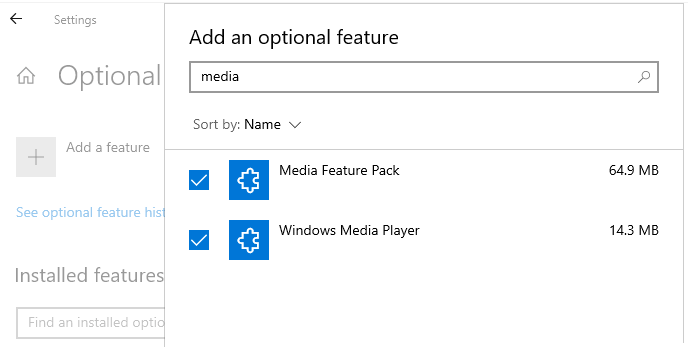
- Click on the Add a feature button.
- Type media in the text box.
- Select Media Feature Pack and Windows Media Player, and install them.
Windows 11
- Open Settings (Win + i), and click System.
- On the right side, click Optional features.
- Next, click Add an optional feature, and click View features.
- Type media in the text box.
- Select Windows Media Player Legacy (app) and Media Feature Pack.

- Click Add, and click Install.
Option 3: Install Windows Media Player and Media Feature Pack Using DISM
The DISM command can be used to install Windows Media Player or Media Features. Run the following commands to install the Media Feature Pack and WMP on Windows 10 or 11.
Note: You don’t have to install “Media Feature Pack” on regular Windows 10/11 Editions, as it’s already integrated.
Open an admin Command Prompt and run the following command to install WMP (legacy) on all editions:
dism /online /add-capability /capabilityname:Media.WindowsMediaPlayer~~~~0.0.12.0
And then run the following command (only for N and KN Editions) to install Media Feature Pack.
dism /online /add-capability /capabilityname:Media.MediaFeaturePack~~~~0.0.1.0
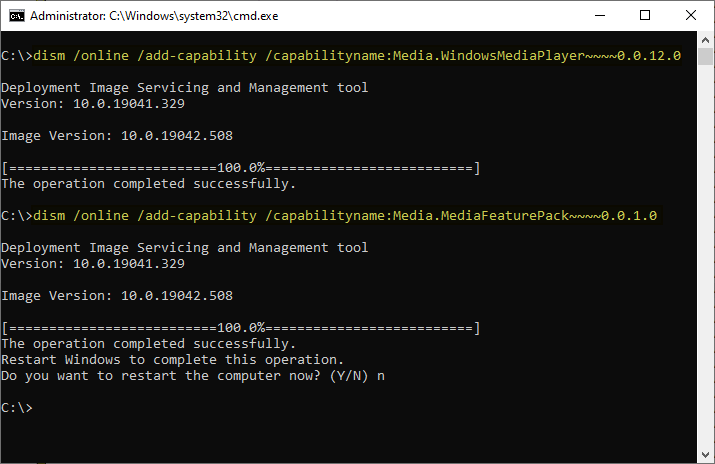
Restart Windows.
If you get the error code 0x80070490, “Media Feature Pack couldn’t install”, please try the following commands:
dism /online /remove-capability /capabilityname:Media.MediaFeaturePack~~~~0.0.1.0
and then run:
dism /online /add-capability /capabilityname:Media.MediaFeaturePack~~~~0.0.1.0
List of Media Feature Pack Modules
COLORCNV.DLL
CastingShellExt.dll
CoreMmRes.dll
DMRServer.dll
DiagPackage.dll
DolbyDecMFT.dll
LAPRXY.DLL
MFCaptureEngine.dll
MFMediaEngine.dll
MFPlay.dll
MFWMAAEC.DLL
MP3DMOD.DLL
MP43DECD.DLL
MP4SDECD.DLL
MPG4DECD.DLL
MSAC3ENC.DLL
MSAMRNBDecoder.dll
MSAMRNBEncoder.dll
MSAMRNBSink.dll
MSAMRNBSource.dll
MSAlacDecoder.dll
MSAlacEncoder.dll
MSAudDecMFT.dll
MSFlacDecoder.dll
MSFlacEncoder.dll
MSHEIF.dll
MSMPEG2ENC.DLL
MSOpusDecoder.dll
MSPhotography.dll
MSRAWImage.dll
MSVP9DEC.dll
MSVPXENC.dll
MSVideoDSP.dll
MSWebp.dll
PlayToReceiver.dll
PortableDeviceApi.dll
PortableDeviceClassExtension.dll
PortableDeviceConnectApi.dll
PortableDeviceStatus.dll
PortableDeviceTypes.dll
PortableDeviceWiaCompat.dll
RESAMPLEDMO.DLL
VIDRESZR.DLL
WMADMOD.DLL
WMADMOE.DLL
WMASF.DLL
WMNetMgr.dll
WMPMediaSharing.dll
WMPNSSUI.dll
WMSPDMOE.DLL
WMVCORE.DLL
WMVDECOD.DLL
WMVENCOD.DLL
WMVSDECD.DLL
WMVSENCD.DLL
WMVXENCD.DLL
WPDShServiceObj.dll
WPDSp.dll
WebcamUi.dll
Windows.Media.Audio.dll
Windows.Media.Editing.dll
Windows.Media.Renewal.dll
Windows.Media.Streaming.dll
Windows.Media.Streaming.ps.dll
Windows.Media.dll
WmpDui.dll
WpdFs.dll
WpdMtp.dll
WpdMtpDr.dll
WpdMtpIP.dll
WpdMtpUS.dll
WpdMtpbt.dll
Wpdcomp.dll
asferror.dll
audiodev.dll
cewmdm.dll
dlnashext.dll
dxmasf.dll
evr.dll
gnsdk_fp.dll
mf.dll
mfAACEnc.dll
mfasfsrcsnk.dll
mfaudiocnv.dll
mfcore.dll
mfds.dll
mfdvdec.dll
mferror.dll
mfh263enc.dll
mfh264enc.dll
mfmjpegdec.dll
mfmkvsrcsnk.dll
mfmp4srcsnk.dll
mfmpeg2srcsnk.dll
mfnetcore.dll
mfnetsrc.dll
mfperfhelper.dll
mfplat.dll
mfps.dll
mfreadwrite.dll
mfsrcsnk.dll
mfsvr.dll
mftranscode.dll
mfvdsp.dll
mfvfw.dll
mpvis.DLL
msmpeg2adec.dll
msmpeg2vdec.dll
msvproc.dll
mswmdm.dll
spwmp.dll
sqlcecompact40.dll
sqlceoledb40.dll
sqlceqp40.dll
sqlcese40.dll
sqmapi.dll
winmde.dll
wmcodecdspps.dll
wmdmlog.dll
wmdmps.dll
wmerror.dll
wmidx.dll
wmp.dll
wmpdxm.dll
wmpeffects.dll
wmploc.DLL
wmpnssci.dll
wmpps.dll
wmpshell.dll
wmvdspa.dll
wpd_ci.dll
wpdbusenum.dll
wpdshext.dll
Installing an older version of the Media Features Pack (via the standalone installer) on a more recent Windows build might cause WMVCore.dll missing errors.
One small request: If you liked this post, please share this?
One "tiny" share from you would seriously help a lot with the growth of this blog. Some great suggestions:- Pin it!
- Share it to your favorite blog + Facebook, Reddit
- Tweet it!

Thanks , I thought that no windows media player inside win10.
I downloaded Windows Media Features for Windows 10 N but still have the same problem((( I have no Windows Media Player and also, because Windows 10 N has no Media Features, I can not run icloud…
windows media player has never played well ever for more than a few weeks at a time 10 years
Thanks.
The last option worked for me.
@jonnie: Great, thanks for the feedback.
Great,
The last option worked for me as it was missing from windows features.
Very helpful thanks again.
You rock! Awesome, precisely what I needed.
Ramesh, thanks so much for this post. Brief, informative & successful. I’m a long term follower of your helpful posts going back to the early days of XP.
@Ian: Since the XP days… Great, I’m very glad to hear that. Thank you very much for reading.
When attempting to install via DISM, error: 5 (Access denied). When attempting to add a component from system settings, error: Failed to add. HELP!
Windows 10 LTSC 21H2
@yuhrim: Which antivirus do you use?
Please share your CBS logs on OneDrive and post the download link here.
dopo infinite ricerche sul web per ripristinare la funzionalità di windows media player in windows 11,ho trovato qui la giusta soluzione. Grazie.