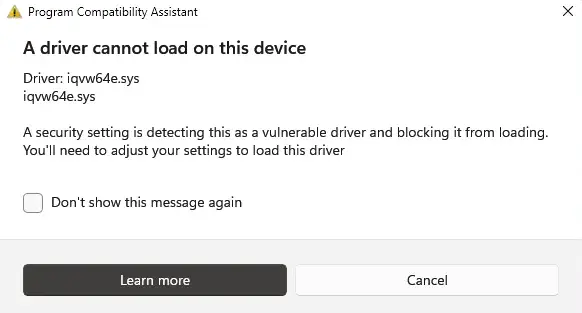
After upgrading to Windows 11, you may see a vulnerable driver notification at startup that mentions the driver file iqvw64e.sys. Here’s the full message:
Program Compatibility Assistant

A driver cannot load on this device

Driver: iqvw64e.sys
iqvw64e.sys

A security setting is detecting this as a vulnerable driver and blocking it from loading.
Cause
iqvw64e.sys is an outdated, vulnerable Intel Network Adapter Diagnostic Driver often blocked by Windows 11 (specifically 24H2 and higher).
File Info
Filename: C:\WINDOWS\System32\drivers\iqvw64e.sys
Company Name: ND_QV -> Intel Corporation
Internal Name: iQVW64.SYS
Original Name: iQVW64.SYS
Product: Intel(R) iQVW64.SYS
Description: Intel(R) Network Adapter Diagnostic Driver
File Version: 1.3.2.18 built by: WinDDK
Product Version: 1.3.2.18
Copyright: Copyright (C) 2002-2019 Intel Corporation All Rights Reserved.
Resolution
The iqvw64e.sys service is loaded by a service named NAL. To resolve the issue, follow one of the methods below:
Option 1: Update the Intel(R) Network Connections software
Visit the Intel Support site and download the latest version of the Intel Network Connections software, and install it.
Option 2: Backup and delete the iqvw64e.sys driver service
Open Command Prompt (admin) and run these commands to backup the iqvw64e.sys driver and delete it.
md C:\DrvStore
PnpUtil /export-driver * C:\DrvStore
rundll32.exe c:\windows\system32\pnpclean.dll,RunDLL_PnpClean /DRIVERS /MAXCLEAN
reg export "HKLM\SYSTEM\CurrentControlSet\Services\NAL" C:\NAL.reg
sc.exe delete NAL
Restart Windows and rename the following file:
C:\WINDOWS\System32\drivers\iqvw64e.sys
to the following:
C:\WINDOWS\System32\drivers\iqvw64e.sys.old
Restart Windows.
Option 3: Uninstall the Intel(R) Network Connections software
An Intel employee posted the following:
The Intel(R) Network Connections software manages your Ethernet Network Controller (Wired Ethernet Connection) drivers.If you don’t regularly connect your laptop to the internet using a cable, your computer should be OK with the generic driver that Windows* will automatically install once you remove the software. For more information, we can recommend engaging our team over at the /community/tech/wired/content Wired Ethernet Support Community, or your computer manufacturer.
Reference: What is Intel(R) Network Connections Driver and can I delete it. – Intel Community
You should be able to uninstall the Intel(R) Network Connections software via Apps and Features in Settings.

Hopefully, that should resolve the iqvw64e.sys warning at startup.
One small request: If you liked this post, please share this?
One "tiny" share from you would seriously help a lot with the growth of this blog. Some great suggestions:- Pin it!
- Share it to your favorite blog + Facebook, Reddit
- Tweet it!
