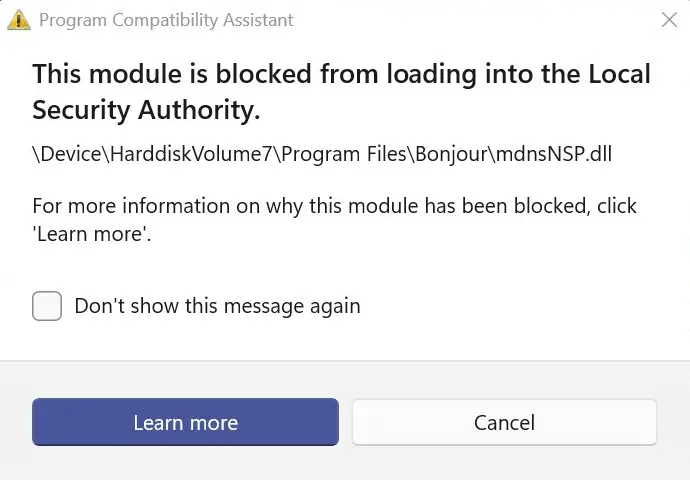
When you start Windows, the Program Compatibility Assistant notification dialog launches, mentioning that the module mdnsNSP.dll has been blocked from loading.
This module is blocked from loading into the Local Security Authority.

\Device\HarddiskVolume#\Program Files\Bonjour\mdnsNSP.dll

For more information on why this module has been blocked, click 'Learn more'.
Cause
This error occurs if an older version of mdnsNSP.dll (Bonjour Namespace provider), is installed on the computer. It’s part of iTunes. The older version of the module is incompatible with Windows 11.
Local Security Authority (LSA) protection is a Windows security feature to help prevent the theft of credentials used for signing into Windows.
If LSA protection is enabled and it blocks the loading of software into the LSA service, a notification indicates the blocked file. You might be able to remove the software loading the file, or you can disable future warnings for that file when it’s blocked from loading into LSA.
(LSA protection is turned on by default on new installs of Windows 11 version 22H2 and 23H2 on enterprise managed devices. It’s turned on by default on all new installs of Windows 11 version 24H2 and later.)
For more information, see Device Security in the Windows Security App – Microsoft Support.
Resolution
Please open Apps & Features and completely uninstall Bonjour or iTunes. If you can’t uninstall iTunes for some reason, follow one of these methods.
Option 1: Unregister mdnsNSP.dll
If Bonjour, iTunes, or any other Apple software is not listed in Apps & Features, do the following:
- Create a System Restore Point or completely backup the registry using one of the methods in this article.
- Open an admin Command Prompt and run these commands:
regsvr32 /u "C:\Program Files\Bonjour\mdnsNSP.dll"

regsvr32 /u "C:\Program Files (x86)\Bonjour\mdnsNSP.dll"

sc.exe delete "Bonjour Service"
- Restart Windows.
Option 2: Reinstall iTunes using classic installer and then uninstall it
If Bonjour, iTunes, or any other Apple software is not listed in Apps & Features, you can download and install the older version of iTunes (which is causing the original issue) and then uninstall cleanly using Programs & Features.
Download iTunes 12.4.3 for Windows (64-bit – for older video cards) – Apple Support:
https://support.apple.com/en-us/106379
Note: It’s a very old version of iTunes and your system might become slightly unstable after installing it on Windows 11. If Explorer doesn’t load after installing it, use Task Manager to open Programs and Features (appwiz.cpl) and uninstall these components:
- iTunes
- Apple Application Support
- Apple Mobile Device support
- Apple Software Update
- Bonjour
Restart Windows.
If you need iTunes, visit the Microsoft Store and install the latest version which doesn’t cause the problem.
Important
The Microsoft Autoruns utility lists the mdnsNSP.dll Winsock entry. However, deleting it causes a reboot loop. It’s because Autoruns fails to update the “Num_Catalog_Entries” and “Num_Catalog_Entries64” registry values under the Winsock2 registry key below.
HKEY_LOCAL_MACHINE\System\CurrentControlSet\Services\WinSock2\Parameters\NameSpace_Catalog5
The value data for “Num_Catalog_Entries” and “Num_Catalog_Entries64” SHOULD match the number of subkeys listed under the sub-keys “Catalog_Entries” and “Catalog_Entries64”, respectively. The keys there are named “00000000001”, “00000000002”, etc. So, if Bonjour’s mdnsNSP.dll is in sub-key “00000000008”, delete that entire sub-key and then change Num_Catalog_Entries and Num_Catalog_Entries64 from a value of 8 to 7.
So, please do not to use Autoruns to delete the Winsock Provider entries.

One small request: If you liked this post, please share this?
One "tiny" share from you would seriously help a lot with the growth of this blog. Some great suggestions:- Pin it!
- Share it to your favorite blog + Facebook, Reddit
- Tweet it!

It seems like your suggestion at top, implies that Apple’s installation of Bonjour, even if Apple claims that its updates are up to date, is including a bad mdnsNSP.dll, repeatedly. Will Apple iTunes work properly without Bonjour?
@XB70,
Please see the suggestions here:
mdnsNSP.dll – This module is blocked from… – Apple Community:
https://discussions.apple.com/thread/255869043?sortBy=newest_first&page=1