When you install World of Warships (WoW) via the Microsoft Store, it often occupies significant space within the protected C:\Program Files\WindowsApps folder. The game can require 60–90 GB of storage after installation, and sometimes even more during updates.
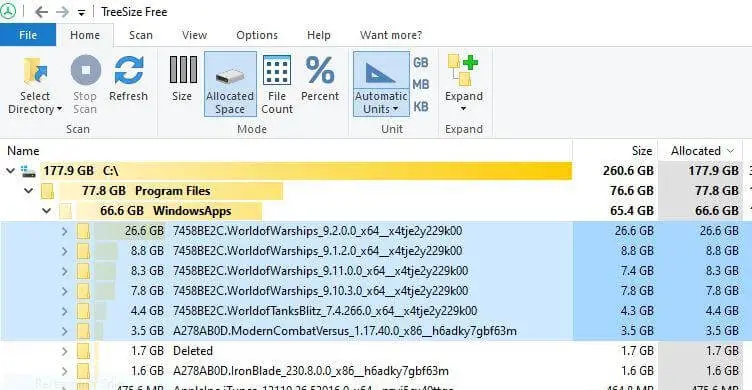
In some cases, the older versions are not removed during the WoW update, and each versioned folder may occupy 60 GB or more space.

If you uninstall the app, the package folders still remain under WindowsApps. You’re wondering how to properly delete the WoW subfolders in the WindowsApps folder.
Resolution
Here’s the safe, recommended way to remove World of Warships from the WindowsApps folder and reclaim space.
First, please open PowerShell (as an administrator) and run the following command to check whether World of Warships is staged.
get-appxpackage -allusers *warships*
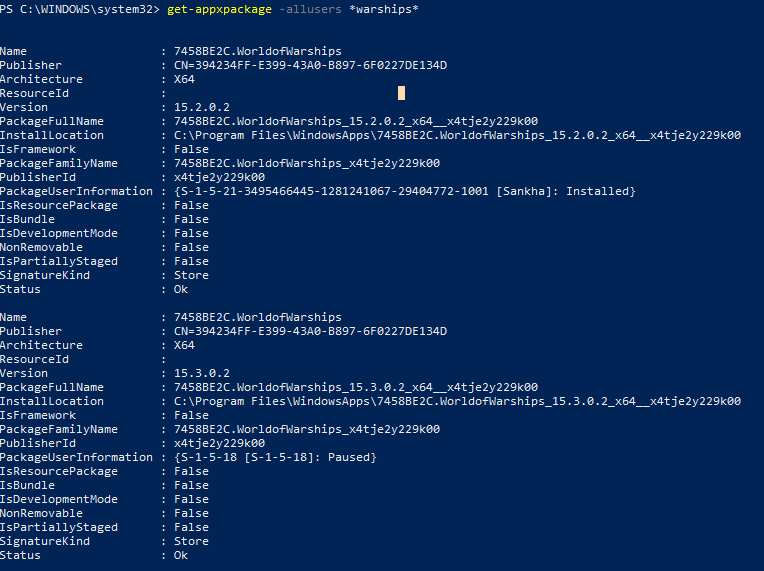
If you see an output like the above, please run the following command:
get-appxpackage -allusers *warships* | remove-appxpackage -allusers
Press Enter.
.
That’s it. The above command removes the staged WoW appx package folder, thereby freeing up 60-90 GB of disk space.
One small request: If you liked this post, please share this?
One "tiny" share from you would seriously help a lot with the growth of this blog. Some great suggestions:- Pin it!
- Share it to your favorite blog + Facebook, Reddit
- Tweet it!
