When you open the Windows directory, an unknown 10 GB file named “D” with the system and hidden attributes appears. Deleting the file causes the error “The process cannot access the file because it is being used by another process.”


Cause
The strange file “D” is most likely the page file. This issue occurs when BitLocker Drive Encryption (BDE) is enabled on the OS volume and you’ve configured the page file on the D: drive.
Since BDE forces the pagefile on the OS volume, the unknown file named D (that represents the D: drive) or any other drive letter seems to be created in the Windows folder. As a workaround, setting the PagefileOnOsVolume registry value to 0 (or) moving the page file to the C: drive should prevent this issue.
Resolution
Resetting the page file configuration to defaults should resolve the issue.
- Run systempropertiesadvanced.exe.
- Under Settings, click Performance.
- Select the Advanced tab, and click Change.
- Uncheck the Automatically manage paging file size for all drives option.
- Select the D: drive and select “No paging file”, and click Set.
- Select the C: drive and select “System managed size”, and click Set.

- Click OK and restart Windows when prompted.
- After rebooting Windows, re-enable the Automatically manage paging file size for all drives checkbox.
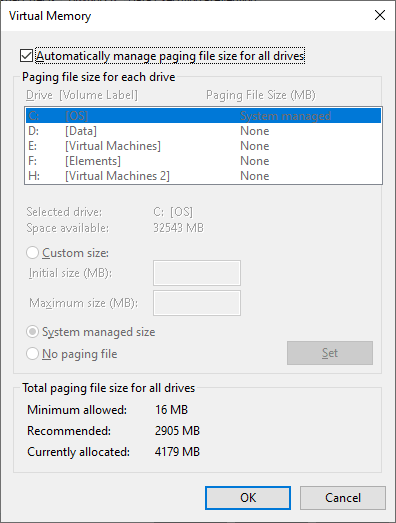
The above steps move the paging file from the D drive to the C drive. That should resolve the issue.
One small request: If you liked this post, please share this?
One "tiny" share from you would seriously help a lot with the growth of this blog. Some great suggestions:- Pin it!
- Share it to your favorite blog + Facebook, Reddit
- Tweet it!
