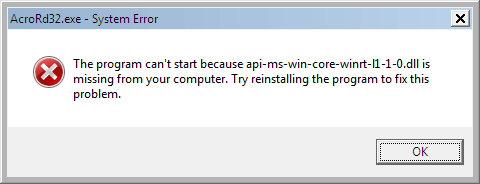
Since the Feb 2026 update of Adobe Acrobat Reader, Windows 7 users receive the following error when opening a PDF or the Adobe Acrobat Reader app. You wonder how to get the missing api-ms-win-core-winrt-l1-1-0.dll file.
AcroRd32.exe - System Error

The program can't start because api-ms-win-core-winrt-l1-1-0.dll is missing from your computer. Try reinstalling the program to fix this problem.
This issue has also been reported in the Adobe forums. Please see [Reader][Win7] 21208 update breaks Acrobat Reader, won’t start, missing dll | Community
Windows 7’s System File Checker can’t restore api-ms-win-core-winrt-l1-1-0.dll because it’s not a built-in module in Windows 7. Let’s see how to fix the issue.
Resolution
The module api-ms-win-core-winrt-l1-1-0.dll is present in Windows 8 and may be present in higher versions. Please follow one of the methods below to resolve the issue.
Option 1: Obtain the DLL from the Windows 8.1 ISO
If you have the Windows 8.1 64-bit ISO, mount it and open the \Sources\Install.wim file using 7-Zip. You should be able to extract the module from the System32 folder (for the 64-bit DLL) or the SysWOW64 folder (for the 32-bit DLL).
For more information, see the article How to Extract Specific Files from the Windows ISO. The information applies to Windows 8.1 ISO as well.
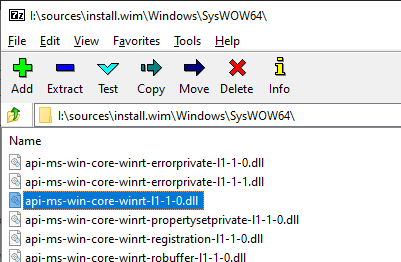
If you’re using the Adobe Reader 32-bit version, extract api-ms-win-core-winrt-l1-1-0.dll from the SysWOW64 folder in your ISO to your desktop.
If you’re using the Adobe Reader 64-bit version, extract api-ms-win-core-winrt-l1-1-0.dll from the System32 folder in your ISO to your desktop.
Then, copy the file to one of the following directories, depending upon your OS bitness:
C:\Program Files (x86)\Adobe\Acrobat Reader DC

C:\Program Files\Adobe\Acrobat Reader DC
Option 2: Download the DLLs
Download AdobeFix.zip
Unzip and extract the contents to a folder.
Then, copy the file to one of the following directories, depending upon your OS bitness:
C:\Program Files (x86)\Adobe\Acrobat Reader DC

C:\Program Files\Adobe\Acrobat Reader DC
File information
	Filename:	api-ms-win-core-winrt-l1-1-0.dll
	Verified:	Unsigned
	Link date:	9:44 AM 8/22/2013
	Company:	Microsoft Corporation
	Description:	ApiSet Stub DLL
	Product:	Microsoft® Windows® Operating System
	Prod version:	6.3.9600.16384
	File version:	6.3.9600.16384 (winblue_rtm.130821-1623)
	MachineType:	32-bit
	Binary Version:	6.3.9600.16384
	Original Name:	apisetstub
	Copyright:	© Microsoft Corporation. All rights reserved.
	MD5:	32ED77AB9B6A59C25825FE521D549B72
	SHA1:	9E5CC3E47B96D2CFD7BF7C5730EC1BDCCB788860
	SHA256:	50DE5CF7A5F9660F7A573F3F9C8D16C38F6018400DC3507ACB3FF0B11B23655D
	VT detection:	0/77
	VT link:	https://www.virustotal.com/gui/file/50de5cf7a5f9660f7a573f3f9c8d16c38f6018400dc3507acb3ff0b11b23655d/detection
	Filename:	api-ms-win-core-winrt-error-l1-1-0.dll:
	Verified:	Unsigned
	Link date:	5:12 PM 8/22/2013
	Company:	Microsoft Corporation
	Description:	ApiSet Stub DLL
	Product:	Microsoft® Windows® Operating System
	Prod version:	6.3.9600.16384
	File version:	6.3.9600.16384 (winblue_rtm.130821-1623)
	MachineType:	64-bit
	Binary Version:	6.3.9600.16384
	Original Name:	apisetstub
	Copyright:	© Microsoft Corporation. All rights reserved.
	MD5:	8C1062C91FA9F749E38FFE39AEAE49E6
	SHA1:	4766ADD81DF6C9374792F1A16B8D0BA93EAA2FE8
	SHA256:	217040F485FAD2F3941F3D78CC02AC64137E37FF83C5C822D14852654E8FC27D
	VT detection:	0/77
	VT link:	https://www.virustotal.com/gui/file/217040f485fad2f3941f3d78cc02ac64137e37ff83c5c822d14852654e8fc27d/detection
Option 3: Install an older build of Adobe Acrobat Reader
Adobe Acrobat Reader version 25.1.21111.0 doesn’t have this issue. Please follow the steps below:
- Uninstall Acrobat Reader via Programs and Features.
- Download Acrobat Reader 25.1.21111.0 from the link below:
English:
https://ardownload3.adobe.com/pub/adobe/reader/win/AcrobatDC/2500121111/AcroRdrDC2500121111_en_US.exe

French:
https://ardownload3.adobe.com/pub/adobe/reader/win/AcrobatDC/2500121111/AcroRdrDC2500121111_fr_FR.exe

German:
https://ardownload3.adobe.com/pub/adobe/reader/win/AcrobatDC/2500121111/AcroRdrDC2500121111_de_DE.exe

Japanese:
https://ardownload3.adobe.com/pub/adobe/reader/win/AcrobatDC/2500121111/AcroRdrDC2500121111_ja_JP.exe

Spanish:
https://ardownload3.adobe.com/pub/adobe/reader/win/AcrobatDC/2500121111/AcroRdrDC2500121111_es_ES.exe
- Install the 25.1.21111.0 version. Do not launch the program yet!
- Launch services.msc, double-click the Adobe Acrobat Update Service
- Click Stop to stop the service if it’s running.
- Set its Startup type to Disabled.
- Click Apply, and click OK.
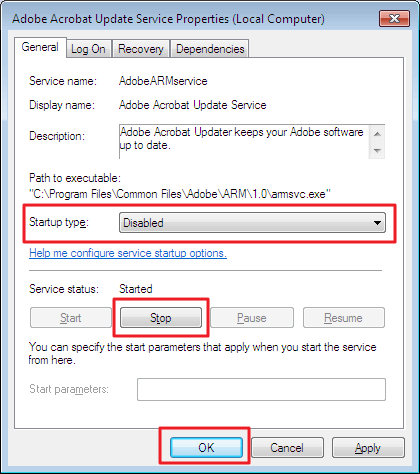
- Close the Services MMC.
- Open Task Scheduler, and select Task Scheduler Library.
- Right-click on the Adobe Acrobat Update Task, and choose Disable.
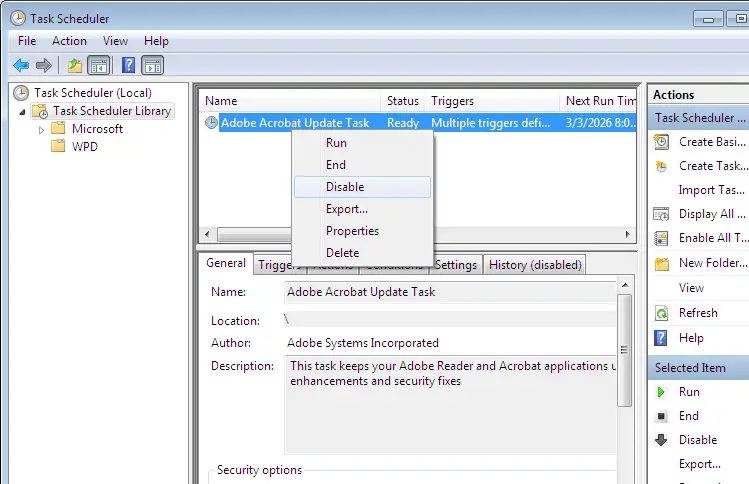
- Close Task Scheduler.
- Launch Notepad as administrator.
- Open the following file:
C:\Windows\System32\drivers\etc\HOSTS
- Add the following lines at the end of the HOSTS file.
127.0.0.1 activate.adobe.com

127.0.0.1 practivate.adobe.com

127.0.0.1 ereg.adobe.com

127.0.0.1 update.adobe.com

127.0.0.1 swupdl.adobe.com

127.0.0.1 genuine.adobe.com
- Save the file and close Notepad.
- After doing all of the above, restart Windows for the changes to take effect.
One of the above methods should resolve the api-ms-win-core-winrt-l1-1-0.dll error when opening Adobe Acrobat Reader.
One small request: If you liked this post, please share this?
One "tiny" share from you would seriously help a lot with the growth of this blog. Some great suggestions:- Pin it!
- Share it to your favorite blog + Facebook, Reddit
- Tweet it!

When I try option 2 I get this error:
Secure Connection Failed
An error occurred during a connection to http://www.winhelponline.com.blog.
Cannot communicate securely with peer: no common encryption algorithm(s).
Error code: SSL_ERROR_NO_CYPHER_OVERLAP
The page you are trying to view cannot be shown because the authenticity of the received data could not be verified.
Please contact the website owners to inform them of this problem.
@Vance:
It could be due to an SSL issue in Windows 7. I can’t repro the issue.
But I have uploaded the zip file on SendSpace: https://www.sendspace.com/file/h6j25m
Let me know if that helps.