 The Export to Microsoft Excel context menu option in Internet Explorer helps you export tabular data in a Web page to Microsoft Excel. If for some reason the Export to Microsoft Excel option is not added after installing Microsoft Office, you can add it back manually.
Add “Export to Microsoft Excel” command to the Context menu
Launch Regedit.exe and navigate to:
HKEY_CURRENT_USER\Software\Microsoft\Internet Explorer\MenuExt
Create a subkey and name it as Export to Microsoft Excel
Double-click (default) and set its Value data as follows:
For Excel 2003
res://C:\Program Files\Microsoft Office\OFFICE11\EXCEL.EXE/3000
For Excel 2007
res://C:\Program Files\Microsoft Office\OFFICE12\EXCEL.EXE/3000
For Excel 2010
res://C:\Program Files\Microsoft Office\Office14\EXCEL.EXE/3000
For Excel 2016
res://C:\\Program Files\\Microsoft Office\\OFFICE16\\EXCEL.EXE/3000
For Excel 2016 – Office 365
res://C:\\Program Files\\Microsoft Office\\root\\OFFICE16\\EXCEL.EXE/3000
Note: If using 32-bit Office on a 64-bit computer, the path would be C:\Program Files (x86) instead of C:\Program Files.
Hint: You can check the path to excel.exe by right-clicking the Excel shortcut in the Start menu and clicking Properties.
Exit the Registry Editor.
REG Files
To automate the above setting, download exporttoexcel.zip and save it to desktop. Unzip and run the appropriate registry file for the version of Microsoft Excel installed. To remove the option, run the file undo.reg.
Usage
- Open Internet Explorer and browse a Web page containing tabular data.
- Right-click on the data and choose Export to Microsoft Excel.
- Select one or more tables by clicking the arrows corresponding to each table.
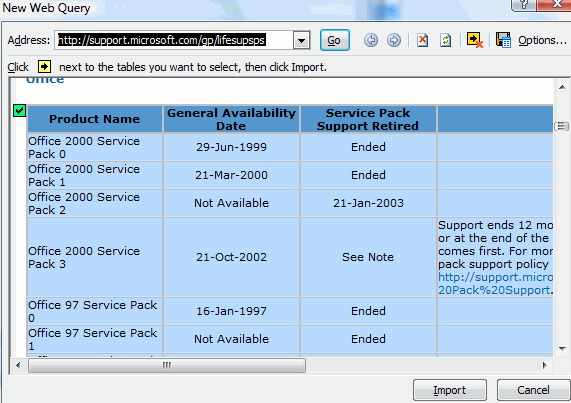
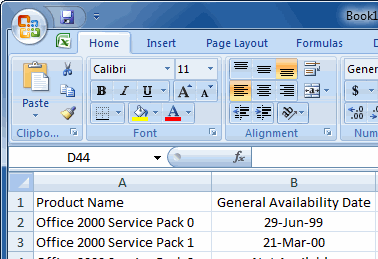
This imports the table into Excel.
One small request: If you liked this post, please share this?
One "tiny" share from you would seriously help a lot with the growth of this blog. Some great suggestions:- Pin it!
- Share it to your favorite blog + Facebook, Reddit
- Tweet it!
