When you attempt to delete a file or folder which is in use by a process, the File In Use dialog appears showing the name of the program that has locked the file.
However, there are cases where the “File In Use” dialog doesn’t show the name of the process that has a lock on the file you’re trying to delete. In some cases, the dialog will show “the action can’t be completed because the file is open in another process“.
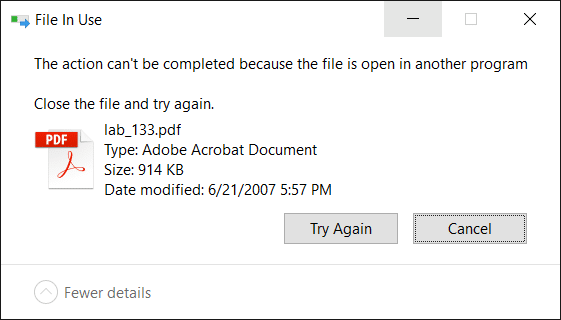
For investigating processes and locked files, Windows Sysinternals Process Explorer is probably the first option that comes to mind for most users. However, there are two built-in solutions to display the current open files list along with corresponding process names.
Find which process has locked a file using:
1. Resource Monitor
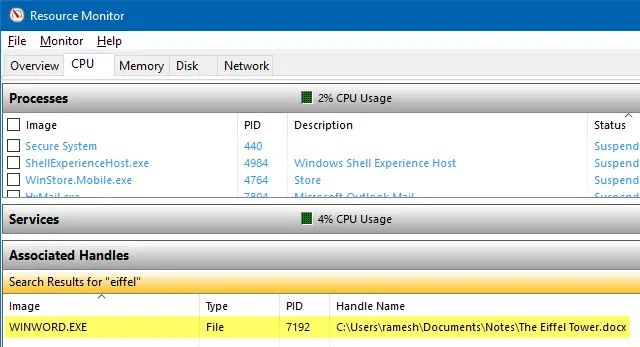
Resource Monitor (resmon.exe) is a built-in tool that has many useful features. With Resource Monitor, you can track current network and internet usage, view associated handles for locked files, as well as manage processes just as you’d using the Task Manager.
To find the process name that has a file locked, click the CPU tab, type the file name or part of it in the Associated Handles text box.
We’ve covered Resource Monitor earlier. Check out these articles:
- How to Use Resource Monitor to Find Which Process Has Locked a File?
- Which Program is Using all of Your Internet Bandwidth? Use Resource Monitor to Find it
2. Process Explorer
Process Explorer needs no introduction. In Process Explorer, all you need to do is use the Find feature and type in the file name. This shows the process that’s accessing the file.
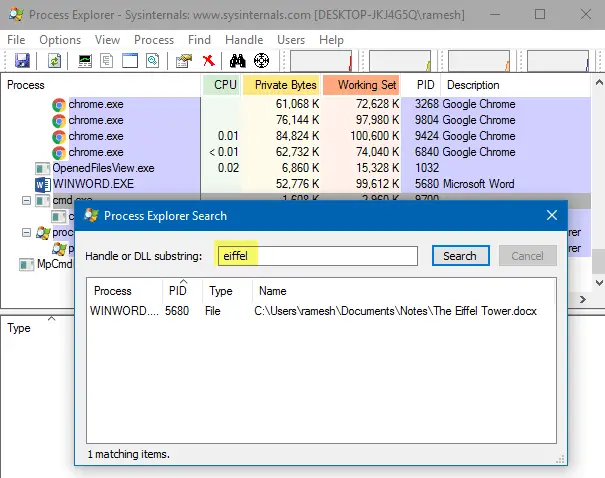
From the lower pane view, you can close the file handle if necessary.
You must run Process Explorer as administrator in order to manage processes which are running elevated. To elevate Process Explorer, click the File menu → Show Details for All Processes.
Check out these Process Explorer related articles:
- How to Delete a Stubborn Undeletable File or Folder in Windows?
- Find Which Program is Using Your Webcam Currently
- How to Find Which Program Caused An Unknown Error Message?
- What does Failed to Enumerate Objects in the Container mean?
3. Handle from Windows Sysinternals
Handle is a utility from Microsoft Sysinternals that displays information about open handles for any process in the system. You can use it to see the programs that have a file open, or to see the object types and names of all the handles of a program. Handle is like a command-line version of Process Explorer.
Note: Handle v4.21 has a small bug where it always reports “No matching handles found” if the drive-letter is in uppercase. Hope Microsoft fixes it in the next update.
From an admin Command Prompt window, use the command-line syntax to find the process which is having the file open:
handle.exe -a -u filename_with_path
If the file name contains spaces, enclose it within double quotes.
Example:
handle.exe -a -u "c:\users\ramesh\desktop\Mandate-form.pdf"
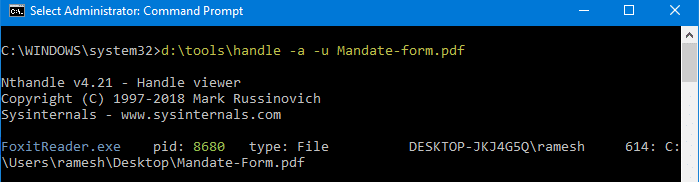
(Mentioning the filename without the path may not necessarily work in every situation. It’s advisable to include the full path always.)
The output shows the process name, the process identifier, user name, the locked (target) file name with path.
Sysinternals Handle: Command-line arguments
usage: handle [[-a [-l]] [-u] | [-c [-y]] | [-s]] [-p |] [name] [-nobanner]
| -a | Dump all handle information. |
| -l | Just show pagefile-backed section handles. |
| -c | Closes the specified handle (interpreted as a hexadecimal number). You must specify the process by its PID.WARNING: Closing handles can cause application or system instability. |
| -y | Don’t prompt for close handle confirmation. |
| -s | Print count of each type of handle open. |
| -u | Show the owning user name when searching for handles. |
| -p | Dump handles belonging to process (partial name accepted). |
| name | Search for handles to objects with <name> (fragment accepted). |
| -nobanner | Do not display the startup banner and copyright message. |
No arguments will dump all file references.
Add Sysinternals Handle to right-click menu
You can add Sysinternals Handle to the right-click menu for files to quickly find the program that has locked the file. To add it to the context menu, follow these steps:
- Download Handle from Microsoft Sysinternals site.
- Copy the files handle.exe & handle64.exe to a folder – e.g.,
d:\tools - Copy the following lines of code to Notepad, and save the file as
find_handle.vbsto a permanent location.'Runs Sysinternals Handle.exe utility with filename argument. '© Ramesh Srinivasan -- https://winhelponline.com/blog 'Created Date: Mar 29, 2008 'Updated Date: Jun 11, 2019 'For all versions of Windows, including Windows 10 Option Explicit Dim objShell, WshShell, objFSO, sBaseKey, sFilename Set objShell = CreateObject("Shell.Application") Set WshShell = CreateObject("WScript.Shell") Set objFSO = CreateObject("Scripting.FileSystemObject") If WScript.Arguments.Count = 0 Then sBaseKey = "HKCU\Software\Classes\*\shell\" WshShell.RegWrite sBaseKey & "FindHandle\", "Find Handle", "REG_SZ" WshShell.RegWrite sBaseKey & "FindHandle\command\", "wscript.exe " & """" & _ WScript.ScriptFullName & """" & " " & """" & "%1" & """", "REG_SZ" Else If objFSO.FileExists(WScript.Arguments(0)) = True Then sFilename = lcase(WScript.Arguments(0)) objShell.ShellExecute "cmd.exe", "/k d:\tools\handle.exe -a -u " & _ """" & sFilename & """", "", "runas", 1 End If End IfNote: The Sysinternals Handle.exe path is hard-coded as
d:\tools\handle.exein the above script. If the program is located on a different path, modify the path in the script accordingly. For 64-bit Windows, you can use either handle.exe or handle64.exe - Double-click
find_handle.vbsto add the context menu entry in the registry. You’ll need to do this only once. But, if you relocate the script to a different folder, you’ll need to double-click it again to update the path in the registry. - You’ll see the Find Handle option when you right-click on a file. Clicking on it will launch the script which in turn runs handle.exe with the filename argument to find the process which has the file locked.

To remove the Find Handle context menu entry, start the Registry Editor (regedit.exe) and delete the following key:
HKEY_CURRENT_USER\Software\Classes\*\shell\FindHandle
4. OpenFiles.exe — a built-in console tool
Another built-in tool we’re going to use is Openfiles.exe, a console tool that’s not new to Windows. It was originally introduced in 2000 as part of the Windows Resource Kit 2000/2003 tools. This utility was then included by default in Windows Vista and higher (including Windows 10). Openfiles displays the currently open files list from local or shared folders, along with the Handle ID and Process executable name. This tool also allows you to disconnect one or more files that are opened remotely from a shared folder.
Enable “Maintain Objects List” global flag for the First time
First, to enable tracking of local file handles, you need to turn on ‘maintain objects list’ flag by running the following command from admin Command Prompt.
openfiles /local on
You’ll see the following message:
INFO: The system global flag ‘maintain objects list’ is currently enabled.
You’ll need to run this command for the first time only. Then restart Windows for the change to take effect.
View open files and the corresponding process names
After restarting Windows, from an admin Command Prompt window, type:
openfiles
This lists the File/Handle ID, Process Name and the list of files opened locally or opened remotely via local share points, in a table format.
To view the output in List or CSV formats, use the /query parameter.
openfiles /query /FO LIST
openfiles /query /FO CSV
To copy the output to clipboard, pipe the output to Clip.exe as below. Then paste the output in Notepad or any other editor of your choice.
openfiles |clip
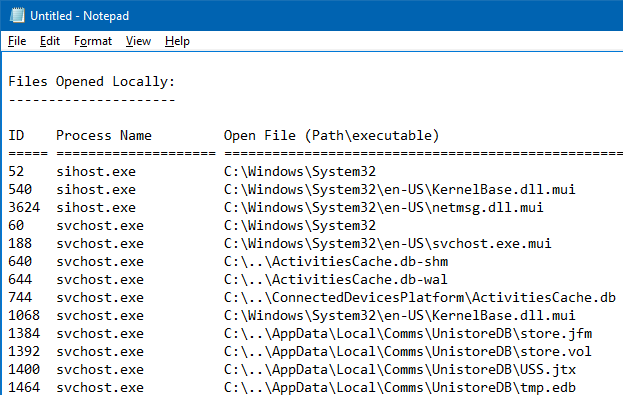
openfiles /query /FO LIST |clip
openfiles /query /FO CSV |clip
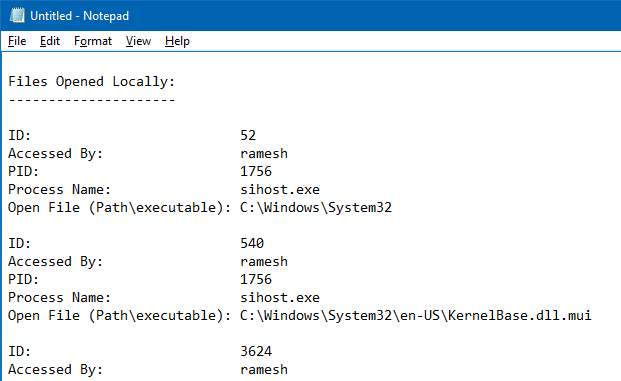
For more information on copying Command Prompt output to clipboard or save the output to a file, check out the article How to Copy Command Prompt Output Text to Clipboard or Save to File?
To find if a particular file is being in use by a program (and to know which program), you may use the following command-line.
openfiles | findstr /i <filename>
Example:
openfiles | findstr /i eiffel
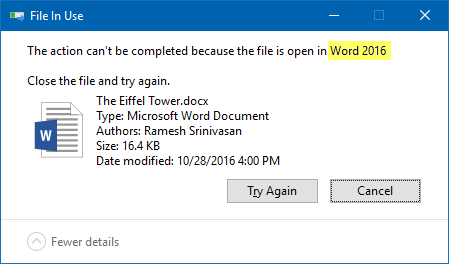
The above command lists all open files that contain the word “eiffel” in the file name. In this example, Word 2016 is currently having the lock over the file “The Eiffel Tower.docx” (ID 4576).

And “File In Use” dialog tells me the same thing.
Disconnect files opened remotely from shared folder.
To disconnect files opened from shared folder so that you can delete, rename the file or modify the contents, use the /disconnect parameter to cut connections to that file. Here are the command-line options.
OPENFILES /Disconnect [/S system [/U username [/P [password]]]]
                      {[/ID id] [/A accessedby] [/O openmode]}
                      [/OP openfile]

Description:
    Enables an administrator to disconnect files and folders that
    have been opened remotely through a shared folder.

Parameter List:
    /S     system         Specifies the remote system to connect to.

    /U     [domain\]user  Specifies the user context under which the
                          command should execute.

    /P     [password]     Specifies the password for the given user
                          context.

    /ID    id             Specifies to disconnect open files by file ID.
                          The "*" wildcard may be used.

    /A     accessedby     Specifies to disconnect all open files by
                          "accessedby" value. The "*" wildcard
                          may be used.

    /O     openmode       Specifies to disconnect all open files by
                          "openmode" value. Valid values are Read,
                          Write or Read/Write. The "*" wildcard
                          may be used.

    /OP    openfile       Specifies to disconnect all open file
                          connections created by a specific "open
                          file" name. The "*" wildcard may be used.

    /?                    Displays this help message.

Examples:
    OPENFILES /Disconnect /?
    OPENFILES /Disconnect /ID 1
    OPENFILES /Disconnect /A  username
    OPENFILES /Disconnect /O Read/Write
    OPENFILES /Disconnect /OP "c:\My Documents\somedoc.doc" /ID 234
    OPENFILES /Disconnect /S system  /U username /ID 5
    OPENFILES /Disconnect /S system  /U username /P password /ID *
Openfiles.exe perfectly does the job of listing all open files along with the process names, but it can’t forcibly kill processes. However, this excellent (but overlooked) built-in console tool can come in handy when you want to quickly find a process name that’s using a file, or to disconnect a file that’s being accessed through a shared folder by a network user — without depending on a third-party solution.
5. OpenedFilesView
OpenedFilesView from Nirsoft displays the list of all opened files on your system. For each opened file, additional information is displayed: handle value, read/write/delete access, file position, the process that opened the file, and more… Optionally, you can also close one or more opened files, or close the process that opened these files.
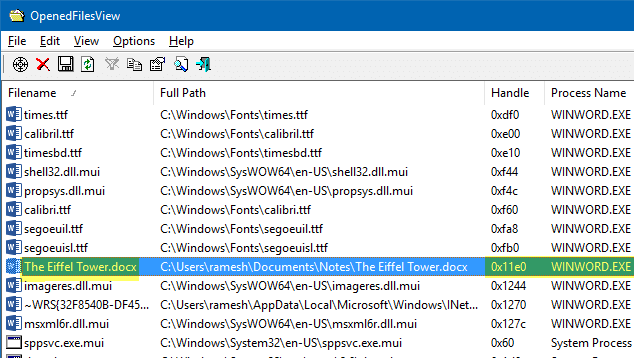
You can close processes of selected files or close selected file handles. The handle number is represented in hex values whereas openfiles.exe console tool shows it in the normal format. This tool also lets you add a context menu option to quickly find the process which is currently using a file, via the right-click menu. The context menu option / command-line support, I consider, is one of the most useful features offered by OpenedFilesView.
One small request: If you liked this post, please share this?
One "tiny" share from you would seriously help a lot with the growth of this blog. Some great suggestions:- Pin it!
- Share it to your favorite blog + Facebook, Reddit
- Tweet it!

So, I couldn’t help noticing: You said without a third party tool and you ended up introducing two. 😉
One important fact about Process Explorer is that it needs no administrative privileges. Without it, it can’t see all handles but for a standard user account, that’s probably okay, because that account can’t open elevated processes anyway.
By the way, I have moved on from Process Explorer to Process Hacker.
@Fleet Command: Introduced one 3rd party tool, but emphasis given to Openfiles.exe. PE is not a 3rd party IMO.
@Fleet Command : Admin privileges – That’s a good point. And will check out P.Hacker. I’ve used it earlier to fix the SD of certain services.
27/02/2021
which one of these programs will tell you what windows process is Locked to one on the e: drive ??
If a notepad open a file then you can not find it using this handler tool. Any suggestion for this?.