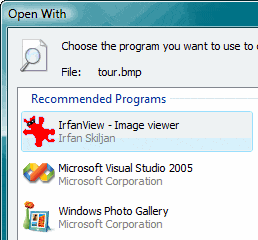
When you right-click a file and choose Open With, and click the Choose Program… option, the list of registered applications are displayed in the Open With dialog. Programs that are not already listed in the Open With dialog can be added manually using the Browse… option.
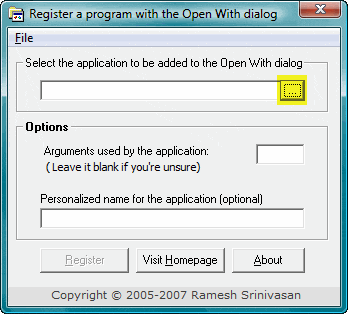
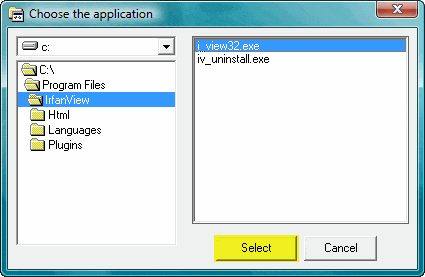
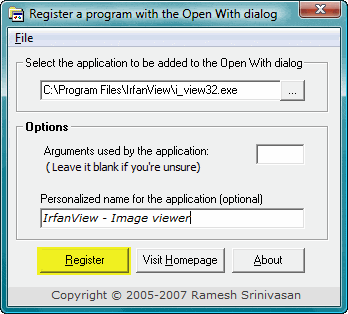
OpenWithAdd tool which I wrote, can be helpful in circumstances where, when you browse to locate an application, it does not get added to the Open With dialog. It can now (v1.2 onwards) run under Windows Vista as well. Here are some screenshots:
OpenWithAdd can be downloaded from this link.
One small request: If you liked this post, please share this?
One "tiny" share from you would seriously help a lot with the growth of this blog. Some great suggestions:- Pin it!
- Share it to your favorite blog + Facebook, Reddit
- Tweet it!


Works within Windows 7 as well… many thanks Ramesh. I’d tried to associate Lightroom using the usual methods but it just wouldn’t register.
Your wee programme did the trick, so well done you!!!
A brilliant little program to fix a really annoying problem. I was going nuts trying to associate jpg-files with Photoshop CS4 and then I found this great and simple solution. Thanks a lot!
Couldn’t get image files associated with Photoshop CS5, solved in 3 seconds with this awesome program.
Thanks 🙂
Any idea why OPEN WITH worked fine one day and not the next? I’ll use your utility if I have to (BTW, thanks!) but would prefer to correct the problem in Vista.
Thanks 😉 really good one and very useful
Wow, I just spent an hour trying to fix the “Cannot add a program to the Open With dialog in Windows 7 and this program fixed it! Thank you!!
Superb!!! Thanks a lot. I was getting extremely frustrated ‘cos of this and spent hours in google trying to find a solution. I followed your instructions and solved it in 2 mins. Thank you so much.
You rock buddy.
Finally. You’re a genius. Windows is incredibly frustrating. Thank you!!!
Works, unbelievable! THANK YOU! Can you please explain why Windows itself fails to register the file in the Browse dialog? How is your application able to do it? Thank you.
Works great on Vista Business! Thank you!
OpenWithAdd doesn’t seem to work, to add WordPad to the “Open With” menu, in 64-bit Windows 10 Home, version 1909.
I first tried to add %ProgramFiles%\Windows NT\Accessories\wordpad.exe but that didn’t work; OpenWithAdd complained that the program didn’t exist.
Then I tried to add C:\Program Files\Windows NT\Accessories\wordpad.exe and OpenWithAdd appeared to succeed, but WordPad still doesn’t appear in the “Open with >” menu, even after I’ve selected it from “Choose another app” / “More apps”.
BTW, I can see that it changed Computer\HKEY_CLASSES_ROOT\Applications\wordpad.exe\shell\open\command from “%ProgramFiles%\Windows NT\Accessories\wordpad.exe” “%1” to “C:\Program Files\Windows NT\Accessories\wordpad.exe” “%1” and changed the field type from REG_EXPAND_SZ to REG_SZ. (I don’t think those changes should make any difference.)
@Dave: What happens when you browse to add Wordpad.exe via Open with > Choose another app option?
Also, what are the values you see under this registry key:
openwithadd programe works fine thanks alot
Ramesh,
For some reason I can’ get this to work.
I’m trying to put Windows Media Player in the Open With window. My computer is a Windows 7 64 bit machine.
I get a message that the file doesn’t exist. I suspect I am not selecting the correct file to register.
Darn good idea though
@Banacek: It’s a 32-bit program. You may select the 32-bit executable instead, and add it to the Open with menu:
C:\Program Files (x86)\Windows Media Player\wmplayer.exeAlternately, you can edit the registry and set the path to wmplayer.exe manually, in this branch:
HKEY_CLASSES_ROOT\Applications\wmplayer.exe\shell\open\commandWow Incredible!! Works on windows 7. So easy to use.
Finally I was able to create a binding to a portable program. Thanks a lot!