Command Prompt is one of the most used tools in Windows. For tasks requiring administrator privileges, we need to start Command Prompt as administrator (“elevated”). This article describes different ways to open an elevated or administrator Command Prompt window.
How to Open Elevated or Admin Command Prompt
From the Win-X menu in Windows 11/10 and 8.1
- Press the Win + X key, or right-click the Start button.
- Click Command Prompt (Admin)
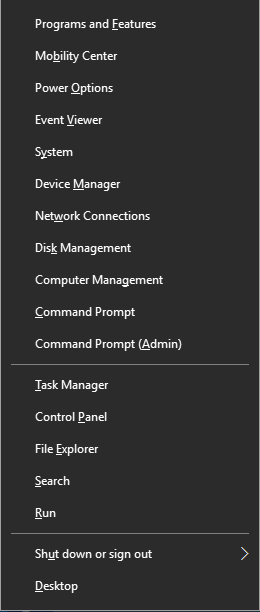
Note: Recent versions of Windows 10 replace Command Prompt with PowerShell in the Win + X menu. To get Command Prompt back in the menu, see the article Get back “Open command window here” context menu option in Windows 10
Using Ctrl + Shift + Enter in Windows 10 and 11
- Right-click Start, and click Run.
- Type
cmd.exein the Run dialog - Press Ctrl + Shift and Enter.
This launches a Command Prompt window as an administrator.
RELATED: Start Programs Elevated (as Administrator) from Run Dialog in Windows 10 [Ctrl + Shift]
Using Start Search
- Click Start, type cmd.exe
- When the search results are shown, right-click the cmd.exe entry and choose Run as administrator.
Alternately, select the cmd.exe in the search results using the UP/DOWN arrow and press Ctrl + Shift + Enter on the keyboard. Ctrl + Shift + Enter runs the program as administrator.
Using Task Manager – New task
- Right-click on the taskbar and click Task Manager. Or, press Ctrl + Shift and Esc
- In Task Manager, click the File menu and click Run new task
- Type
cmd.exein the text box. - Enable Create this task with administrative privileges
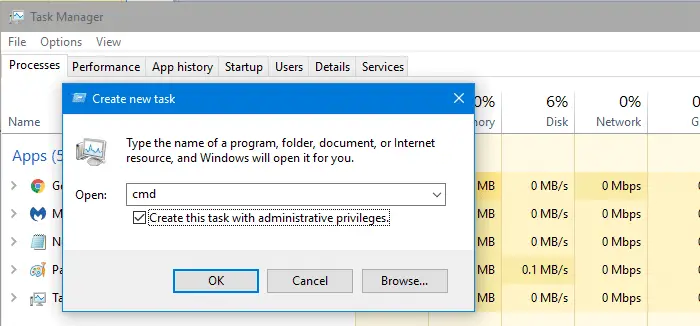
- Click OK.
The Task Manager method offers an advantage. In Windows 10, as Task Manager runs as administrator by default, it doesn’t show you the UAC prompt when you launch a program using it from an administrator account.
Run as administrator using Shortcut Properties
Click Start, click All Programs, click Accessories, right-click Command Prompt, and then click Run as administrator. You can even pin the Command Prompt shortcut to the taskbar for easy reach.
Or you can create a new desktop shortcut to cmd.exe. Right-click on the shortcut and choose Run as administrator. To run the shortcut as an administrator by default:
- Right-click the Command Prompt shortcut you created on the Desktop
- Click Properties
- In the Shortcut tab, click Advanced.
- Enable the checkbox for Run as administrator
- Click OK and OK.
Now, every time when you double-click the shortcut Command Prompt window will open elevated.
If you’re a frequent user of the Command Prompt, you can Pin it to the Start menu or Taskbar.
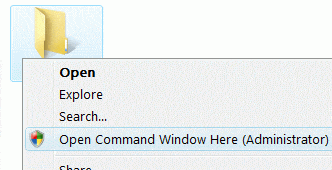
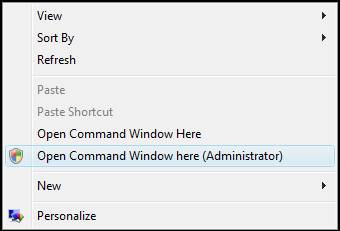
Run as Administrator via the folder and desktop right-click menu
To add the Open Command Window Here (Administrator) option to the right-click menu for folders and the Desktop, use the following .reg file:
Windows Registry Editor Version 5.00

[HKEY_CLASSES_ROOT\Directory\shell\runas]
@="Open Command Window Here (Administrator)"

[HKEY_CLASSES_ROOT\Directory\shell\runas\command]
@="cmd.exe /s /k pushd \"%V\""

[HKEY_CLASSES_ROOT\directory\Background\Shell\runas]
@="Open Command Window Here (Administrator)"

[HKEY_CLASSES_ROOT\directory\Background\Shell\runas\command]
@="cmd.exe /s /k pushd \"%V\""
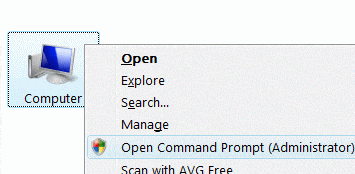
To add the entry to This PC (Computer) context menu, use the following REG file:
Windows Registry Editor Version 5.00

[HKEY_CLASSES_ROOT\CLSID\{20D04FE0-3AEA-1069-A2D8-08002B30309D}\shell\runas]
@="Open Command Prompt (Administrator)"

[HKEY_CLASSES_ROOT\CLSID\{20D04FE0-3AEA-1069-A2D8-08002B30309D}\shell\runas\command]
@="cmd.exe"
Note that the .reg files above replace the runas command in the registry if one was added manually earlier. For example, if you’ve added something like “Take Ownership” to the right-click menu for folders, it will be replaced by Command Prompt (Administrator).
How to Use .reg Files
Make a .reg file out of the above contents, and double-click the .reg file and apply the settings to the registry.
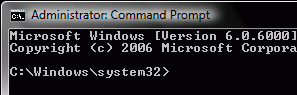
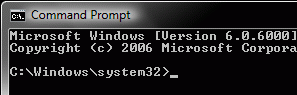
You can now open an elevated Command Prompt from the context menu of a folder, This PC or on the Desktop. It adds an Open Command Prompt here (Administrator) option in the context menu for folders and This PC (Computer) and the Desktop. Here are the screenshots:
Screenshots
One small request: If you liked this post, please share this?
One "tiny" share from you would seriously help a lot with the growth of this blog. Some great suggestions:- Pin it!
- Share it to your favorite blog + Facebook, Reddit
- Tweet it!

Very clear instructions which worked.
Thanks for this!
thanks alot. it worked. the last two commands are not needed there.
i mean, if we delete the registry entries in regedit, we dont need to enter those commands
btw. thanks
it Works THANK’S Alot
Excellent work. Even I could understand it. Wow.