There are situations where you need to reset the Recycle Bin store folder to fix problems such as Recycle Bin not showing the files that have been deleted. In some cases, you may be unable to completely empty the Recycle Bin. Each drive has a hidden and protected folder named $Recycle.bin, which is where the Recycle Bin stores files that you and other users on the computer delete. Windows creates a fresh $Recycle.bin folder automatically after you reset it.
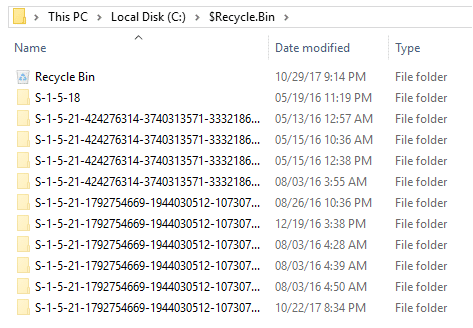
If you change to the directory of the Recycle Bin store folder using Command Prompt, you’ll see some cryptic file names. When you delete a file, the Recycle Bin assigns the deleted item an obscure file name and stores it. Only Windows knows the file name mappings.
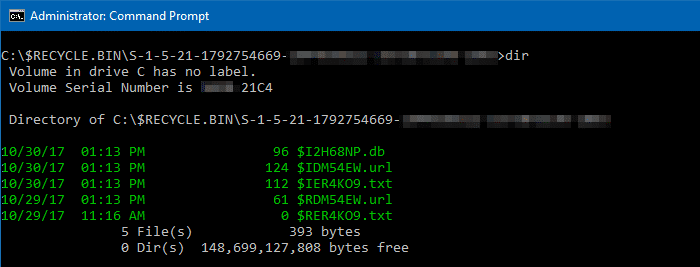
Due to the corruption of the store folder, certain weird things can happen occasionally. Resetting the store fixes corrupt Recycle Bin in most cases.
Fixing a corrupted Recycle Bin in Windows
IMPORTANT: The following procedure permanently deletes all files and folders which are already in the Recycle Bin (from all user accounts in the system) and cannot be recovered.
1. Open an elevated Command Prompt window.
2. Type the following command and press ENTER:
rd /s /q C:\$Recycle.bin
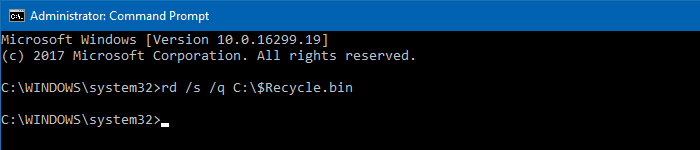
This clears out the $Recycle.bin folder on the C:\ drive. You need to do this for each hard disk partition in your system.
3. Type EXIT to close the Command Prompt window.
While the above method fixes Recycle Bin store folder corruption, it wouldn’t help fix any cosmetic problems (e.g., Recycle Bin showing incorrect icon) with the Recycle Bin.
Related articles
- How to Empty the Recycle Bin Using Task Scheduler
- Fix Recycle Bin Icon Does Not Refresh Automatically
- Restore Missing Recycle Bin Desktop icon
- How to Empty the Recycle Bin In a Single Click in Windows 10
- How to Empty the Recycle Bin Without the Confirmation Window Showing Up
One small request: If you liked this post, please share this?
One "tiny" share from you would seriously help a lot with the growth of this blog. Some great suggestions:- Pin it!
- Share it to your favorite blog + Facebook, Reddit
- Tweet it!
