When searching about a topic on the internet, one might easily end up opening a couple a dozen web sites in separate tabs. What would you do if you need to copy all those URLs to make a note of them in your document, or send them to a friend? This article explains how to copy the title and URL of all open tabs in Internet Explorer.
We’ve covered how to copy the title and URL of the current tab in article Copy Title and URL Extension for Internet Explorer. But the extension works for the currently active tab only. Rather than copying one URL at a time, here are a couple of smart methods to copy the url & title of all open tabs in Internet Explorer.
Copy the Title and URL of All Open Tabs in Internet Explorer
Option 1: Copy URLs of all Open Tabs in IE
To copy the web addresses of all open tabs in Internet Explorer, here is a quick method:
- Click the Tools menu (Alt + T) and click Internet Options
- In the Home page section, click the Use current button.This adds all the URLs from current open tabs to the text box.
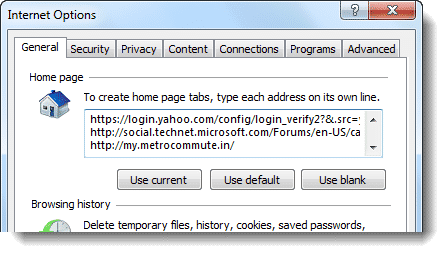
- Right-click on the text box, click Select All
- Right-click on the selection and then click Copy
- Click Cancel to close Internet Options without altering the Home page settings.
- Open Notepad and paste the data from the clipboard.
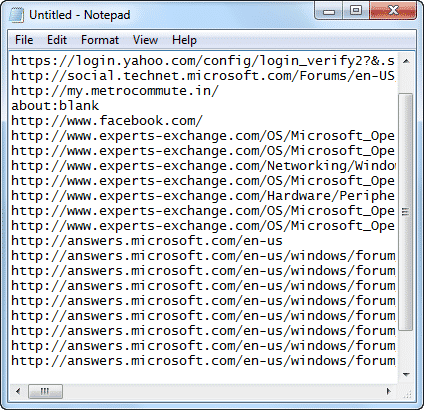
Option 2: Copy Title & URL of all Open Tabs in IE
Wouldn’t it be nice if there is a way to capture the Page Titles in addition to the URL? This can be especially useful if you have some unfriendly URLs, such as:
https://www.winhelponline.com/blog/?p=300
By looking at the URL, nobody would even have the slightest notion of what that link is about. In that case, capturing the page title along can be of utmost help. There is a way to do that in Internet Explorer. It takes just 4 mouse clicks to get the title and URL of your open tabs.
We will make use of the Add Current Tabs to Favorites feature in Internet Explorer, plus a script I wrote which gets the Title and URL of internet shortcuts from a predefined folder. Assuming you have the tabs currently open, use these steps to get the title and URL of those tabs.
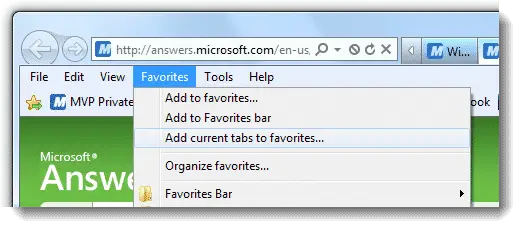
- Click the Favorites menu, and click Add current tabs to favorites…
Type Temp as the folder name, and press Enter
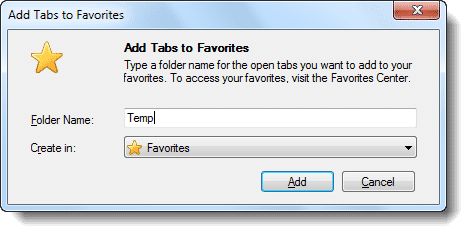
The shortcuts are added to the Temp folder under the Favorites shell folder of your user profile.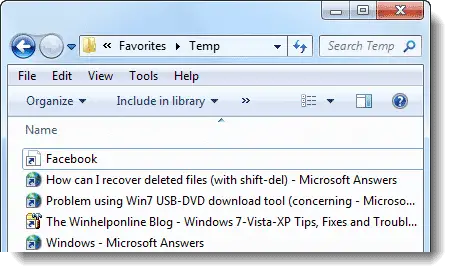
Note: This assumes you don’t plan to use the folder for permanent storage of shortcuts. In other words, reserve the folder “Temp” exclusively for this purpose, because the script (referenced below) queries the title and URL each shortcut in theFavorites\Tempdirectory, and then empties the folder every time it’s run. - Next, download the script ie_title_url.vbs. Save it to a permanent location and run it.
It should launch a text document containing the title and URL of each tab page you added to the
Tempfolder.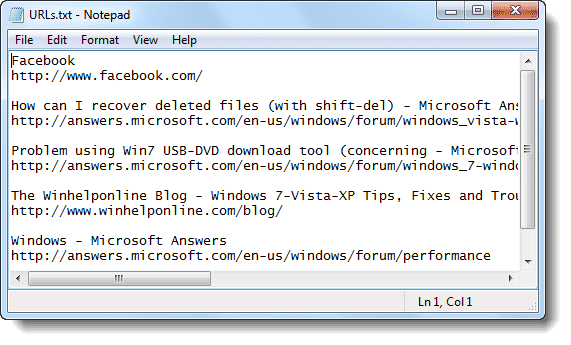
Note: If using Mozilla Firefox or Google Chrome, there are some useful add-ons or extensions that can copy tab URLs to the clipboard in a single click, which is covered in the article How to Copy URL and Title of All Open Tabs in Chrome and Firefox?
One small request: If you liked this post, please share this?
One "tiny" share from you would seriously help a lot with the growth of this blog. Some great suggestions:- Pin it!
- Share it to your favorite blog + Facebook, Reddit
- Tweet it!


Nice trick.
Though unfortunately, when I am researching, I must include all sorts of source information such as title, work title, author, publisher, date, access date and URL. I pretty much have to extract a lot from each tab.
But it wasn’t the worst part: Sometimes I’d like to print a web page but there is this fairly large mass of hyperlinks which are lost in print. I have to manually extract their URLs and insert in parentheses in front of them.
And who is insane enough to use Internet Explorer?
Simply brilliant trick! Never thought about this! For Firefox, there’s an addon called CopyAll but this trick is JUST FANTASTIC.
Btw Ramesh, why do you blog so less these days. Your blog is very informative.
“We will make use of the “Add Current Tabs to Favorites” feature introduced in IE8…”
…or the “Add Tab Group to Favorites” feature in good old IE7.
@Robear: Ah! forgot about that IE7 option. Will update the post. Thanks.
I use this one frequently.
I wanted to try this tip out but when I go to the “Favorites” drop down menu the “Add Current Tabs To Favorites” option is not highlighted and clickable. My explorer version is 8. Any suggestions??
@Mark: The option is enabled if there are atleast 2 tabs open.
Is there a way to convert links in favorites files to similar format without having to open all the files? Better yet, is there a way to capture the date of the article as well, (and possible automatically sort them from most recent article to older articles) in similar way, without having to go through and sort them all out by date? Please advise. Thanks. David R.
Is there a wayt to do grab Title, Date, and URL for all closed links in Favorites Files, then have them automatically sorted by date from most recent to oldest, without having to sort through all of them? If so, would be incredibly helpful.
EXCELLENT work, will come in handy! I “Bookmark all tabs” in Firefox frequently, now I can do even more in IE — thanks!