Many of our articles contain information about modifying the registry. To quickly open the Registry Editor to a selected key from the web browser, you can browser add-ons available for Chrome, Firefox or Internet Explorer.
Google Chrome “Chome Registry Jumper” extension
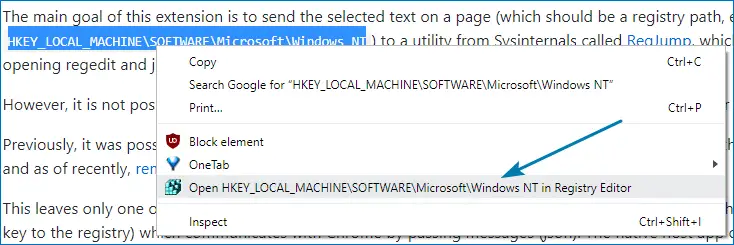
The Chome Registry Jumper extension available at the Chrome Web Store opens the selected registry key in Regedit. This extension uses Chrome’s Native Messaging feature and runs Sysinternals RegJump using PowerShell in the background.
To make this extension work, you must do these things (as the extension manual says):
- Download Sysinternals RegJump from Microsoft, and extract it to:
%LOCALAPPDATA%\Google\Chrome\User Data\Default\Extensions\ihjgnaklogcickonfphakiihgjpkdheh\1.0.1_0\host\regjump
- Register the host program to communicate with RegJump, by running
register-host.batlocated in:%LOCALAPPDATA%\Google\Chrome\User Data\Default\Extensions\ihjgnaklogcickonfphakiihgjpkdheh\1.0.1_0\host
You’ll now see the option named Open in Registry Editor in the right-click menu when you select a registry path text in a webpage.
However, your anti-virus program may block registry launch attempts by this extension. Malwarebytes, for example, blocks it saying Exploit automatically blocked: Malwarebytes detected and blocked an exploit.
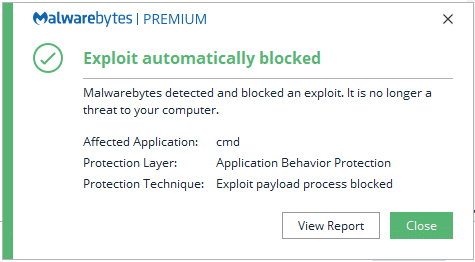
Malwarebytes seems to consider the native messaging (in general) as an exploit and blocks the extension from launching any script in the background. If you’re curious, visit the ChromeRegJump project’s GitHub page to see the source code. Also, you can go through the PowerShell script file nativehost.ps1 in the extension folder here:
%LocalAppData%\Google\Chrome\User Data\Default\Extensions\ihjgnaklogcickonfphakiihgjpkdheh\1.0.1_0\host
I’ve inspected the PowerShell script nativehost.ps1 (for Chrome Registry Jumper v1.0.1 by Igal Tabachnik) and found nothing malicious. It simply launches regjump.exe in elevated mode.
If you’re convinced that the extension is safe, you may add necessary exceptions in your anti-virus program. Since the program is available at the Chrome Web Store, it gives us some hope that the extension (and their future versions) must have gone through some sort of vetting process, although there have been some malware incidents at the Chrome Web Store seen in the past.
Open In RegEdit Add-on for Firefox
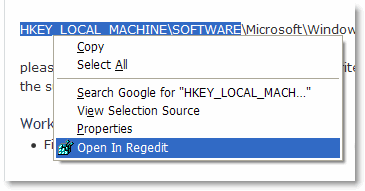
The Open In RegEdit add-on for Mozilla Firefox works by setting the LastKey registry value and then opening the Registry Editor (regedit.exe). Note that we’ve covered the Regedit – LastKey method previously.
Start Mozilla Firefox and navigate to Open In RegEdit add-on page. Click the Add to Firefox button and install the add-on.
Open a new instance of Mozilla Firefox and navigate to a Web page that contains information about modifying the registry. Select the text (registry key), right-click and choose Open In Regedit. Registry Editor will open directly to the selected key.
Internet Explorer “Go to registry key” extension
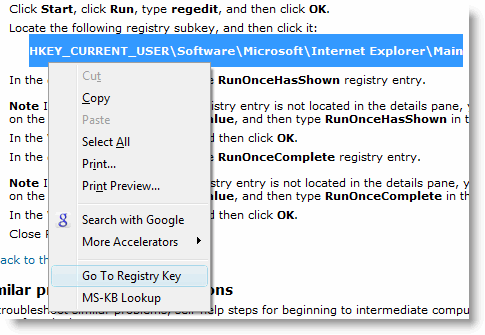
I’ve written a context menu Add-on (Menu Extension) for Internet Explorer that launches the Registry Editor and jumps to the specified registry key directly.
First, download RegJump from Microsoft Sysinternals site. Unzip the file and move RegJump.exe to the Windows directory. RegJump is a command-line tool that takes a registry path and makes Regedit open to that path.
- Download jump_to_reg_ie.zip, unzip and extract the contents to a folder.
- Double-click regjump.reg to run it.
- Move the file regjump.htm to the C:\Windows\Web directory.
- Open a new instance of Internet Explorer and navigate to a Web page that contains information about modifying the registry.
- Select the text (registry key), right-click and choose Go To Registry Key. Registry Editor will open directly to the selected key.
One small request: If you liked this post, please share this?
One "tiny" share from you would seriously help a lot with the growth of this blog. Some great suggestions:- Pin it!
- Share it to your favorite blog + Facebook, Reddit
- Tweet it!

Hi, I realize this is a post from 2008, but I created a similar extension for Chrome, you can find it here: https://github.com/hmemcpy/ChromeRegJump