Windows does not have a GUI option to disable the taskbar thumbnail preview feature. I’ve experimented with the registry setting TaskbarNoThumbnail and its equivalent GPO Turn off taskbar thumbnails. That setting seems to apply only to Windows Vista and has no effect in Windows 7 and higher.
You can, however, disable the taskbar thumbnail feature (sort of) in Windows 7 through Windows 10, using a registry edit. This can be done by setting the taskbar thumbnail preview hover delay to a large value (say 10000 milliseconds or more), so that the preview is not immediately generated when you hover over a taskbar icon. Well. Then the article title should have really been “How To Delay Taskbar Thumbnail Preview in Windows”.
I heard about this registry value via article Adjust Taskbar Preview Hover Delay at WinGeek.com (Credits to Steve Sinchak) and experimented the registry value by inputting a large decimal value to prevent the immediate display of thumbnails on the Taskbar.
Disable Taskbar Thumbnail Preview in Windows 10
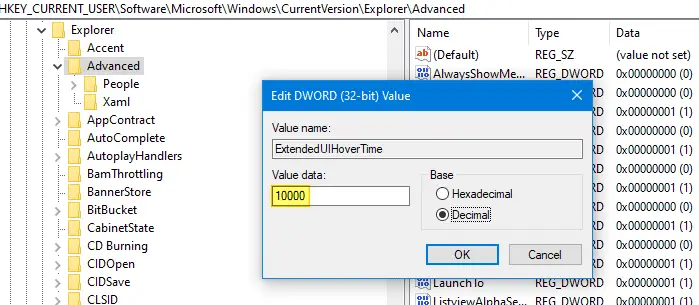
- Launch the Registry Editor (regedit.exe) and navigate to the following location:
HKEY_CURRENT_USER\Software\Microsoft\Windows\CurrentVersion\Explorer\Advanced
- Create a new DWORD (32-bit) value named
ExtendedUIHoverTime - Double-click ExtendedUIHoverTime and select Decimal
- To increase the hover delay to 5 seconds, type 5000. Type 10000 for 10 seconds and so forth…
- Exit the Registry Editor.
- Logoff and login back, or restart the Shell (“Exit Explorer” method).
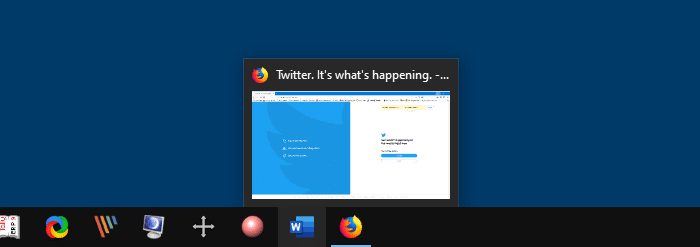
Here is how it looks after applying the ExtendedUIHoverTime setting. Hovering the mouse pointer over the taskbar icon shows the tooltip instead of the thumbnail. Taskbar Thumbnail wouldn’t appear until the specified time (10000ms) has elapsed. The registry setting works fine in Windows 10, as well.

Disable Taskbar Thumbnails for a Taskbar icon group
To disable Taskbar thumbnails for a taskbar group icon, create the NumThumbnails registry DWORD (32-bit) value under the following registry key:
HKEY_CURRENT_USER\Software\Microsoft\Windows\CurrentVersion\Explorer\Taskband
(This registry value has been discussed in the article How to Increase the Taskbar Thumbnail Preview Size)
The NumThumbnails registry value specifies how many thumbnails to display for an item. By default when you open five instances of a program (e.g. Notepad), five thumbnails are displayed one for each instance.. and so forth up based on your screen resolution limit. If the limit is exceeded, it stacks the items on top of each other.
For instance, if NumThumbnails value is set to 10 (decimal), thumbnail previews are shown only if you have less than or equal to 10 program windows. Opening more than 10 instances of the same program will cause the items to be stacked.
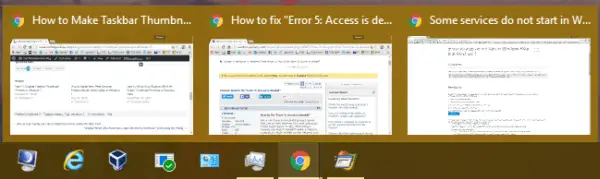
Let’s set NumThumbnails to 2. If there are more 2 windows, they all are stacked as shown:
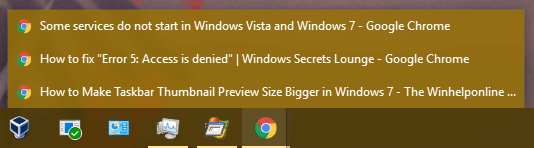
That’s it! Hope you learned how to disable taskbar thumbnails for a taskbar icon or taskbar icon group. All of the above information applies to Windows 7 through Windows 10.
One small request: If you liked this post, please share this?
One "tiny" share from you would seriously help a lot with the growth of this blog. Some great suggestions:- Pin it!
- Share it to your favorite blog + Facebook, Reddit
- Tweet it!

It’s not working anymore on windows 10 v1909
WORKED! YES!
I run Win 10 Pro, build 19042.
Nothing work for me.
Please, I hate the previews…. hate hate hate