Let’s assume you’re working in the training department of a firm, and need to send training materials to new recruits on a regular basis. The usual way is to right-click on the file, choose Send To, and click Mail Recipient. This attaches the file to the compose window in your mail client.

How about saving bandwidth in your local network by sending the target path of documents (residing in a network share), instead of attaching them to mail?

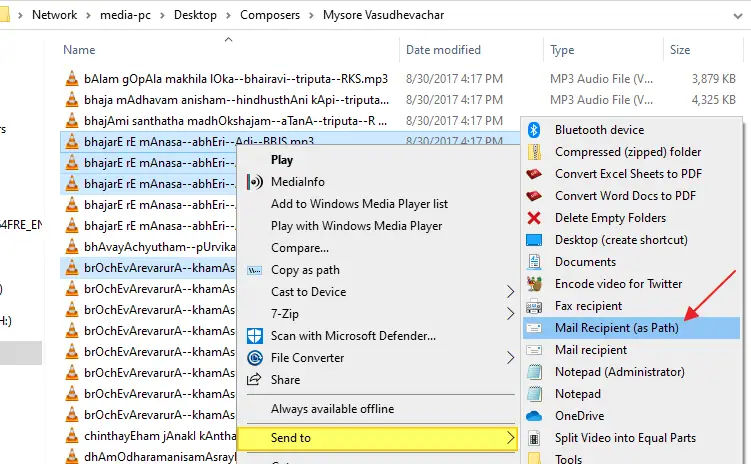
For this purpose, I wrote a script which adds the Mail Recipient (as Path) option to the Send To menu, which when clicked, opens the compose mail window and adds the target location of selected files and folders to the Body.

1. Download SendLinkToMail.zip

2. Unzip the archive and extract the file sendlinktomail.vbs to a permanent location.

3. Double-click sendlinktomail.vbs to run it.

4. When you see the following prompt, simply press ENTER:

The Mail Recipient (as Path) is now added to the Send To menu.

5. Open the location which contains documents that you want to email (as Path)

6. Select the files.

7. From the File menu, choose Send To and click Mail Recipient (as Path)

This opens your mail client, with the Subject and Body fields populated.
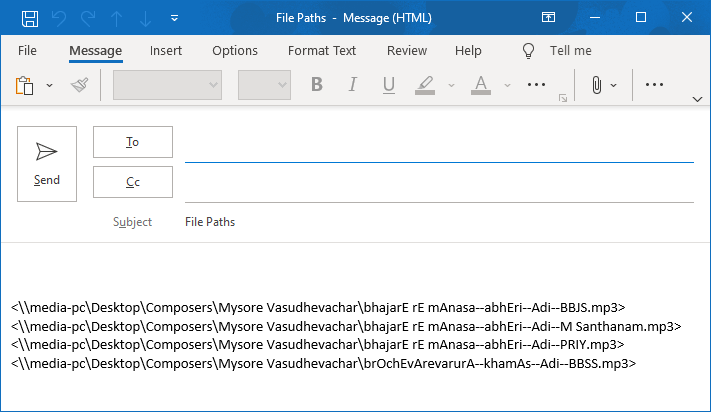

Note: Hyperlink is formed correctly as long as the path does not contain spaces.

Add a salutation, type your message, mention the To: address and send it.

Customization

To change the default Subject line and To: address, edit the script using Notepad and modify the variables in Line #28 and 29. For example:

strRecipientEMail = "somename@mydomain.com"
strMailSubject = "Training Documents"

Undo Information

To remove Mail Recipient (as Path) option from the Send To menu, re-run the script, type UNINSTALL and press ENTER. Then delete the file sendlinktomail.vbs manually.

Related Posts


Email SubscriptionPrefer an E-mail subscription?

Enter your email address:

Delivered by FeedBurner

16 Comments

  1. Mike_G
    said this on Wednesday, February 3rd 2010 1:58 am

    The message below didn’t come out as posted?

    It should have said have %3C or less than char before filename

    and %3E or greater than char after filename

  2. Mike_G
    said this on Wednesday, February 3rd 2010 1:46 am

    I got it work by adding the “” character (%3E) after each file string. This handled the spaces in files names.

  3. Greg
    said this on Saturday, January 30th 2010 10:54 pm

    @Rob,
    Could you please explain where did you put the in the script?
    i can not make it work…

  4. Greg
    said this on Saturday, January 30th 2010 7:52 pm

    great script!
    but how can i convert a path with spaces into hyperlink? most of the files that i have to send have spaces…

  5. Rob
    said this on Monday, January 25th 2010 11:38 pm

    Nice little script but need to tweak it slightly for my purposes.

    First thing was to accommodate the ‘&’ character in the network path – this just mean encoding the & to %26

    Secondly i was having the same problem as @Leandro – this was amended by putting <> after, e.g.:

    <>

    And finally, to include the filename of the first file as the subject, i used the following:

    strMailSubject = objFSO.GetBaseName(WScript.Arguments.Item(0))

    happy to share the update script.

  6. said this on Monday, November 9th 2009 6:53 am

    Is there a way to have this attach the file instead of pasting the link in the body?
    thanks,

    austen

  7. Olivier
    said this on Tuesday, August 4th 2009 3:32 pm

    Hi,

    I tried the script but the hyperlink is not created just the field.

    can you help me ?

    THX

  8. Leandro
    said this on Friday, July 17th 2009 4:55 am

    Hi
    I tried this script but the only thing that goes into the e-mail body is the file name, not a real link that you can click on.
    Am I doing anything wrong here?

    Thanks in advance!
    Leandro

  9. MrT
    said this on Thursday, April 2nd 2009 5:39 am

    Charlie thats not a real question! windows XP can already do that!

    how about this: How could I modify this script so it adds a shortcut (.lnk) of the selected files instead?

  10. Charlie
    said this on Saturday, March 7th 2009 3:46 am

    Is there a way to have this attach the file instead of pasting the link in the body?
    thanks,
    charlie

Leave a Reply