When you right-click an internet shortcut (.URL file), the “Print” command is the default (shown in bold letters) action. As a result, double-clicking on internet shortcuts will open the Print dialog.
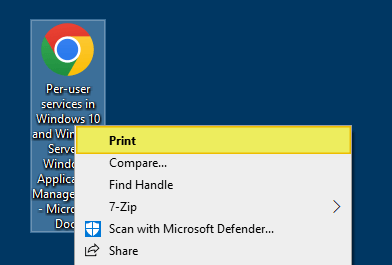
And, the Web document tab may be missing in the property sheet for Internet Shortcut (.URL) files.
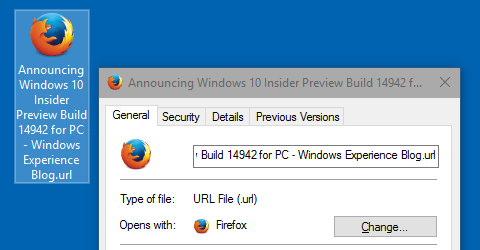
Additionally, the shortcut icon overlay for .url files may be missing. That’s another indication that file association settings for .URL are incorrect.
Another symptom is that the .URL files show up with a generic white icon instead of the browser icon.
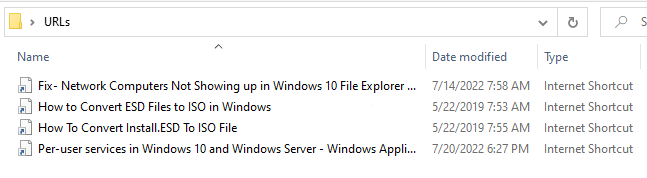
Resetting the default browser or changing the default browser (e.g., from Chrome to Firefox/others or vice versa) using Default Apps or Default Programs does not fix the issue.
Solution
The above issues can occur if the .URL files are associated incorrectly using the Open with dialog, or a GUID is accidentally deleted or blocked in the registry.
Use the registry fix below to resolve the problem in any version of Windows, including Windows 10 or 11.
- Copy the following lines to Notepad.
Windows Registry Editor Version 5.00 ;Restores missing "Web document" tab for internet shortcuts. ;Fixes the URL file context menu where Print was the default option. ;Created by Ramesh Srinivasan ;Website: https://www.winhelponline.com/blog/ ;Created on May 07, 2004 ;Updated on Jul 26, 2022 ;For Windows 11, 10, 8, 7, and Vista. [HKEY_CLASSES_ROOT\.url] @="InternetShortcut" "IsShortcut"="" [HKEY_CLASSES_ROOT\InternetShortcut\shell\Open] "CLSID"="{FBF23B40-E3F0-101B-8488-00AA003E56F8}" "LegacyDisable"="" [HKEY_CLASSES_ROOT\InternetShortcut\shell\Open\Command] @="\"C:\\WINDOWS\\system32\\rundll32.exe\" \"C:\\WINDOWS\\system32\\ieframe.dll\",OpenURL %l" [HKEY_CLASSES_ROOT\InternetShortcut\shellex\ContextMenuHandlers\{FBF23B40-E3F0-101B-8488-00AA003E56F8}] @="" [HKEY_CLASSES_ROOT\InternetShortcut\shellex\PropertySheetHandlers\{FBF23B40-E3F0-101B-8488-00AA003E56F8}] @="" [-HKEY_CURRENT_USER\SOFTWARE\Microsoft\Windows\CurrentVersion\Explorer\FileExts\.url] [-HKEY_CURRENT_USER\SOFTWARE\Microsoft\Windows\Roaming\OpenWith\FileExts\.url] [HKEY_CURRENT_USER\SOFTWARE\Microsoft\Windows\CurrentVersion\Shell Extensions\Blocked] "{FBF23B40-E3F0-101B-8488-00AA003E56F8}"=- [HKEY_LOCAL_MACHINE\SOFTWARE\Microsoft\Windows\CurrentVersion\Shell Extensions\Blocked] "{FBF23B40-E3F0-101B-8488-00AA003E56F8}"=- - Save the file with a .reg extension — e.g.,
webdoctab.reg - Double-click the registry file to apply the settings to the registry. Click Yes when asked for confirmation.
- Next, open Default Apps or Default Programs and set the default browser.
- Log off and log back in (or restart Explorer) for the change to take effect.
The Web Document tab should now be available in properties sheet.
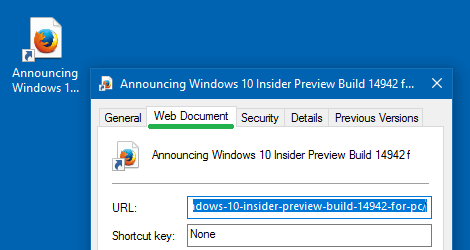
And, the .URL file type icon and the .URL overlay (shortcut icon) should have been restored.
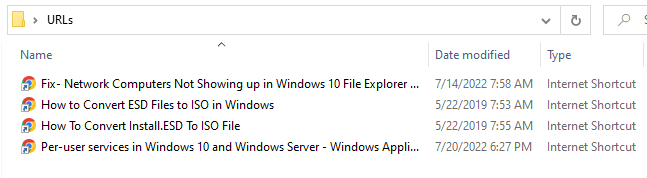
And, of course, the above registry fix should resolve the original issue (“Print” command being the default right-click option) as well.
One small request: If you liked this post, please share this?
One "tiny" share from you would seriously help a lot with the growth of this blog. Some great suggestions:- Pin it!
- Share it to your favorite blog + Facebook, Reddit
- Tweet it!

03 dec 22 0201 GMT Thank you. I cancelled my appointments with both my cardiologist and my psychiatrist. I restored WIN 10 defaults (Edge) and then swapped back to Chrome. Voila!
Stll – perhaps you could explain how “Web Document” came to be deleted from my Internet Shortcut Properties.
To close: you are one of the very few people who can add the coda “hope this helps”. It sure “worked for me”.