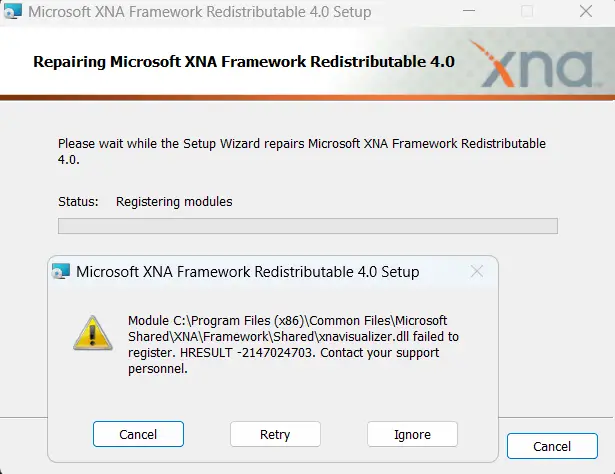
When you install the Microsoft XNA Framework 4.0 (xnafx40_redist.msi) package, the setup may encounter the following error:
Module C:\Program Files (x86)\Common Files\Microsoft Shared\XNA\Framework\Shared\xnavisualizer.dll failed to register. HRESULT -2147024703. Contact your support personnel.
Cause
The error -2147024703 (hex: 0x800700C1) means ERROR_BAD_EXE_FORMAT (the file is not a valid Win32 application).
To register xnavisualizer.dll, the 32-bit version of msvcr100.dll should be present in the C:\Windows\SysWOW64 directory. If the SysWOW64 directory has the corrupt or the 64-bit version of msvcr100.dll, this error occurs.
Resolution
Download msvcr100.dll (32-bit, zipped), unzip, and copy the DLL file to Windows\SysWOW64. Overwrite existing file if prompted.
File info: msvcr100.dll
    Verified:   Signed
    Signing date:   2:20 PM 6/11/2011
    Company:    Microsoft Corporation
    Description:    Microsoft® C Runtime Library
    Product:    Microsoft® Visual Studio® 2010
    Prod version:   10.00.40219.325
    File version:   10.00.40219.325
    MachineType:    32-bit
    Binary Version: 10.0.40219.325
    Original Name:  msvcr100_clr0400.dll
    Internal Name:  msvcr100_clr0400.dll
    Copyright:  © Microsoft Corporation.  All rights reserved.
    MD5:    0E37FBFA79D349D672456923EC5FBBE3
    SHA256: 8793353461826FBD48F25EA8B835BE204B758CE7510DB2AF631B28850355BD18
Attempt to run the Microsoft XNA Framework 4.0 setup again. It should work.
One small request: If you liked this post, please share this?
One "tiny" share from you would seriously help a lot with the growth of this blog. Some great suggestions:- Pin it!
- Share it to your favorite blog + Facebook, Reddit
- Tweet it!
