When you start your Windows 11 computer, the following warning about the driver pcdsrvc_x64.pkms may appear.
Program Compatibility Assistant

A driver cannot load on this device

Driver: pcdsrvc_x64.pkms
pcdsrvc_x64.pkms
A security setting is detecting this as a vulnerable driver and blocking it from loading. You’ll need to adjust your settings to load this driver.
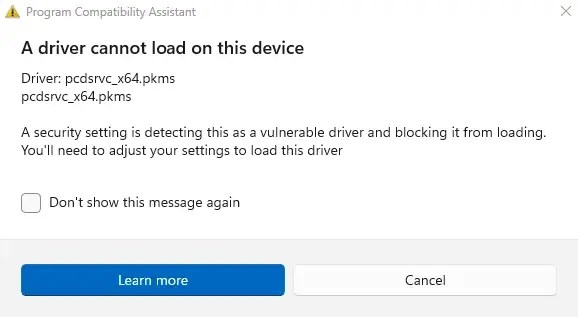
The above error may appear on Windows 11 24H2 and higher. pcdsrvc_x64.pkms is a Dell driver, installed by the Dell SupportAssist app.
Resolution
Option 1: Update Dell SupportAssist
Please see if updating Dell SupportAssist resolves the issue. You can download it from SupportAssist for Home PCs | Dell USA.
If that doesn’t help, uninstall Dell SupportAssist.
Option 2: Uninstall Dell SupportAssist
- Open Control Panel → Programs and features.
- Right-click “Dell SupportAssist” and choose Uninstall.
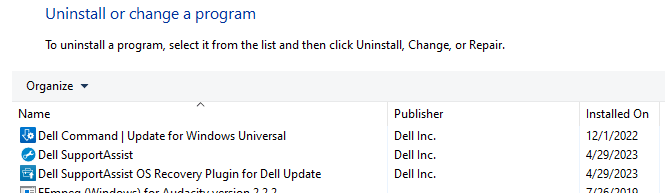
- Also, uninstall Dell SupportAssist Agent, Dell SupportAssist Update Plugin, and Dell SupportAssist Remediation, if listed.
- Restart Windows.
You may continue using Dell Update (for consumer PCs) or the Dell Command | Update (DCU) application (for commercial PCs) to receive BIOS and driver updates on your PC.
Or you could visit the Dell Drivers & Downloads portal now and then to download the necessary updates. See also How to Get Email Alerts for Dell Driver Updates.
One small request: If you liked this post, please share this?
One "tiny" share from you would seriously help a lot with the growth of this blog. Some great suggestions:- Pin it!
- Share it to your favorite blog + Facebook, Reddit
- Tweet it!
