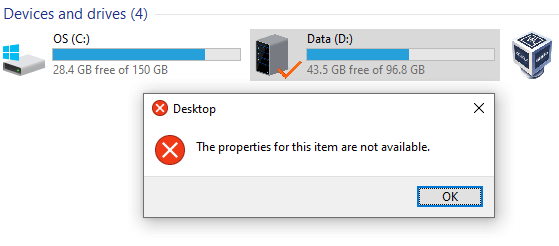
When you right-click on a drive letter in This PC and click Properties, the properties dialog may not open, and the following error may appear:
The Properties for This Item Are Not Available.
Resolution
The error “The Properties for This Item Are Not Available” occurs if the following registry key is missing or damaged:
HKEY_CLASSES_ROOT\Drive\shellex\PropertySheetHandlers
To resolve the error, download drive_properties_fix.reg (zipped), unzip the archive and run the enclosed registry fix. Click Yes to confirm.
REG file contents
Windows Registry Editor Version 5.00

;Drive properties fix for Windows 10 and 11.

[HKEY_CLASSES_ROOT\Drive\shellex\PropertySheetHandlers]
@="{5F5295E0-429F-1069-A2E2-08002B30309D}"

[HKEY_CLASSES_ROOT\Drive\shellex\PropertySheetHandlers\Sharing]
@="{f81e9010-6ea4-11ce-a7ff-00aa003ca9f6}"

[HKEY_CLASSES_ROOT\Drive\shellex\PropertySheetHandlers\{1f2e5c40-9550-11ce-99d2-00aa006e086c}]

[HKEY_CLASSES_ROOT\Drive\shellex\PropertySheetHandlers\{4a7ded0a-ad25-11d0-98a8-0800361b1103}]

[HKEY_CLASSES_ROOT\Drive\shellex\PropertySheetHandlers\{55B3A0BD-4D28-42fe-8CFB-FA3EDFF969B8}]

[HKEY_CLASSES_ROOT\Drive\shellex\PropertySheetHandlers\{596AB062-B4D2-4215-9F74-E9109B0A8153}]

[HKEY_CLASSES_ROOT\Drive\shellex\PropertySheetHandlers\{5F5295E0-429F-1069-A2E2-08002B30309D}]

[HKEY_CLASSES_ROOT\Drive\shellex\PropertySheetHandlers\{7988B573-EC89-11cf-9C00-00AA00A14F56}]
@=""

[HKEY_CLASSES_ROOT\Drive\shellex\PropertySheetHandlers\{ECCDF543-45CC-11CE-B9BF-0080C87CDBA6}]

[HKEY_CLASSES_ROOT\Drive\shellex\PropertySheetHandlers\{ef43ecfe-2ab9-4632-bf21-58909dd177f0}]
@=""

[HKEY_CLASSES_ROOT\Drive\shellex\PropertySheetHandlers\{fbeb8a05-beee-4442-804e-409d6c4515e9}]
@=""

[HKEY_CLASSES_ROOT\Drive\tabsets]
"location"=dword:00000703
"selection"=dword:00000703
The fix applies to Windows 10 and Windows 11 (including 25H2) systems.
No reboot should be necessary after running the fix. If you get the following error, you may ignore it because some of the above keys may already exist.
Cannot import drive_properties_fix.reg: Not all data was successfully written to the registry. Some keys are open by the system or other processes, or you have insufficient privileges to perform this operation.
Note: If the issue is unresolved, please launch regedit.exe under the TrustedInstaller privileges and import the registry file manually via the File menu. For more information, please see the article How to Run Programs as TrustedInstaller to Write to Certain Registry Keys or Files.
That should resolve the issue.
One small request: If you liked this post, please share this?
One "tiny" share from you would seriously help a lot with the growth of this blog. Some great suggestions:- Pin it!
- Share it to your favorite blog + Facebook, Reddit
- Tweet it!
