When you copy one or more files to a FAT32 partition on any disk (USB, HDD, or SSD), you’re prompted to copy without preserving the properties. Here’s the full message:
Are you sure you want to copy this file without its properties?

The file <filename> has properties that can't be copied to the new location.
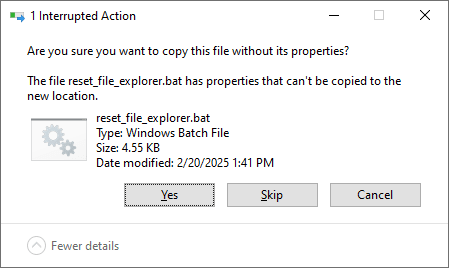
You wonder why the above prompt appears and whether it’s okay to lose the “properties” of the copied file(s)?
Explanation
The above prompt occurs if the source file contains NTFS Alternate Data Streams (ADS). ADS allow files to contain hidden metadata or additional data streams ($DATA attributes) beyond their primary content, without altering the file size in Explorer.
For example, when you download a file from the internet, the source URL of the downloaded file and the internet zone ID will be stored in the NTFS ADS. We’ve seen that in the articles Determine where a File was Downloaded from and Bulk Unblock Files Downloaded from the Internet.
The most common use of ADS is to store “zone” data. However, if a custom application wants to store metadata in the NTFS ADS, it’s possible but rare.
Related links
https://www.bleepingcomputer.com/tutorials/windows-alternate-data-streams/
https://www.winitor.com/pdf/NtfsAlternateDataStreams.pdf
So, when you copy the file to a non-NTFS partition (e.g., FAT32 or exFAT), you can click Yes. The NTFS ADS will be lost because it’s not supported in non-NTFS partitions. You’ll lose the NTFS Alternate Data Streams, but the file contents and the timestamp will be intact.
One small request: If you liked this post, please share this?
One "tiny" share from you would seriously help a lot with the growth of this blog. Some great suggestions:- Pin it!
- Share it to your favorite blog + Facebook, Reddit
- Tweet it!
