When you open an Office app, such as Excel, Outlook, Word, PowerPoint, or OneNote, you may get an error message regarding the file c2r64.dll. Here are some of the errors that users encounter:
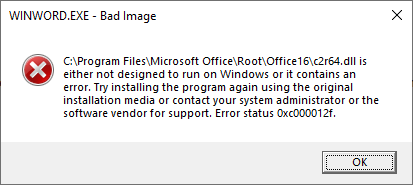
WINWORD.EXE - Bad Image

C:\Program Files\Microsoft Office\Root\Office16\c2r64.dll is either not designed to run on Windows or it contains an error. Try installing the program again using the original installation media or contact your system administrator or the software vendor for support. Error status 0xc000012f.
(or)
WINWORD.EXE - System Error

The code execution cannot proceed because c2r64.dll was not found. Reinstalling the program may fix this problem.
Cause
Error 0xc000012f occurs if the file c2r64.dll is corrupted.
Resolution
You can resolve the c2r64.dll errors using one of the methods below:
Method 1: Reinstall Office
Launch Programs and Features (appwiz.cpl) in the Control Panel.
Depending on your Microsoft 365 or Office installation type (Click-to-run or MSI-based), you’ll see the following options to proceed with the repair. Follow the steps for your installation type.
Click-to-run
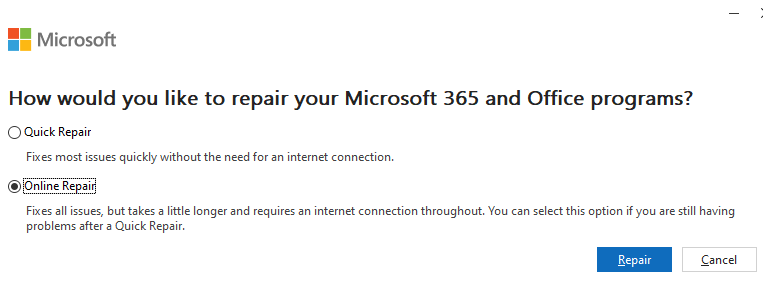
In the window “How would you like to repair your Microsoft 365 and Office Programs”, select Online Repair, and click Repair to make sure everything gets fixed.
MSI-based
In the Change your installation window, select Repair and then click Continue.
Follow the instructions on the screen to complete the repair.
Method 2: Download c2r64.dll (Office 64-bit)
This method applies to the 64-bit edition of the Office.
- Download c2r64.dll (zipped) for the Office 64-bit edition.
- Unzip the archive and extract c2r64.dll to the desktop.
- Move the file to the following folder. Overwrite the existing file when prompted.
C:\Program Files\Common Files\microsoft shared\ClickToRun
C2R64.dll – File information.
	File Name:	C2R64.dll
	Verified:	Signed
	Signing date:	6:00 AM 2/22/2026
	Publisher:	Microsoft Corporation
	Description:	Microsoft Office component
	Product:	Microsoft Office
	File version:	16.0.19725.20126
	MachineType:	64-bit
	Original Name:	c2r64.dll
	MD5:	5605CDF09759C9396A2862A70B3F0A84
	SHA1:	AEE31C344664A2794900FC271FAC9F0D0D602B8E
	SHA256:	3B7A3877D6EA09E9AEEF608B90C3DC06D1870049BB7CC5C676636BACD5B8FE3D
	VT detection:	0/77
	VT link:	https://www.virustotal.com/gui/file/3b7a3877d6ea09e9aeef608b90c3dc06d1870049bb7cc5c676636bacd5b8fe3d/detection
Additional note
The following file:
C:\Program Files\Microsoft Office\Root\Office16\c2r64.dll
is a symbolic link that points to the following file:
C:\Program Files\Common Files\microsoft shared\ClickToRun\c2r64.dll
That should resolve the c2r64.dll error when launching Office apps.
One small request: If you liked this post, please share this?
One "tiny" share from you would seriously help a lot with the growth of this blog. Some great suggestions:- Pin it!
- Share it to your favorite blog + Facebook, Reddit
- Tweet it!
