If “Add legacy hardware” and other options are missing from the Action menu in Device Manager, it is likely because the Device Manager’s tree view is not focused.
Resolution
In Device Manager, click the computer name (at the top of the list) or any existing device node first.
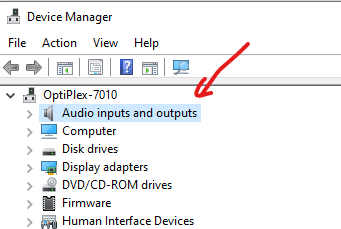
Then check the “Action” menu again.
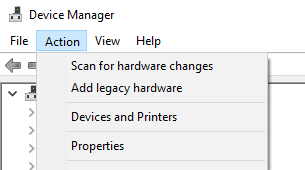
The options Scan for hardware changes, Add legacy hardware, Devices and Printers, Properties, and Help should now be visible.
One small request: If you liked this post, please share this?
One "tiny" share from you would seriously help a lot with the growth of this blog. Some great suggestions:- Pin it!
- Share it to your favorite blog + Facebook, Reddit
- Tweet it!
