When you try to move or rename a folder in Windows 10 or 11, the errors Can’t find the specified file, and The file or folder does not exist occur. Also, duplicate icons with no text appear for special folders, namely Documents, Downloads, Music, Pictures, and Videos, under This PC section in File Explorer.
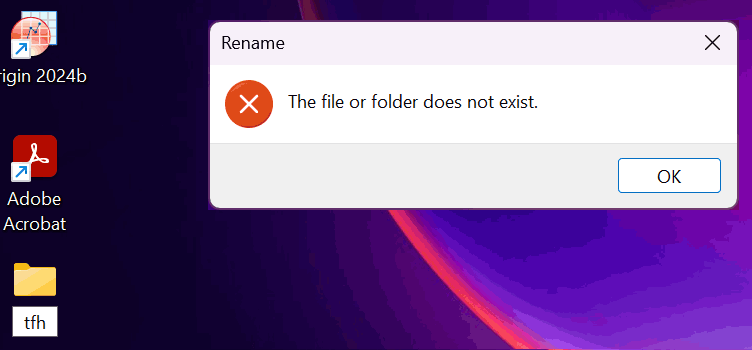
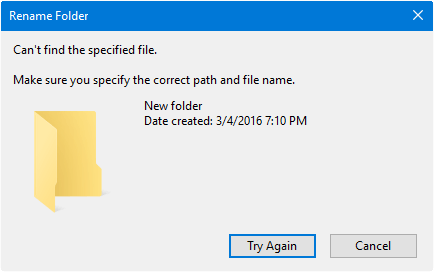
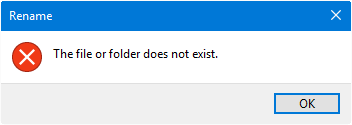
(Fig 1, 2, & 3) Errors when renaming a folder.
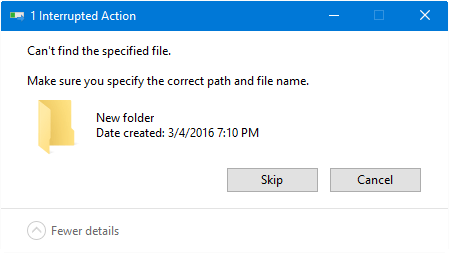
(Fig 4) Error “Interrupted Action” – “Can’t find the specified file” when moving a folder.
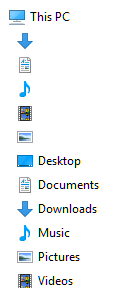
(Fig 5) Duplicate icons appear for special folders, containing no text.
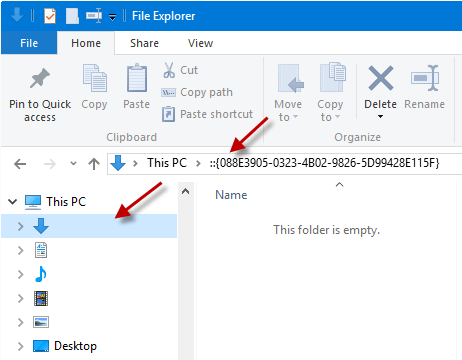
(Fig 6) Clicking a nameless item shows the special folder GUID in the address bar.
In addition, the following symptoms may be observed:
- Unable to move folders to a different location, nor be able to restore deleted items from the Recycle Bin.
- Unable to launch special folders using the Shell: command. For example, when you run the command
shell:My Music, you may receive the following error:Windows cannot find 'shell:My Music'. Make sure you typed the name correctly, and then try again.
Resolution
If you’re unable to rename or move folders, it’s caused by missing registry entries under the FolderDescriptions registry key. Follow these steps to fix the problem:
- Please create a System Restore Point or backup the registry hives.
- Download the following file:
- w10_folder_descriptions.zip (for Windows 10 22H2.)
- w11_folder_descriptions.zip (for Windows 11 24H2.)
- Open the zip file and extract “folderdescriptions.reg” to your desktop.
- Move “folderdescriptions.reg” to the C:\ drive’s root.
- Download AdvancedRun from Nirsoft and run it.
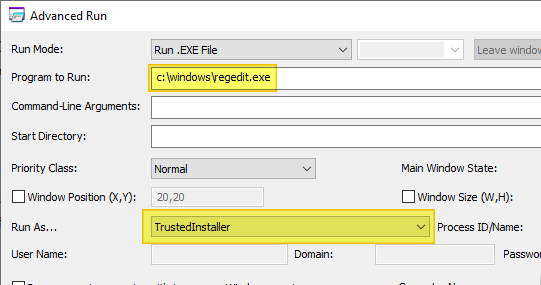
- Using AdvancedRun, launch c:\windows\regedit.exe as TrustedInstaller.
- In the Registry Editor window, click File, and click Import…
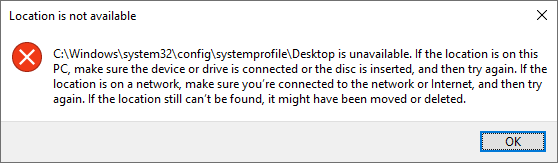
- Dismiss the “Location is not available” message box by clicking OK.
- In the “Import Registry File” window, type C:\folderdescriptions.reg in the “File name” text box, and press Enter.
- Click Yes to confirm. If you see the following error, please ignore it:
Not all data was successfully written to the registry. Some keys are open by the system or other processes, or you have insufficient privileges to perform this operation.
- After the import is successful, exit the Registry Editor.
- Restart Windows and see if the issue is resolved.
More Information
The above steps restore the default keys and values under the FolderDescriptions registry branch:
HKEY_LOCAL_MACHINE\SOFTWARE\Microsoft\Windows\CurrentVersion\Explorer\FolderDescriptions
The above registry branch is like a template that stores various settings and GUIDs for shell folders in Windows. It tells the shell how to parse special folders when you use Explorer. The shortcut shell: commands (aliases) we use to open special folders directly, come from the FolderDescriptions key.
Important: Please do not run the registry file in other versions of Windows. For Windows 8.1, download w8_folder_descriptions.zip, unzip and run the enclosed .reg file.
One small request: If you liked this post, please share this?
One "tiny" share from you would seriously help a lot with the growth of this blog. Some great suggestions:- Pin it!
- Share it to your favorite blog + Facebook, Reddit
- Tweet it!

After TWO months of searching for a solution, this one WORKED! Thanks so much, Ramesh! Also thanks to those who posted comments verifying this fix and what to expect:
– I’m using Windows 8.1 PC desktop,
– Downloaded the Win8 zip folder from the above link,
– Right-clicked on “w8_folder_description.reg” file inside and selected “Merge” at the top of the list of options,
– In seconds, saw the error message saying some files couldn’t be open or installed,
– Rebooted my computer to find all my folders can now be renames and moved to other folders/directories! So grateful to not have to reset and rebuild from scratch ..
– I’m experiencing minor bugs with MS Office but expect them to go away once I re-install the program. – Jan 9, 2019
A thousand thanks! Back in business with no muss & no fuss!
That didn’t work for me it could be the version I’m using but, I found the answer attempt to do something else.
I noticed my ribbon was minimized up top in File Explorer and clicked on the arrow to customize the quick access toolbar and at the end of my options to check and add to the toolbar was rename file.
12/2019
Ramesh,
Thanks! Worked 100% the first time with no issues.
Do you have a paypal account?
Dear Ramesh
Thankssssssssss
Finally it fixed my problems after 2 days searching of recovery methods and now it’s back to work flawlessly…
Nothing solves this problem for me when running explorer. But I can change folder names easily using XYplorer.
After weeks of searching for cure for not being able to rename new & existing folders, I finally discovered someone who knows what they’re doing. I doubleclicked the .reg file you provided the link for and was able to instantly do a rename to a New Folder. No restart was necessary !
Thanks at LEASt a million !
This worked! Thanks!
GOD BLESS YOU! Finally, something that WORKED. You are amazing. THANK YOU SO MUCH.
Hello, and many THANKS !!
Spent hours upon hours trying to resolve this folder renaming thing and finally found the solution.
This didn’t work for me 🙁 Absolutely lost at this point, it seems like nothing has worked and I have no idea what caused this.
After several failures, this worked for me! I wish I had found this post earlier.
Obrigado achei que não ia mais conseguir arrumar, não salve no disco do windows provavelmente o sistema ou antivirus irá deletar.
Thank you. It worked well.
this also worked for me after an entire day of searching for solutions! many many thanks
YES!!!!! Thank you. This was driving me crazy…
Thanks – I was working with Microsoft CoPilot for hours to resolve this – your fix worked !!! Thank you!
This is great – thank you so much.
Wonder why MS don’t have this fixed yet, and why all MS “specialists” just answer with “restart your explorer”, “download latest update” and other nonsense in stead of trying to solve the problem.