When you open the Services management console (services.msc), the Task Scheduler service may be in a disabled state. In the Task Scheduler properties page, all the options may be grayed out, and the service Startup type cannot be changed.
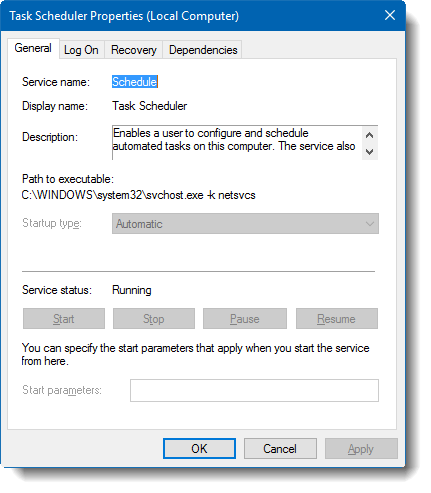
This article tells you how to configure the Task Scheduler service using a couple of methods.
Task Scheduler Service Grayed Out in Services MMC
To permanently enable the options in the Task Scheduler service properties, modify the service permissions as mentioned in the article How to View and Modify Service Permissions.
Method 1: Change service settings using Regedit
The Task Scheduler service’s start type is not configurable using the Services MMC console. To reset the startup type of the Task Scheduler service to the default setting (i.e., Automatic), do the following:
- Right-click scheduler.reg and choose “Save link as” in your browser.
- Save the file to your Desktop.
- Right-click on the file and choose Merge.
- Restart Windows for the changes to take effect.
This REG file applies to Windows 11, Windows 10, and earlier.
Additional Information
The Task Scheduler service settings are stored in the registry key:
HKEY_LOCAL_MACHINE\SYSTEM\CurrentControlSet\Services\Schedule
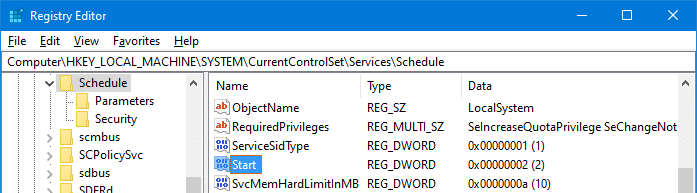
The DWORD value named Start determines how the service is started. The valid values are:
- 2 is Automatic
- 3 is Manual
- 4 is disabled
The above REG file resets it to 2, which is the Windows-default setting.
Using the reg.exe console tool
Alternatively, you can run the following command from an admin Command Prompt window to set Task Scheduler startup type to Automatic:
reg add HKEY_LOCAL_MACHINE\SYSTEM\CurrentControlSet\Services\Schedule /v Start /t reg_dword /d 2 /f
Method 2: Use the SYSTEM account to configure the service
To configure the Task Scheduler service, stop, or restart it via the Services console or command-line, you may need to use the LocalSystem account.
- Start Command Prompt (cmd.exe) under SYSTEM (“LocalSystem”) account. For more information, check out the article How to Run a Program as SYSTEM (LocalSystem)
- Run the following command from the Command Prompt window:
mmc.exe services.msc
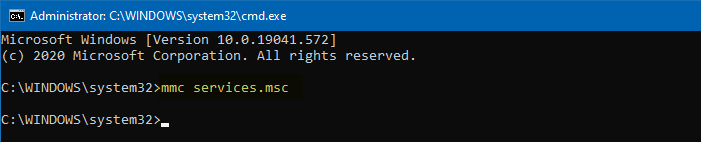
This starts the MMC under the SYSTEM account.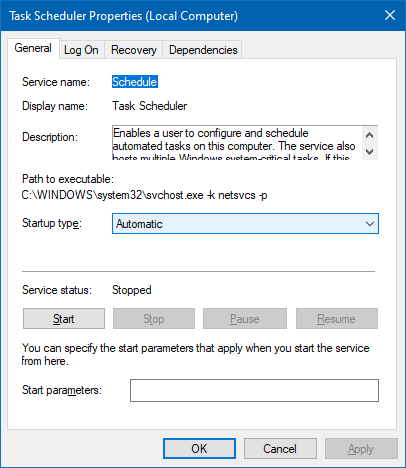
As you see, the Start button and the Startup type list boxes are enabled when you access the Services MMC using the SYSTEM account. You should be able to configure the Task Scheduler service.
One small request: If you liked this post, please share this?
One "tiny" share from you would seriously help a lot with the growth of this blog. Some great suggestions:- Pin it!
- Share it to your favorite blog + Facebook, Reddit
- Tweet it!
