Windows Vista introduces the Preview pane in Explorer, which shows the contents of the currently chosen file. You can also play multimedia files from the Preview pane, without opening Windows Media Player. This article explains how to use the PreviewConfig utility to register a custom file type for the Preview pane in Windows Vista and Windows 7.
Registering file types for the Preview pane
If you have a custom file type and wish to register a plain text or a multimedia Preview handler for the custom file type, you can do so using this utility.
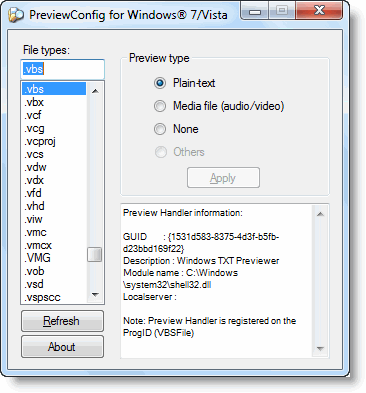
Download PreviewConfig.zip (63 KB)
(Contains previewconfig.exe and readme.txt)
Usage
Download and run PreviewHandler utility (requires administrative privileges to run). Select the file type from the listing, and choose the type of Preview you want for this file type (Media / Plain-text / None), and click Apply.
Additional details are available in the Readme.txt file.
Adding new file types
If a file type is not displayed in the listing, you may manually type the file extension (example, .cpp) into the text box provided, and choose the Preview type for this file extension.
Example
You may use this utility to register text previews for plain-text file types such as:
.REG | .CSS | .BAT | .CMD | .INF | .CS | .VB | .CPP | .SQL
Preview Handler information
When you select a file type, the information of the Preview handler registered for the file type will be displayed in the text box. You can copy the contents to Clipboard by double-clicking the text box.
Preview Pane in Windows Vista and 7
You can enable the preview pane by selecting Organize | Layout | Preview Pane from the folder’s menu.
One small request: If you liked this post, please share this?
One "tiny" share from you would seriously help a lot with the growth of this blog. Some great suggestions:- Pin it!
- Share it to your favorite blog + Facebook, Reddit
- Tweet it!


Does the job fine but found a potential issue. Haven’t done much troubleshooting analysis though.
Here is the general scenario. I had a file type (.config) that had an association with Visual Studio. PreviewConfig reported that it had no preview type and let me assign a preview type of Plain-text of which it persisted
The registry key {1531d583-8375-4d3f-b5fb-d23bbd169f22} that gets assigned for this type got assigned to HKEY_CLASSES_ROOT\VisualStudio.config.10.0\shellex\{8895b1c6-b41f-4c1c-a562-0d564250836f} and not under HKEY_CLASSES_ROOT\.config as I might have expected.
Bottom line preview will not work for .config file types. I was however successful in changing preview types for other file types with no prior associations.
No handler found for .PDF – No apparent means to use “Other” or to add other handlers. Something else coming from you?
Can you please help me,I have searching a lot to find a preview handler for .rar and .zip files….but filed,tried your application but still cant preview it in the preview pane…if there is anyway you can help me ,please do let me know,
PS:THis is a brilliant app. 🙂
Thank you very much! Restored my lost sql preview.
This also helps with an annoying problem with MS Office 2010 (and probably other recent versions) in Windows 7: if you open a folder and double-click a .docx (Word 1020) or .xlsx (Excel 2010) file, it opens the file, displays it for a brief flash, then pops it behind the folder window. I’ve searched for a solution, tried registry changes that deal with timings etc., but nothing works. This didn’t happen with Office 2003 in W7. It finally occurred to me that maybe it’s because when it generates the preview in the Windows Explorer preview pane, it makes the preview the top window. (Office 2003 wasn’t able to preview .doc or .xls files.) This stupid error also interferes with renaming or copying a file. So I turned off the preview pane and yup, problem solved – except that I want the preview pane for other file types. This “PreviewConfig” utility enabled me to set the preview handler for .docx and .xlsx to “None”, and it works perfectly and solves the problem! Thanks for the util.
Excellent!!! Thanks!!!
I ran PreviewConfig.exe as administrator, and selected
File type: .ino
Preview type: Plain-text
and clicked “Apply”.
But preview pane is still blank.
Please disregard my last comment (I was looking at an empty .ino file, ha ha)
The PreviewConfig utility works perfectly.
Very nice and simple to use utility.
Thank you for writing it.
I use it to preview .ino files.
“Other” not working? I can set Office Files to “Text” but can’t assign a doc viewer for that file type, .doc or .xls, with the ‘Other’ feature. Can only set to text.
Am I missing something about ‘Other’ or does it not work?
Thanks,
Bryan