 In Windows XP, the special folders, namely My Pictures, My Music, and My Videos, are present under the My Documents folder and displayed in the Windows Explorer folder pane as a sub-category under My Documents.
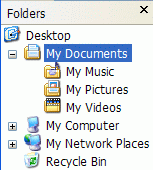
So, when you relocate the My Pictures, My Music, or the My Videos folder to a different folder or drive, they are not displayed under the My Documents folder in the folder pane. To quickly access the My Music, My Pictures, and the My Videos folder from the folder pane, you can create separate namespace extensions for those folders and have them listed in the folder pane in Windows Explorer.
Editor’s note: My Documents folder is always displayed in the folder pane, regardless of its file system location. This is because the My Documents folder, which you see in the folder pane, is a namespace extension, which is an alias to the user’s documents folder. Whereas the My Music, My Pictures, and the My Videos folders don’t have any namespace extensions by default.
Add My Music, My Pictures, My Videos to the folder pane
I’ve created three .REG files that create namespace extensions for My Music, My Pictures, and the My Videos folders. Download addtofolderpane.zip and save to Desktop. Unzip the archive and run the files mymusic.reg, mypictures.reg and myvideos.reg.
Now open Windows Explorer, and you’ll see that the My Music, My Pictures, and My Videos are listed under Desktop (which is the namespace root) and parallel to My Documents.
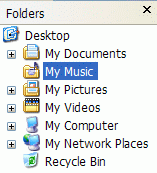
The REG files add three GUID entries in the registry, and the locations are:
HKEY_CLASSES_ROOT\CLSID\{88250a20-f8f7-4cb9-a5e7-9e8e77467640}
HKEY_CLASSES_ROOT\CLSID\{88250a20-f8f7-4cb9-a5e7-9e8e77467641}
HKEY_CLASSES_ROOT\CLSID\{88250a20-f8f7-4cb9-a5e7-9e8e77467642}
To reverse the changes, run the undo .REG files enclosed in the above zip file.
One small request: If you liked this post, please share this?
One "tiny" share from you would seriously help a lot with the growth of this blog. Some great suggestions:- Pin it!
- Share it to your favorite blog + Facebook, Reddit
- Tweet it!
