The Microsoft Defender command-line utility MpCmdRun.exe is mostly used to schedule scans and update the definitions. The MpCmdRun.exe command usage info can be obtained by running MpCmdRun.exe with “/?” or without any parameter.
However, it doesn’t mention a useful switch that updates Defender signatures and runs a Quick Scan at once.
MpCmdRun.exe — Signature Update & Quick Scan
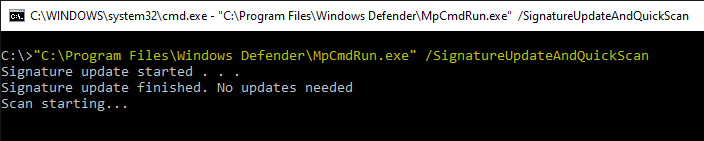
To update the definitions and run a Quick Scan in one go, use the switch SignatureUpdateAndQuickScan
"C:\Program Files\Windows Defender\MpCmdRun.exe" /SignatureUpdateAndQuickScan
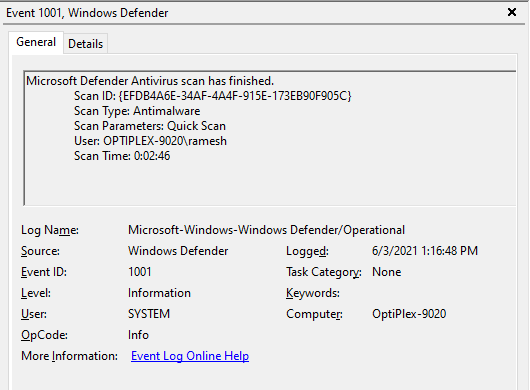
… and the event (1001) is written to Microsoft-Windows-Windows Defender/Operational event log.
Other MpCmdRun.exe command-line switches
Here are the other commonly used MpCmdRun.exe command-line switches:
Run a Quick Scan
"C:\Program Files\Windows Defender\MpCmdRun.exe" -Scan -ScanType 1
Run a Full Scan
"C:\Program Files\Windows Defender\MpCmdRun.exe" -Scan -ScanType 2
Update the Definitions
"C:\Program Files\Windows Defender\MpCmdRun.exe" -SignatureUpdate
To see the complete list of arguments, open a Command Prompt window and type:
"C:\Program Files\Windows Defender\MpCmdRun.exe"
One small request: If you liked this post, please share this?
One "tiny" share from you would seriously help a lot with the growth of this blog. Some great suggestions:- Pin it!
- Share it to your favorite blog + Facebook, Reddit
- Tweet it!

None of the commands you explained above does not run, ı got only some explanation in red…
@Prooffy: Well, your comment doesn’t help. I can’t analyze the problem without knowing the exact error message.
It’s hard to describe, but from what I understand, the Google Workspace platform, API consoles, have the tools to do what I’m doing, and someone is having fun disabling security and accessing my data and devices.is it possible for someone to still have access to my account and do this, I don’t see the logged in device but for a second I see the device name change and then everything is supposedly my device
for others who have the error “some explanation in red” you may need to check the folder path.
MpCmdRun.exe may be located in
C:\ProgramData\Microsoft\Windows Defender\Platform\4.18.XXXXX.X-0