Many users of Windows Mail or Windows Live Mail (part of Windows Live Essentials) used to backup individual emails and save them as .EML files. Since Windows Live Mail has been discontinued, users are forced to use third-party mailers or even buy Microsoft’s own produce, Microsoft Outlook. However, the preview pane in File Explorer shows “No preview available” when a .EML file is selected.
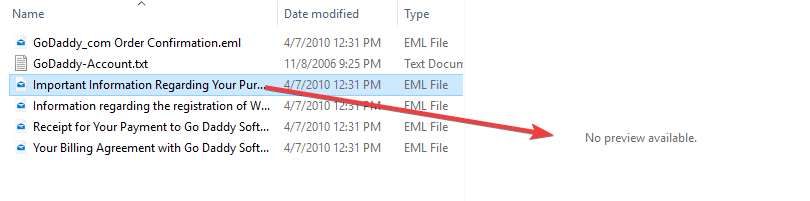
This article tells you how to preview .EML files in File Explorer Preview pane, in Windows 7 through Windows 10.
Option 1: Enable .EML Preview Using Preview Handler Association Editor
- Download Preview Handler Association Editor by Stephen Toub of Microsoft.
- Unzip and run the program
PreviewHandlerEditor.exe.File name: PreviewHandlerEditor.exe [SHA1] 217e64b9a4d143ecd36216ab4a86be5235b24fd1 [SHA256] 5008F954130454CC143272E4C527243B25E782168ED4F4C9AFB656B59055915B
- In the drop-down box, select “Microsoft Windows Mail Mime Preview Handler“. Note that there are two of those entries there. You can select either of them.
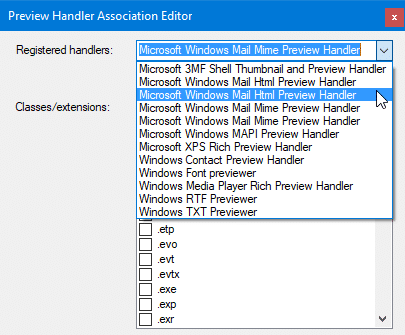
- Uncheck the Only show classes associated with this handler setting.
- Scroll down and locate
.emlfile type entry from the list.
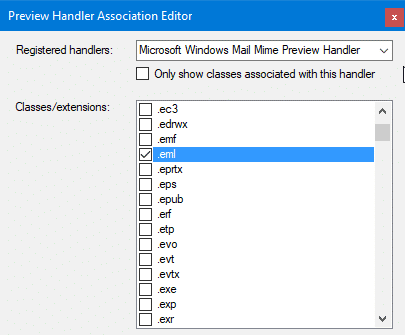
- Enable the checkbox for
.emlfile type. - Close Preview Handler Association Editor.
Option 2: Enable .EML Preview Using the Registry Editor
Using Preview Handler Association Editor (More info) or PreviewConfig (which I wrote during Windows Vista days) can be the easiest option for most users. However, if you don’t want to use 3rd party tools, and need to deploy the setting across your network, here is the direct registry setting:
- Right-click Start, click Run.
- Type
regedit.exeand click OK. This starts Registry Editor. - Go to the following registry branch:
HKEY_CLASSES_ROOT\.eml
- With the
.emlkey selected, create a subkey namedshellex - Under
shellex, create another subkey named{8895b1c6-b41f-4c1c-a562-0d564250836f} - With the newly created subkey selected, double-click the
(default)value on the right pane and set its data to:{92dbad9f-5025-49b0-9078-2d78f935e341} - After completing the above steps, make sure that the registry settings looks like this.
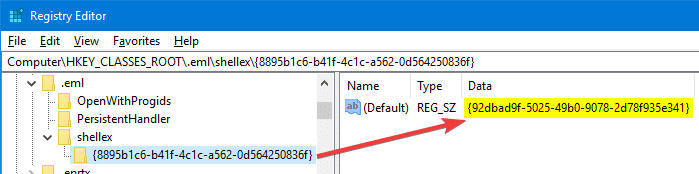
- Exit the Registry Editor.
That’s it! You’ve now added a preview handler for .EML files and will be able to preview the .EML file contents in Explorer.
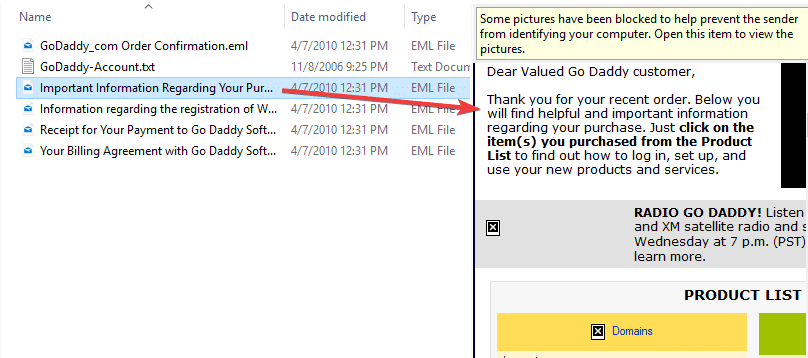
Note: To enable the preview pane (if not already enabled) in File Explorer, press Alt + P. The switch acts as a toggle.
Hope the instructions in this article helped you get back .EML preview capability in File Explorer. Also, check out my other post on how to enable File Explorer preview for .PS1 PowerShell script files.
One small request: If you liked this post, please share this?
One "tiny" share from you would seriously help a lot with the growth of this blog. Some great suggestions:- Pin it!
- Share it to your favorite blog + Facebook, Reddit
- Tweet it!

Hello!
Option 2 (made by registry change) works also with .msg files ?
Thank you.
Best regards!
@Luca: Unfortunately, none of the preview handlers work for Outlook .msg file type. But Microsoft says it works if you have Office 32-bit edition installed. See Microsoft article Can’t preview .msg files in Windows File Explorer with 64-bit Outlook
Hi,
thanks a lot for your article !
I’ve tried the second method, everything is just in your explanation.. but… no preview 🙁
I guess I made something wrong but don’t know what….
Even restarted my computer, in case… still no preview
have you already heard about some cases where it doesn’t work ?
anyway, thanks for your article ! 🙂
@Joëlle: For which file type. Can you send me the registry export for me to simulate the issue?
Option 2 worked best for me,
Option 1 did not format the HTML and showed the MIME TYPE… header.
Thanks Ramesh, this is just what I’ve been looking for. I tried Option 2 (registry editor), and it worked almost perfectly. I can now see the email in the File Explorer preview pane.
Just one small gripe. I can only see the content (body) of the email in the preview pane, not the metadata. Is there something I’ve overlooked? How can I get the metadata to display in the preview pane, just as it does for .msg messages?
@Justin: The EML filter will do only this. If you want to preview it in raw mode, you may have to use the “plain text” filter/GUID.
Hi Ramesh,
Thank you for this article. Very insightful.
The link to Preview Handler Association Editor is dead.
Any chance you can share the file or point me to another online resource to download it?
Thank you.
@Eric BC: Thanks for the heads up. I’ve updated the download link. Kindly check now.
This regrettably did not work (either method) because the following branch:
HKEY_CLASSES_ROOT\.eml
did not exist.
Same in the Preview Handler Association Editor.
The item .eml
did not exist.
@George, you can add the branch manually using the Registry Editor. Click on the Edit menu → click New → select “Key”. And name the key as “
.eml“Hi Ramesh,
Thank you for updating the link and sorry if I wasn’t being clear.
Actually the dead link is not yours but the one to the download from the page you are referring to.
It appears the exe was removed from download.
Any chance you have a copy of it you’d accept to share?
Regards,
Eric
@Eric: Please try this link.
I works now.
Thank you so much
Excelent!
Ramesh,
I used Option 2 and the previewer came right up. However, like Justin, the previewer cuts off the top of the emails I am previewing. You indicated, “If you want to preview it in raw mode, you may have to use the “plain text” filter/GUID.” How would I enable that?
Judy,
For plain-text preview, the GUID you want to use is
{1531d583-8375-4d3f-b5fb-d23bbd169f22}… instead of
{92dbad9f-5025-49b0-9078-2d78f935e341}It’s working now
Thanks !!
Bonjour Ramesh,
Ca fonctionne aussi sur W11 Famille ?
Pourquoi la sous-clé porte la référence {8895b1c6-b41f-4c1c-a562-0d564250836f} et pourquoi sa valeur est {92dbad9f-5025-49b0-9078-2d78f935e341} ? C’est valable quelquesoit le logiciel de messagerie utilisé ?
@Bubbles:
Yes, it should work in Windows 11 as well.
Does preview work with “{92dbad9f-5025-49b0-9078-2d78f935e341}” selected as the default previewer? If it doesnt, select “Microsoft Windows Mail Mime Preview Handler“ and let me know if that helps.