Summary: Incorrect icon shown for a file type, desktop shortcut, or taskbar icons in Windows. This article tells you how to fix it.
Recently I received a query wherein the user has installed Foxit Reader. Later, he set accidentally associated the .zip file type with Foxit Reader via the Open with dialog. They got the association problem straightened out by running the .zip association fix from the File association fixes page.
However, the .zip file type was still showing the Foxit Reader icon, although the association settings were correct.

Whenever the file association settings are changed or a new association is created via the registry or script, the system might not be aware of the change. Programs use the SHChangeNotify API call specifying the SHCNE_ASSOCCHANGED event, in order to refresh the icons without requiring a reboot.
This article explains the different ways to quickly refresh the icons in Windows 7, 8, and 10 without rebuilding the Windows icon cache or restarting Windows.
How to Refresh the Icons
After a file association change or shortcut icon modification, the icon should refresh immediately or after a restart. If that does not happen, you can force a shell icon refresh by performing a task that triggers the SHChangeNotify API.
Follow one of these methods:
1) Using IE4UINIT
Using IE4Uinit.exe (Internet Explorer Per-User Initialization Utility), you can quickly refresh the shell icons.
Press WinKey + R to bring up the Run dialog.
Run the following command (for Windows 10) and hit Enter:
ie4uinit.exe -show
For Windows 8 and earlier, run this command instead:
ie4uinit.exe -ClearIconCache
Here is a small video clip to demonstrate this.
(Incorrect .txt file icon, fixed immediately after running the above command.)
2) Using Default Apps
You can use Default Apps and change the program defaults for any random program (e.g., Google Chrome or Edge as the default), and revert to the original setting. This is to force the Windows shell to refresh the taskbar icons, desktop shortcut icons, and other icons in the Windows user interface.
- Open Settings, Default Apps
- Click on the Photo viewer and select a different program from the list
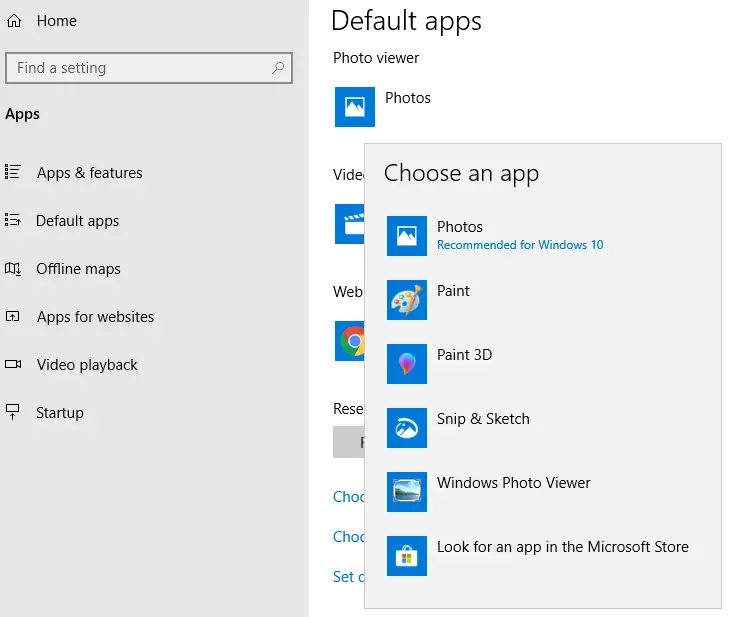
- Again, click on the Photo viewer and select your preferred program this time.
This refreshes the shell icons automatically.
In Windows 8 and earlier, use the Default Programs applet.
- Click Start → Default Programs → Set your default programs
- Select your web browser, email client, or any other item in the list.
- Click the Set this program as default button, and click OK.
3) Using NirCmd
If you’re using the excellent NirCmd console utility (from Nirsoft.net), it can be used to refresh the shell icons. It supports two options to refresh the icons.
- The “
Nircmd.exe sysrefresh” command initiates a general system refresh. You can use this command to refresh your system after changing your system settings in the Registry (e.g., Changing desktop icons size, environment variables, etc.,){Refresh Type}is optional. You can specify one of the following values: “environment” – for refreshing the environment variables, “policy” – for policy settings, “intl” for locale settings.Examples:
nircmd.exe sysrefresh

nircmd.exe sysrefresh environment

nircmd.exe sysrefresh policy
- The “
Nircmd.exe shellrefresh” command initiates a general refresh for Explorer shell (user interface). This command can be useful if you make a change in the registry related to the shell file types (e.g., change file type icons, taskbar icon), and you want that your changes will take effect immediately even without restarting the Explorer shell.
This should fix the incorrect file type icons issue.
Note: If you’re looking for information on how to completely clean and rebuild the icon cache, check out this post How to Rebuild the Icon Cache in Windows.
4) Using a Script
You can use the following VBScript to refresh the icons quickly. This script resets the file association settings for .txt file type using the ASSOC command. This triggers the SHCNE_ASSOCCHANGED event, which instructs the Shell to invalidate the icon and thumbnail cache. This causes Windows to refresh the shell icons.
'File: refreshicons.vbs
'From Winhelponline.com
'Forces a refresh of the shell icons by resetting .txt file association
If WScript.Arguments.length = 0 Then
   Set objShell = CreateObject("Shell.Application")
   objShell.ShellExecute "wscript.exe", Chr(34) & _
   WScript.ScriptFullName & Chr(34) & " uac", "", "runas", 1
Else
   Dim WshShell
   Set WshShell = WScript.CreateObject("Wscript.Shell")
   sCmd = "cmd.exe /c assoc .txt=textfile"
   WshShell.Run sCmd,0,True
   sCmd = "cmd.exe /c assoc .txt=txtfile"
End If
How to Use
- Download the above script or copy the above lines to Notepad and save the file as
refreshicons.vbs - Double-click
refreshicons.vbsto run it.
Alternately, you can run these commands manually (instead of script) from the admin Command Prompt.
assoc .txt=textfile

assoc .txt=txtfile
I hope that helps you refresh the stale/outdated or incorrect icons in Windows.
One small request: If you liked this post, please share this?
One "tiny" share from you would seriously help a lot with the growth of this blog. Some great suggestions:- Pin it!
- Share it to your favorite blog + Facebook, Reddit
- Tweet it!

Good day, I got to the point of extracting an exe fix vista file on my desktop but I can not get the merge option when I right click on the reg file.
Ramesh,
The icon is the 259th one. You yourself said you need to start counting at 0 (zero). Right?
Regards,
juztsteve
Sorry, Ramesh. I meant 261st icon.
Regards,
You can use this app to refresh Desktop, Start Menu and Taskbar icons without restart Explorer : https://github.com/crazy-max/IconsRefresh
AWESOME, this blog is the only place who gaves me the solution of my problem.
Sorry … nothing of understandable cybergibberish resulting in total failure.
Text and Word files look exactly the same on my desktop .. and even the KAKs at Microsoft only have a thousand clicks to nowhere that don’t work either.