The easiest way to determine the last shutdown date and time is to check the event logs. When you shut down a computer Event ID 1074 is written to the event log which denotes a clean shutdown. The following instructions apply all versions of Windows, including Windows 10.
Determine the Last Shutdown or Restart Date & Time in Windows
To find when was a computer last shutdown, check the Event Viewer for the most recent Event ID 1074.
- Run eventvwr.msc to start the Event Viewer.
- In the Event Viewer, expand Windows Logs → System
- Sort the log by Date (descending)
- Click Filter Current Log… on the right pane.
- Add event id:
1074in the Includes list, and enable all event types.
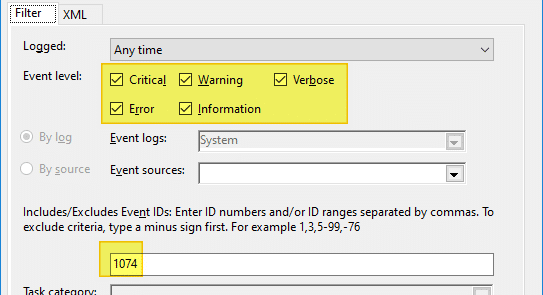
- Click OK.
Here’s a sample shutdown event:
Log Name: System
Source: User32
Date: 2019-06-25T00:15:05.230
Event ID: 1074
Task: N/A
Level: Information
Opcode: N/A
Keyword: Classic
User Name: DESKTOP-JKJ4G5Q\ramesh
Computer: DESKTOP-JKJ4G5Q
Description:
The process C:\Windows\System32\RuntimeBroker.exe (DESKTOP-JKJ4G5Q) has initiated the power off of computer DESKTOP-JKJ4G5Q on behalf of user DESKTOP-JKJ4G5Q\ramesh for the following reason: Other (Unplanned)
 Reason Code: 0x0
 Shutdown Type: power off
Find last shutdown time using Command-line
To retrieve the most recent shutdown event (Event ID 1074) from the System event log using command-line, run this command:
wevtutil qe system "/q:*[System [(EventID=1074)]]" /rd:true /f:text /c:1
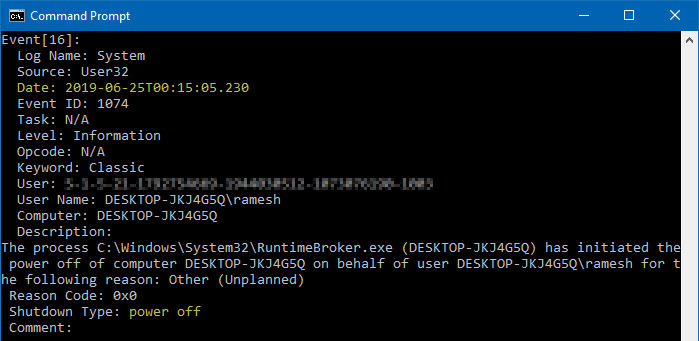
To view only the date (timestamp) of the event without other details, run:
wevtutil qe system "/q:*[System [(EventID=1074)]]" /rd:true /f:text /c:1 | findstr /i "date"
Event ID 6005 and 6006
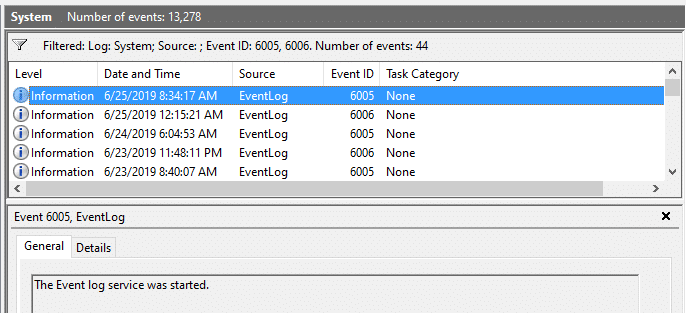
Alternately, you can also look for Event ID 6006 “The Event log service was stopped.” and 6005 “The Event log service was started.” which denotes that a shutdown or a restart event had taken place at the specified time.
Using Windows Script and registry
Windows also stores the last shutdown date and time in a REG_BINARY value named ShutdownTime in the following branch:
HKEY_LOCAL_MACHINE\SYSTEM\CurrentControlSet\Control\Windows
Note: This method shows the correct last shutdown time only if Fast Startup is not being used.
To convert the Binary data to readable form, you may use the following VBScript.
'Determine the last shutdown time and date in Windows 10 and earlier
strValueName = "HKLM\SYSTEM\CurrentControlSet\Control\Windows\" _
  & "ShutdownTime"
Set oShell = CreateObject("WScript.Shell")
Ar = oShell.RegRead(strValueName)
Term = Ar(7)*(2^56) + Ar(6)*(2^48) + Ar(5)*(2^40) + Ar(4)*(2^32) _
+ Ar(3)*(2^24) + Ar(2)*(2^16) + Ar(1)*(2^8) + Ar(0)
Days = Term/(1E7*86400)
WScript.Echo "ShutdownTime = " & CDate(DateSerial(1601, 1, 1) + Days) _
 & " UTC"
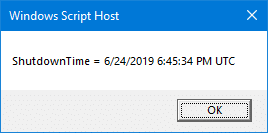
Copy the above code to Notepad and save the file with .vbs extension. Double-click the script to run it.
Another way is to use the Registry Editor to export the following registry key to a file into a .txt file (instead of .reg).
HKEY_LOCAL_MACHINE\SYSTEM\CurrentControlSet\Control\Windows
Exporting the key to a .txt file shows the last write time of the key. When Windows updates the ShutdownTime registry value, the last write time of the key is updated.

One small request: If you liked this post, please share this?
One "tiny" share from you would seriously help a lot with the growth of this blog. Some great suggestions:- Pin it!
- Share it to your favorite blog + Facebook, Reddit
- Tweet it!

great article, it helps me a lot, thank you for your time
Thanks for the article. I always find that the best way to check for when the last shutdown might have been though, is to check the internet browser history for the last page visited before the shutdown, especially if this was on the previous day or night, as that gives a rough time of when you might have last shut down the computer or laptop. This is only really useful if one of the last things you did was surf the web, using that internet browser, but it works fairly well and is easy to check.
its very good ….
the most informative article I have been able to find, thank you