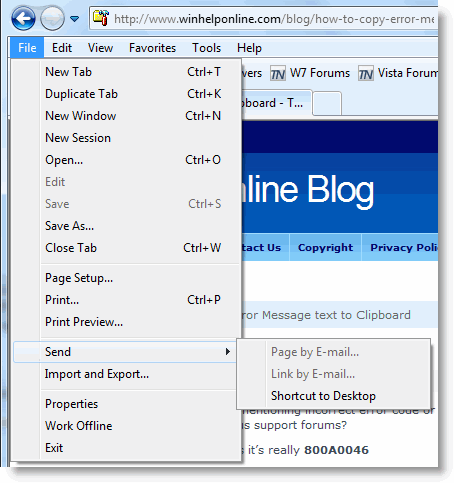
When you try to send a webpage or link by email via the File – Send menu in Internet Explorer, the options Page by E-Mail… and Link by E-Mail… may be dimmed/grayed out. This happens if a default mail client is not correctly set. Use the instructions below to reset the default mail client in Windows XP, Windows Vista and Windows 7.

Follow these steps to resolve the problem.
Windows Vista & Windows 7
1. Click Start, select Default Programs
2. Click Set program access and computer defaults
3. Click Custom, and select your mail client (for example, Microsoft Outlook)
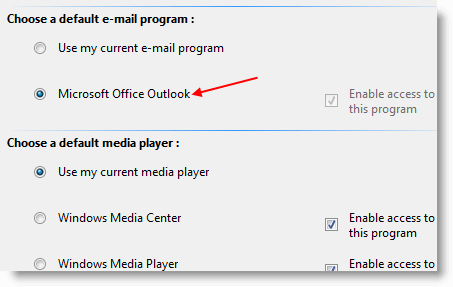
(If User Account Control is enabled, you’ll be prompted for an administrator password or for confirmation after following the step 2 above. When the prompt appears, type your password, or click Continue.)

4. Click OK
Note: Windows 7 doesn’t include a mail client by default. You need to install a mail client such as Windows Live Mail, Mozilla Thunderbird, Microsoft Outlook (not free) separately.
Windows XP
1. Click Start, click Set Program Access and Defaults
2. Click Custom
3. Select your mail client
4. Click OK
Related Posts
- E-Mail Selected Text in a Web Page Using Snip IT Add-on for Internet Explorer
- Add “Mail Recipient (as Path)” Option to the Send to Menu to Email File Paths
- Stop About:Tabs Page From Showing Up When Opening a New Tab in Internet Explorer 8
- Change the Default Start Page When Opening Internet Explorer in NoAdd-Ons Mode
- Printee for Internet Explorer Makes Printing Web Pages Easy
If you enjoyed this post, make sure you subscribe to our RSS feed! We feature Tips, Troubleshooting information, Scripts and Utilities for Microsoft Windows Operating Systems!
Prefer an E-mail subscription?


Thanks for your help will try both of these in the hope that at least one of them will work. Kind of sad and crazy that Microsoft didn’t ‘fix it’ themselves, before this was distributed to the public.
Thanks so much!! This was a quick answer for this problem!!
THX MUCH, YOU FIXED IT FOR ME.
thank you very much. prefer email clients over web mail so installed thunderbird. like the convenience of right clicking a web page and sending a link but feature was disabled. new to win7 and was having trouble figuring out this issue.
I fixed the problem! Go to control panel anf click on uninstall, then on windows mail live. Click on repair, after its through repairing it will ask you to reboot. After you rebbot go to windows live mail and it will ask you if you want to make it your default email handler. Select yes and your on your way. Before this I read all the forums and tried everything. This is the only thing that worked for me.
Bob