When you use a custom icon (.ico) file to customize the Recycle Bin Empty & Full icons manually or via a desktop theme, the Recycle Bin icon may not update or refresh correctly when emptying the Recycle Bin or when you add items to it. In some cases, the issue may occur even if you’re using the Windows default icons for the Recycle Bin.
There are two variations of the problem:
- When using the Windows default icons for the Recycle Bin, Recycle Bin would either be stuck on the empty icon or the full icon, but the icon updates correctly when you press the F5 button on the keyboard.
- Another variation is that the Recycle Bin icon does not refresh automatically only when using custom icon files for Recycle Bin (Full) and Recycle Bin (Empty).
This post mentions the solution for the Recycle Bin icon refresh problem for all versions of Windows, including Windows 10/11.
[Solution] Recycle Bin Icon Does Not Refresh Correctly
Fix #1: If you’re using custom icons for Recycle Bin
To fix the Recycle Bin icon not refreshing automatically when using custom icons, perform the following registry edit.
- Click Start, type
regedit.exeand press ENTER - Navigate to the following branch:
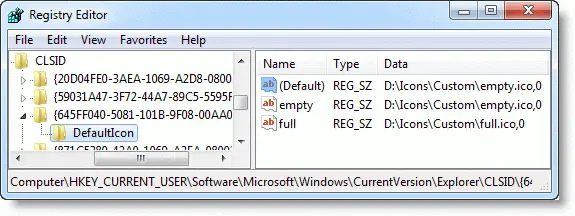
HKEY_CURRENT_USER\Software\Microsoft\Windows\CurrentVersion\Explorer\CLSID\{645FF040-5081-101B-9F08-00AA002F954E}\DefaultIcon - In the right pane, append a comma followed by a 0 (“
,0“) after the icon file path.For example, if your custom icon path is:d:\icons\custom\empty.ico
Change that to:
d:\icons\custom\empty.ico,0
- Repeat the same for the icon file path for the “full” Recycle Bin icon.
Fix your theme file
If you’re distributing a theme and using custom .ico files in the theme, you may want to update your Theme file (.theme) so that the Recycle Bin custom icon file paths end with the trailing ,0
For example:
; Recycle Bin - SHIDI_RECYCLERFULL SHIDI_RECYCLER
[CLSID\{645FF040-5081-101B-9F08-00AA002F954E}\DefaultIcon]
Full=doc.ico,0
Empty=empty.ico,0
Fix #2: If you’re using the Windows default icons for Recycle Bin
If the Recycle Bin doesn’t update or refresh automatically, even if using the default icons for empty and full bins, see if resetting the icons using the Change desktop icons dialog helps.
Reset or Change the Recycle Bin icons
For Windows 10:
- Right-click Desktop → Personalize → Themes → Desktop icon settings
For Windows 7:
- Right-click on the Desktop → Personalize → Change desktop icons.
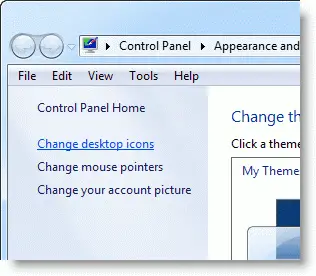
- To restore the default icons, select the item and click the Restore Default button.
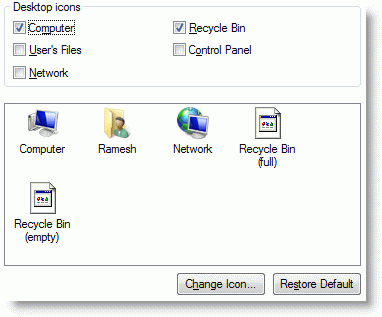
To assign custom icons:
- Select the Recycle Bin (full) icon, click Change Icon, and point to a custom icon file.
- Select the Recycle Bin (empty) icon, click Change Icon, and point to a custom icon file.
Another way to open the Change desktop icons dialog is by running the command control desk.cpl,,0 from the Run dialog. Works in all versions of Windows, including Windows 10/11.
Reset the Recycle bin icon using Registry fix
To reset the Recycle Bin Full & Empty icons in the registry to Windows default values:
- Download recycle_bin_icon.zip, and extract the contents to a folder.
- Double-click recycle_bin_icon.reg to run it.
- Click Yes when asked for confirmation.
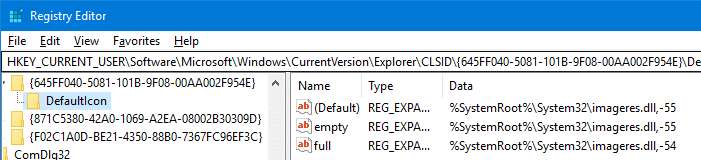
The registry fix applies to Windows Vista through Windows 10/11. The file sets the following values for Full and Empty icons, respectively:
%SystemRoot%\system32\imageres.dll,-54
%SystemRoot%\system32\imageres.dll,-55
I hope that fixes the Recycle Bin icon refresh problem in Windows.
One small request: If you liked this post, please share this?
One "tiny" share from you would seriously help a lot with the growth of this blog. Some great suggestions:- Pin it!
- Share it to your favorite blog + Facebook, Reddit
- Tweet it!


Thank you so much.
I did as you suggest and it’s done.
So many sites suggest user to restore default/uninstall theme
but that’s not what i want.
work like a charm…thanks
Thank you, was explained well and worked.
Awesome!! Very easy to follow and it fixed the issue unlike other sites!!
Perfect, many thanks
Yay! That fixed it, thank you!
Awesome job thanks a lot you are so smart
works perfectly in windows 8.1 – all it takes is the comma zero (,0) trailing the iconpaths in regedit.
Thank you. This worked fine for me in Windows 10 too.
July 2019: Will not work. I use default recycle bins and deleting an item will not refresh it to full until I actually open the recycle bin (the deleted item is there).
Edit on July, 2019 comment earlier: Resetting the recycle bin worked after restarting. You also have to restart PC now, so add that 🙂
It’s a very informative blog. I like it.
That completely fixed the issue, thank you so much!
Worked in 2020 on latest version of windows. Thank you!!
I have manually added “,0” and it works but causes an issue for me when I drag anything onto desktop. For example if I drag a picture from website and place it on desktop, if I drag another one it is placed right on top of it. Same if a program is installed and creates a shortcut on desktop, another shortcut from another installation it’s automatically placed on top. I have both arrange and align to grid disabled. When I removed “,0” from all three reg items drag it works correctly but the bin no longer refreshes.
Worked perfectly. So happy. Thanks so much.
Thank You!
Thank you. This is the solution I’m looking for and it works!!
Thanks a lot, it works perfectly.
man thank you so much for providing solution for this “quite futile” issue!!!!
Just adding my two peneth, thank you so much for this fix, it also worked for me. Bizarre how Microsoft has not noticed this and fixed it.
thanks man it worked hehe
Thank You, a very concise and clear set of instructions that actually work as intended. After trying other solutions with no success, now the recycle bin displays empty and full as it did before replacing the icons.