When you start the System Restore utility in Windows, the following error message may be displayed:
There was an unexpected error:

The filename, directory name, or volume label syntax is incorrect.
(0x8007007B)

System Restore will now close.
The same error might occur when running Windows CompletePC Backup.
Cause
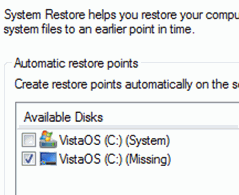
This problem affects especially the OEM systems that have a faulty image. This error is caused by faulty imaging by the original equipment manufacturer (OEM) that results in the presence of an invalid volume. To see if this is the problem, go to System in Control Panel and open System Protection. There will be two volumes shown, one of which is selected and named “Missing.” Selecting C:\ and deselecting “Missing” solves the problem.
Resolution
Click Start, type SystemPropertiesProtection.exe. This opens the System Restore Properties dialog.
You may see two C: drives in the listing with the same Volume label (see figure below). Deselect the checkbox for the duplicate volume, and enable the checkbox for the correct drive — the one with the Windows logo.
The fix applies to Windows Vista through Windows 10.
One small request: If you liked this post, please share this?
One "tiny" share from you would seriously help a lot with the growth of this blog. Some great suggestions:- Pin it!
- Share it to your favorite blog + Facebook, Reddit
- Tweet it!

I had the same error message in Windows 7 Pro, but I got the error when trying to set the size for Restore Points from 0% to 20%. There were no checkboxes , but protection was turned On for the 2 hard drives listed: one (C:) and one (G:) (Missing). When I turned Off protection for (G:), that one disappeared and I could set the size for (C:) to 20%.
Thanks, brother!