When you run an application built using (classic) Visual Basic 6.0, the following error message may occur, and the program terminates.
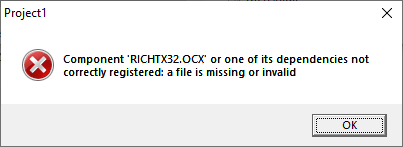
Component 'RICHTX32.OCX' or one of its dependencies not correctly registered: a file is missing or invalid.
(or)
Failed to load control 'RichTextBox' from RICHTX32.OCX
This happens if the program uses Rich TextBox ActiveX Control (RichTx32.ocx), but does not include the ActiveX file in the setup package. This runtime is not included in Windows and is supposed to be distributed along with the program. And, RichTx32.ocx ActiveX Control is not included in VB6 run-time distribution package from Microsoft either.
Download RichTx32.ocx
You may download it here: RichTx32.zip. Unzip the archive and extract the file RichTx32.ocx to one of these folders:
- On Windows 32-bit systems, copy RichTx32.ocx to
C:\Windows\System32 - On Windows 64-bit systems, copy RichTx32.ocx to
C:\Windows\SysWOW64
RICHTX32.OCX – File Information
- Signing date: 7:57 PM 11/25/2013
- Publisher: Microsoft Corporation
- Company: Microsoft Corporation
- Description: RichTx32.OCX
- Product: RichText
- Prod version: 6.01.9839
- File version: 6.01.9839
- MachineType: 32-bit
Hash Checksum
- MD5: 14bb5cf93c7d69d019423c73c60aa856
- SHA1: 6454bb10992eefc59563a73729a8927c6383669b
- SHA256: 221b54ad16161b8ce71807b07559ab49f59dfff4cdf695e808d90bf8beaafcf5
(DLL Source: Microsoft Visual Basic 6.0 Service Pack 6 Security Rollup Update January 2016.)
This file is also available from IBM’s servers. The link is provided below:
https://www.ibm.com/support/pages/system/files/support/swg/rattech.nsf/0/d4e3feebe5a143ab85256e91003d256f/$FILE/richtx32.ocx
Register the OCX
You may also need to register the RichTx32.ocx module using the following command from Command Prompt (admin).
For Windows 32-bit OS
regsvr32.exe %systemroot%\system32\RICHTX32.OCX
For Windows 64-bit OS
%system32\syswow64\regsvr32.exe %systemroot%\syswow64\RICHTX32.OCX
You should see the message DllRegisterServer in C:\WINDOWS\system32\RICHTX32.OCX succeeded. after running the above command.
(Last updated on Jan 14, 2022.)
One small request: If you liked this post, please share this?
One "tiny" share from you would seriously help a lot with the growth of this blog. Some great suggestions:- Pin it!
- Share it to your favorite blog + Facebook, Reddit
- Tweet it!

I have RICHTX32.OCX registered and MSCOMCT2.OCX registered as well using a batch file initiated by Computer Group Policy.
[RegOcx.cmd]
cd %systemroot%\SysWoW64
copy \\2012fs01\software\ocx\*.* C:\Windows\SysWoW64 /y
%systemroot%\SysWoW64\regsvr32.exe RichTx32.ocx /s
%systemroot%\SysWoW64\regsvr32.exe MSCOMCT2.ocx /s
When I test this on the Windows 2012 R2 64 bit server with my own username, which is an admin..The VB6 program runs ok.
When a non admin user runs it, they claim to get this:
Component ‘RICHTX32.OCX’ or one of its dependencies not correctly registered: a file is missing or invalid.
All users can read/execute this RICHTX32.OCX file. Why is this happening I can’t find anything about this anywhere
Thanks
@Scott: Have you tried running ProcMon?
I did as advised above but DllRegisterServer failed , reporting error code 0x8002801c
@Bruce: In Windows 64-bit systems, extract the file to C:\Windows\SysWOW64
Also, make sure you’re using an admin Command Prompt window.
Waw!!! what a wonderfull solution. its saved my days!