When you click on a hyperlink in your mail clients such as Microsoft Outlook, Windows Mail, or Windows Live Mail, you may see the Application not found or General failure errors.
General Failure. The application cannot be found.
This error occurs if the default browser is not correctly set, or the html file association and/or http protocol associations are incorrect. The same error may occur when double-clicking an Internet Shortcut (.URL) file in the system.
To resolve the problem, use Default Apps/Programs to reset the default Web browser preference.
Fix for “Application not found” hyperlink error
For Windows 10 and 11
- Open Settings → Apps → Default Apps.
- Under Web browser, select a browser from the list.
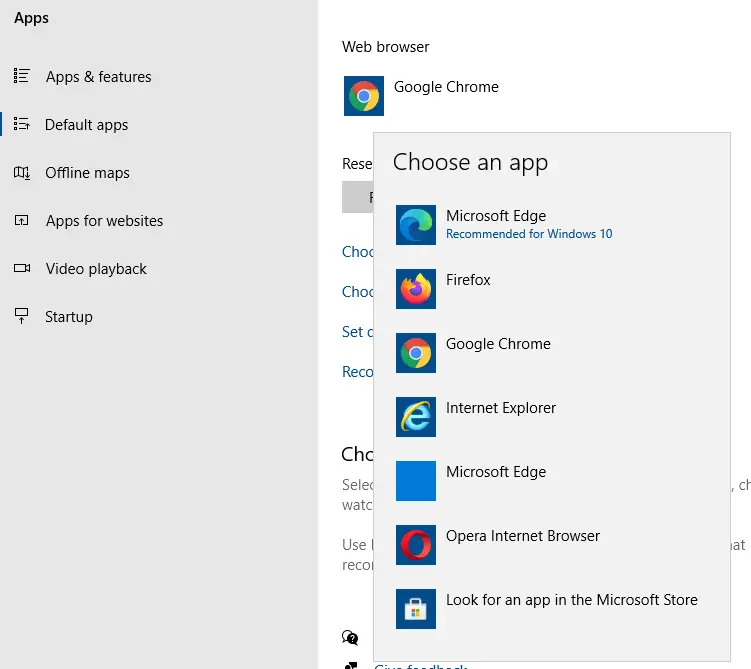
- Repeat the same, but select your preferred (original) browser this time.
Switching the default browser back and forth will resolve the file association issues.
This should repair the hyperlink or http protocol associations automatically, thereby fixing the “Application not found” or “General failure” errors when opening hyperlinks from your mail client.
For Windows 8 and earlier
- Click Start, and click Default Programs
- Click Set program access and computer defaults
- Click Continue if you see the User Account Control prompt.
- Click Custom, select your Web browser (e.g. Internet Explorer), and click OK
- Close and re-open Microsoft Outlook.
Then follow these steps:
- Open Control Panel, Default Programs.
- Click Set your default programs.
- Select your web browser from the list.
- Click “Set this program as default.”
- Click OK.
Related articles
- How to Fix Outlook Hyperlink Restrictions Error
- Clicking a Hyperlink in Outlook Prompts to Select a Browser, With IE set as default
One small request: If you liked this post, please share this?
One "tiny" share from you would seriously help a lot with the growth of this blog. Some great suggestions:- Pin it!
- Share it to your favorite blog + Facebook, Reddit
- Tweet it!
