 It’s not uncommon to see people ending up with duplicate URLs in their browser Bookmarks/Favorites over a period of time. Finding duplicates by comparing the target URL may be a tedious task especially if you have a lengthy favorites list. Here is an useful tool that can help you easily find and remove duplicate items in Internet Explorer Favorites and Mozilla Firefox Bookmarks.
iCloud – Disable Bookmarks Sychronization
If duplicates are generated automatically no matter how many times you clear them, this may be caused by a synchronizing software running in the system. If you’re using iCloud, uncheck Internet Explorer and/or other browsers in the iCloud Control Panel.
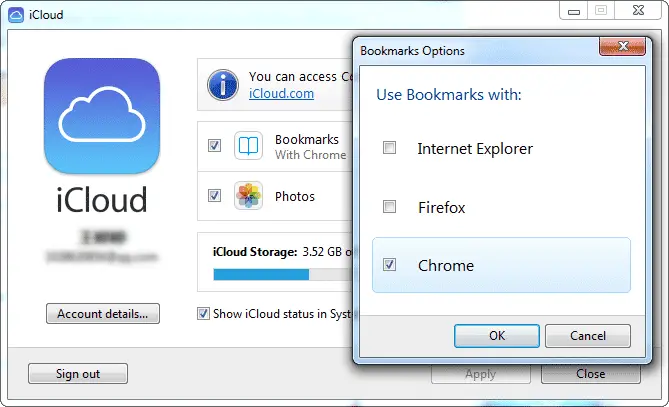
Then remove the duplicates manually, or use FavoritesView.
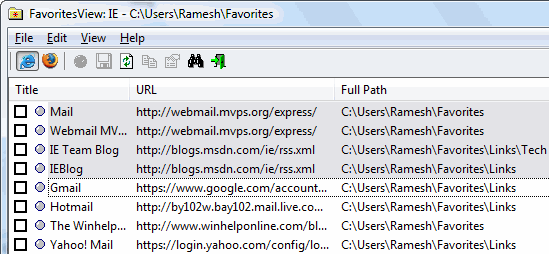
 FavoritesView displays the list of all your Favorites (of Internet Explorer browser) and bookmarks (of Netscape/Mozilla browsers) in a single page. Each line in the list specifies the title of the item, the URL address, the created/modified date of the bookmark item, and the folder name. FavoritesView also allows you to locate duplicate URL addresses in your Favorites/Bookmarks, or find a specific item by specifying the URL or the title.
One small request: If you liked this post, please share this?
One "tiny" share from you would seriously help a lot with the growth of this blog. Some great suggestions:- Pin it!
- Share it to your favorite blog + Facebook, Reddit
- Tweet it!


There is no date on this article, so I don’t know how far I can trust it to resolve my problem. Technology changes often.
(The Copyright date at the bottom does not resolve this, as that just means the web site is still active this year.)