Default Programs Editor is a very useful tool which helps you to edit file type associations, add or remove AutoPlay handlers and static context menu entries. In Windows, there is no built-in option provided to add or edit context menu entries and static verbs. Here is where the Default Programs Editor comes in handy. This program runs in Windows Vista through Windows 10.
Features of Default Programs Editor
File Type Settings
- Add, Edit, and Delete context menu items
- Change file type icon & description
- Change an extension’s associated file type
Autoplay Settings
- Add, Edit, and Delete autoplay handlers
- Change which autoplay options are available for any media type
- Change the default autoplay handler
Default Programs Settings
- Add or Remove default associations
Screenshots
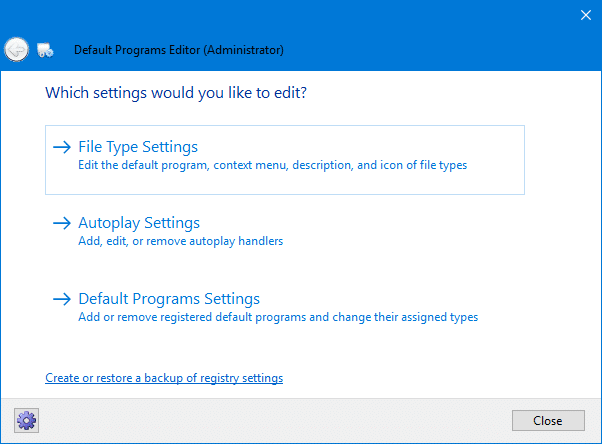
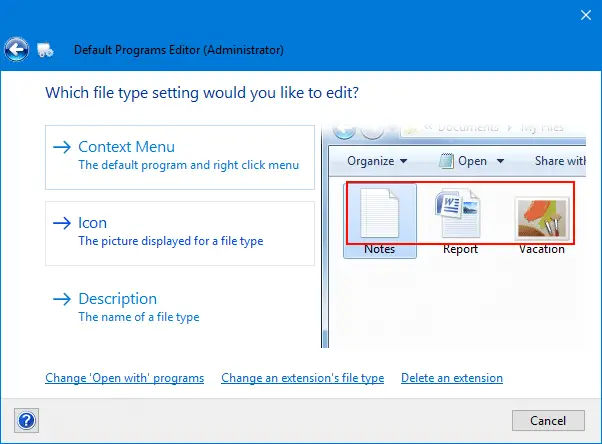
You can download Default Programs Editor from http://defaultprogramseditor.com
One small request: If you liked this post, please share this?
One "tiny" share from you would seriously help a lot with the growth of this blog. Some great suggestions:- Pin it!
- Share it to your favorite blog + Facebook, Reddit
- Tweet it!

Can the program set or remove associations between extensions and programs.
My *.cmd somehow got set to an executable instead of some type of shell/dos, whatever.
@Chuck: You can get the
.cmdfile association fix from hereAll I wanted to do was add apps to the “Open With” menu (though I can see other uses of this app that might be useful in the future). This app would/should be really useful but, so far, I find it harder to use than directly editing the Registry. I’ve tried 3 times and not changed what I wanted to (so, alarmingly, whatever I did change is completely unknown to me and there isn’t even an “undo” option, so trying anything is a risk). There isn’t even the simplest Help file or explanation for each function or app page to be guided by. First time users who are not particularly skilled at IT might find this app as hard to use or harder than other existing methods that it is meant to make simpler. And that’s a shame. Sadly, there is only one video on the internet and that’s rudimentary and out of date, as is another website that described (an old version of ) this app. So, until I can get more guidance, I’ll have to work out how to make changes without this app.
@Paul: Please create an account at Microsoft Answers and post a question there. I’ll be glad to assist you.