Did you notice that in Windows it takes exactly half a dozen mouse clicks to clear the recent items history? This post has a VBScript to clear the recent documents history in a single click in Windows 10 and earlier.
Clear Recent Files history in Windows
In Windows 10, here is the procedure to clear the recent files history which appears in Quick access home view:
- Open File Explorer to Quick access
- Right-click Quick access icon and click Options
- To clear recent files history, uncheck Show recently used files in Quick access
- Click Apply
- Re-enable Show recently used files in Quick access
- click OK
Note: In Step 3 above, you can also click on the Clear button shown in that dialog. But, it also clears the Frequent folders list in Quick access.
Clear recent files history using VBScript
Pick one of the following VBScripts below to clear the recent files history on your Windows 10 computer. The script works in any version of Windows, though.
- Copy any one of the following script codes to Notepad.Script 1
Const sRecent = 8
Set objShell = CreateObject("Shell.Application")
Set objFolder = objShell.Namespace(sRecent)
iClr = 0
Set objFolderItem = objFolder.Self
For Each objVerb In objFolderItem.Verbs
	If InStr(LCase(objVerb.Name), "c&lear recent items list") Then
		objVerb.DoIt
		iClr = 1
		Exit For
	End If
Next
If iClr = 0 Then MsgBox "Could not clear Recent items."
Script 2 (alternate method)
Set WshShell = WScript.CreateObject("WScript.Shell") Set objFSO = CreateObject("Scripting.FileSystemObject") sRD = WshShell.SpecialFolders("Recent") if sRD <> "" then On Error Resume Next objFSO.DeleteFile(sRD & "\*.lnk") objFSO.DeleteFile(sRD & "\*.url") end if - Save the file with .vbs extension — e.g.,
clear_recent_files_history.vbs - Double-click the script file to clear recent files history.
Note that you can pin the shortcut to the script to the Start or Taskbar, and customize the shortcut icon if you’re bored of seeing the default Windows Script icon.
The above scripts work in any version of Windows, including Windows 10. But, if you’re using Windows 7, there is no need for such a script, because you can do it directly via Start → right-click Recent Items → click Clear Recent Items List.
Clear Quick access Frequent folders and Recent files history
To clear the Quick access frequent folders and recent files history, open the Folder Options dialog and click the Clear button.
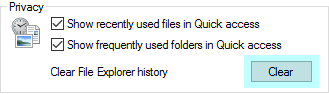
The pinned items in the Quick access won’t be removed.
To automate the above, you can use the following AutoHotKey script/macro:
AutoHotKey script to clear Quick access history
Run, control.exe folders
WinWait, ahk_class #32770
WinActivate, ahk_class #32770
WinWaitActive, ahk_class #32770
Send, !c {Esc}
Install AutoHotKey on your computer. Then, using Notepad, create a script file with the above contents. Save the file as clear_quick_access_history.ahk and double-click the file to run it. The script launches Folder Options, clicks the Clear button automatically and closes Folder Options.
One small request: If you liked this post, please share this?
One "tiny" share from you would seriously help a lot with the growth of this blog. Some great suggestions:- Pin it!
- Share it to your favorite blog + Facebook, Reddit
- Tweet it!

I’d like a way to clear certain filetypes. For example, only *.exe or even just *.mp3
@Bill: Modified version of “Script 2” will do. Here is the one that clears recent .mp3 shortcut items.