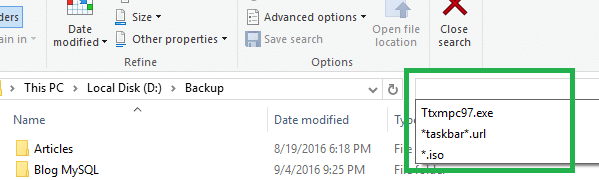
When you click the Search text box in Explorer, the previously typed search queries (MRU) are displayed in the drop-down box. Also, when you type a search query, the autocomplete lists possible matches as you type. Here is how to clear the search entries individually and collectively, in Windows 7, 8 and Windows 10.
You can remove an item from the Search MRU list by highlighting that item (using the mouse, or Up/Down keys) and then pressing the DELETE key.
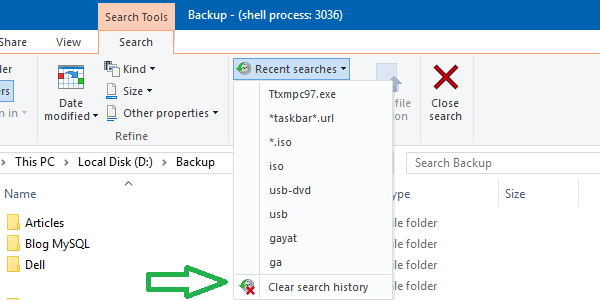
In Windows 10, you can use “Clear search history” option listed under “Recent searches” ribbon button in the Search tab.
To clear the entire Search MRU History via the registry directly, use these steps:
1. Click Start, type Regedit.exe and press ENTER.
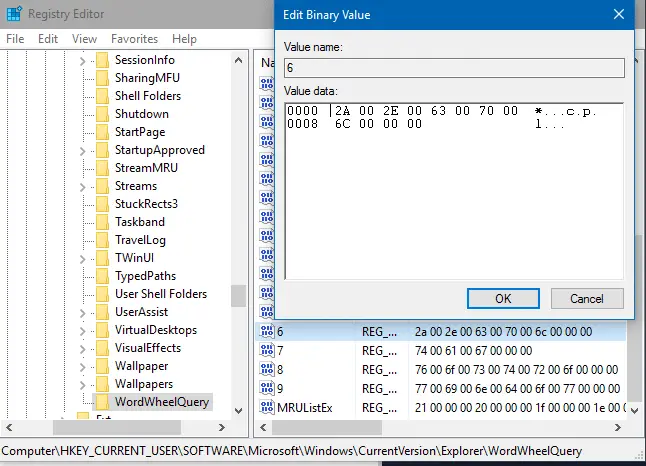
2. Navigate to the following branch:
HKEY_CURRENT_USER\Software\Microsoft\Windows\CurrentVersion\Explorer\WordWheelQuery
3. Right-click the WordWheelQuery branch and choose Delete
This clears the entire search MRU list. To clear specific entries, double-click each binary value until you find the appropriate value to delete. Right-click on the value and choose Delete.
4. Exit the Registry Editor.
One small request: If you liked this post, please share this?
One "tiny" share from you would seriously help a lot with the growth of this blog. Some great suggestions:- Pin it!
- Share it to your favorite blog + Facebook, Reddit
- Tweet it!


Now if you want to permanantly disable Search MRU list,
1. Click start and in the search area type gpedit.msc
2. Now the group policy editor will open. In it go to User Configuration > Administrative Templates>Windows Components>Windows Explorer
3. In the settings panel under Windows Explorer look for Turn off display of recent search entries in the Windows Explorer search box
4. Right click it and select edit
Use not configured or disabled to keep search history enabled.
Use Enable to disable the search history
Great Stuff, works llike a charm!!!
Thank 4 the info! really helpful 😉
Thanks alot. Solved the problem in 5 seconds with your help. Thanks alot.
Regards
Anas
This is the first time I read a guide about changing registry settings where the author doesn’t warn about being careful because if you make a mistake messing around with registry values you could make your computer unusable.
How would you convert the values in that registry key to something legible?
awesome help.. not a techie.. cant go through with messing registry but worked like magic to make me able to delete few search entries.
You Beauty!
My God! You’ve got no idea how this helped. Without you, my secret could’ve been exposed! It could’ve ruined my life! Thank u sooo much
omgggggggg Thankyou so muchhhhh I love uu!