To lock a Windows 2000/XP/Vista workstation, most people use the popular WinKey + L keystroke. Whereas some (mouse users) prefer a shortcut that locks the workstation using the “rundll32.exe user32.dll, LockWorkStation” command.
Using the registry hack in this article, you can add the Lock Workstation command to the Windows XP Start menu, just below the Run command.
This hack uses the slot which is reserved for PC manufacturers to add their link. Here is the registry location for the Start menu OEM Link:
HKEY_CLASSES_ROOT\CLSID\{2559a1f6-21d7-11d4-bdaf-00c04f60b9f0}
(REF: How To Remove OEM link from the Windows XP Start menu?)
Add “Lock Workstation” to Windows XP Start menu
Download add_lock_startmenu_xp.zip and save to Desktop. Unzip the file and double-click add-lock-startmenu-xp.reg to run it. Log off and login back to your user account. You should see the Lock Workstation command in the Start menu, which runs the following command when clicked:
rundll32.exe user32.dll, LockWorkStation
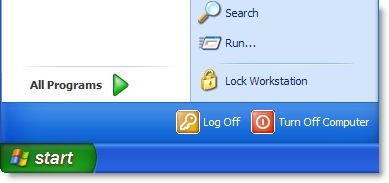
Note that Windows Vista includes the Lock button in the Start menu by default.
One small request: If you liked this post, please share this?
One "tiny" share from you would seriously help a lot with the growth of this blog. Some great suggestions:- Pin it!
- Share it to your favorite blog + Facebook, Reddit
- Tweet it!

