When you open an Office app, such as Word or Excel, you may see the following error.
We're sorry, but Word has run into an error that is preventing it from working correctly. Word will need to be closed as a result.

Would you like us to repair now?
We're sorry, but Excel has run into an error that is preventing it from working correctly. Word will need to be closed as a result.

Would you like us to repair now?
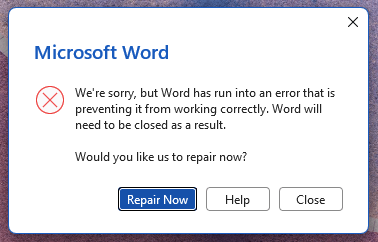
Clicking Repair Now may not resolve the issue because it runs a Quick Repair.
Resolution
To resolve the issue, please do an online repair of Office.
- Open Settings → Apps → Installed apps (or Apps & features, depending on Windows version).
- Select the Microsoft 365 or Office product you want to repair and select Modify.
- Select it and choose Modify.
- When prompted, choose Online Repair (not Quick Repair), then start the repair.
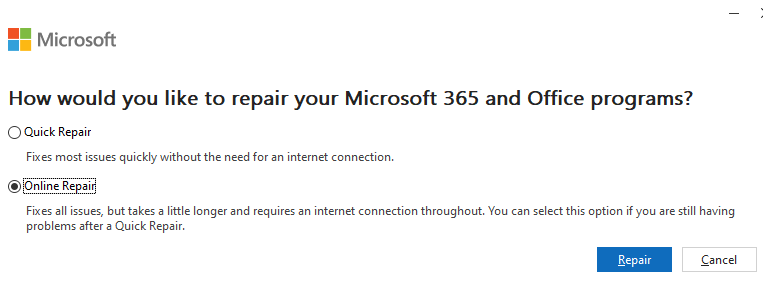
- Stay online and let the process complete; this can take some time and may effectively reinstall Office.
That should resolve the issue.
One small request: If you liked this post, please share this?
One "tiny" share from you would seriously help a lot with the growth of this blog. Some great suggestions:- Pin it!
- Share it to your favorite blog + Facebook, Reddit
- Tweet it!
