A reader wanted to know how to use Windows Search to search for all files in a specific folder and its subfolders with the file extension .doc. This article tells you how to search for a specific file type suing wild card or Advanced Query Syntax (AQS).
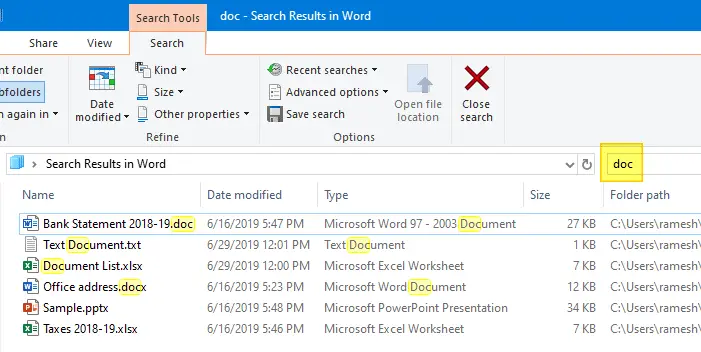
If you just doc in the search bar in File Explorer, it lists all the that contain the word doc, not necessarily with that file extension, including folders named doc and file properties containing the word doc.
How to Search for files with a specific extension
To search for files with a specific file extension and not other files which contain that extension in their name, use one of the search syntaxes (e.g., to find .doc files) below:
*.doc

ext:.doc
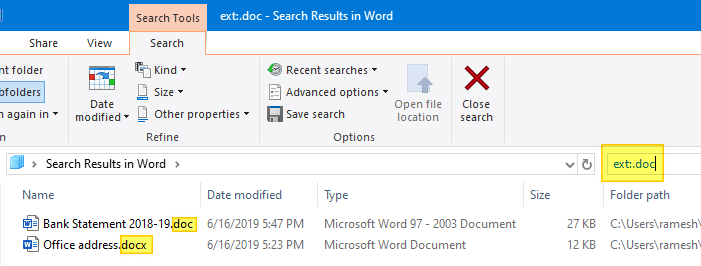
However, if you use the above search query, it lists .docx files in addition to .doc
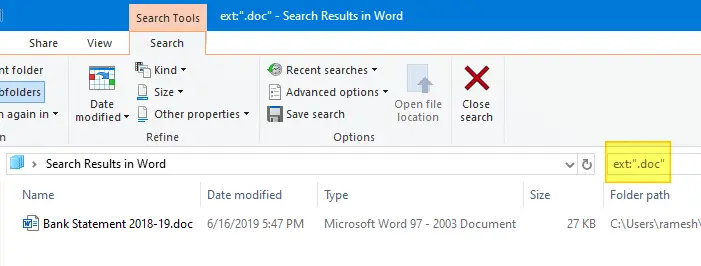
To strictly narrow down the results to .doc files only, enclose the file extension within double-quotes, like below:
*".doc"

ext:".doc"
Here you go!
Additional Tip: You can also search for files by a specific “kind” — e.g., picture, video, contacts, document, folder, etc.

The kind of a file type is determined from the KindMap registry key below (and maybe from the PerceivedType registry value defined for each file type.) which stores the list of file extensions along with the corresponding kind info.
HKEY_LOCAL_MACHINE\SOFTWARE\Microsoft\Windows\CurrentVersion\Explorer\KindMap
Hope that helps!
One small request: If you liked this post, please share this?
One "tiny" share from you would seriously help a lot with the growth of this blog. Some great suggestions:- Pin it!
- Share it to your favorite blog + Facebook, Reddit
- Tweet it!

Thank you.