One of our readers asked how to remove non-numeric characters from file names using the Microsoft PowerToys PowerRename tool. You can accomplish the task using regex.
Those who don’t have Microsoft PowerToys installed, download it from Install PowerToys | Microsoft Learn.
Remove text (non-numbers) from the file name
Method 1
This method also removes spaces within the file name.
- Multi-select the files, right-click, and click PowerRename.
- Use the following regex:
[A-Z a-z]
- Enable “Use regular expressions.”
- Enable “Match all occurrences.”
- Apply to “Filename only.”
As stated earlier, this also removes all the space (not just the leading and trailing spaces) in the file name.
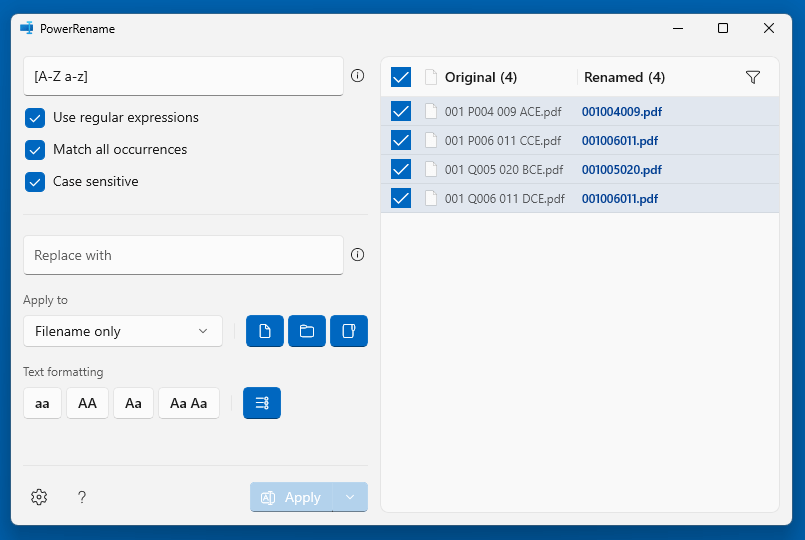
If you don’t want to remove the spaces, use Method 2 below.
Method 2
This method doesn’t remove the whitespaces within the file names, but it does remove the trailing whitespace(s).
In this method, we rename the files in two passes. In the first pass, we remove the non-numeric characters, and in the second pass, we remove the trailing whitespace(s), if any, in the file name.
- Multi-select the files, right-click and click PowerRename.
- First, use this regex:
[A-Za-z]
- Enable “Use regular expressions.”
- Enable “Match all occurrences.”
- Apply to “Filename only.”
After renaming the files, they will look like the ones below—i.e., the file names have a trailing white space before the dot.
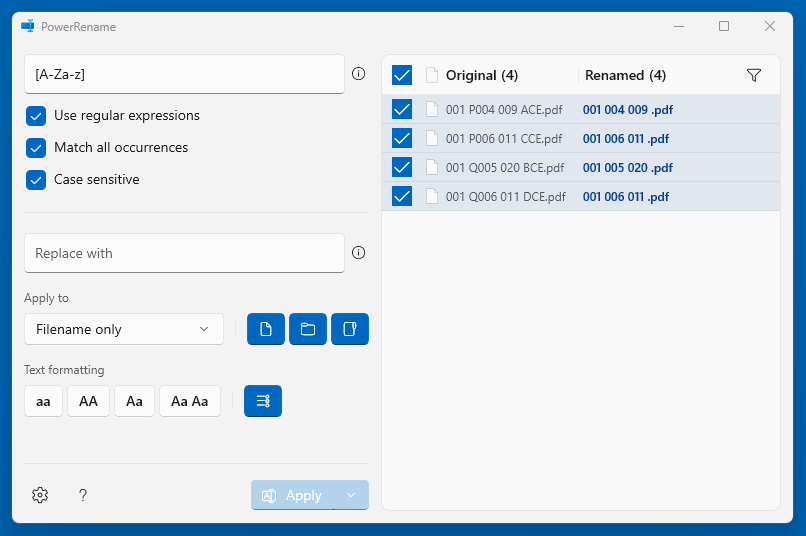
- Next, use the following regex to remove one or more trailing spaces, if any, in the file name:
( *)$
- Enable “Use regular expressions.”
- Enable “Match all occurrences.”
- Apply to “Filename only.”
Here’s what the final output looks like—i.e., the trailing white space has been removed.

That’s it!
Also, see Bulk Rename Utility, which has more features than PowerToys PowerRename.
https://www.bulkrenameutility.co.uk/
One small request: If you liked this post, please share this?
One "tiny" share from you would seriously help a lot with the growth of this blog. Some great suggestions:- Pin it!
- Share it to your favorite blog + Facebook, Reddit
- Tweet it!
