After installing and uninstalling the LockDown Browser for your school or university, the shutdown options may be missing from your Start menu. If you click the Power button, you will see the message, “There are currently no power options available.”
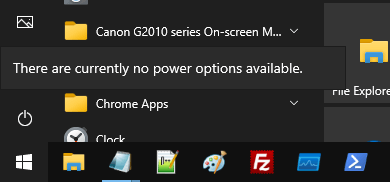
Also, you cannot launch Task Manager, log off the account, or lock the workstation.
Cause
This happens because LockDown Browser removes the options in the Shutdown menu, turns off Task Manager, and removes the “Change password” option in the Ctrl + Alt + Del screen. It also turns off the Lock workstation option in the Ctrl + Alt + Del menu.
Uninstalling LockDown Browser may not remove those policy settings in some cases.
Resolution
To resolve the issue, remove the registry-based policies after creating a System Restore Point.
Option 1: Using a REG file
Download remove_exam_browser_policies.reg (zipped), unzip and run the enclosed REG file. Click Yes to confirm.
Windows Registry Editor Version 5.00

;Restores the shutdown flyout options, Task Manager, Change Password and Lock workstation commands.

[HKEY_CURRENT_USER\SOFTWARE\Microsoft\Windows\CurrentVersion\Policies\System]
"DisableTaskMgr"=-
"DisableChangePassword"=-
"DisableLockWorkstation"=-

[HKEY_CURRENT_USER\SOFTWARE\Microsoft\Windows\CurrentVersion\Policies\Explorer]
"NoClose"=-
"NoLogoff"=-
Option 2: Edit the registry manually
Launch regedit.exe to open the Registry Editor
Go to the following registry branch:
HKEY_CURRENT_USER\Software\Microsoft\Windows\CurrentVersion\Policies\Explorer
In the right pane, delete the following values:
NoClose

NoLogoff
Then, go to the following registry branch:
HKEY_CURRENT_USER\Software\Microsoft\Windows\CurrentVersion\Policies\System
In the right pane, delete the following values:
DisableLockWorkstation

DisableTaskMgr

DisableChangePassword
Exit the Registry Editor.
Log off and log back into your user account for the changes to take effect.
Note: To log off from your account, you can run the shutdown /L command from the Run dialog. To shut down Windows, run shutdown /s /t 0.
More Information
- The “NoClose” registry value corresponds to the “Remove and prevent access to the Shut Down, Restart, Sleep, and Hibernate commands” option in the local group policy editor.
- “NoLogoff” corresponds to “Remove Logoff.”
- “DisableLockWorkstation” corresponds to “Remove Lock Computer.”
- “DisableTaskMgr” corresponds to “Remove Task Manager.”
- “DisableChangePassword” corresponds to “Remove Change Password.”
One small request: If you liked this post, please share this?
One "tiny" share from you would seriously help a lot with the growth of this blog. Some great suggestions:- Pin it!
- Share it to your favorite blog + Facebook, Reddit
- Tweet it!
