When you install the .NET Framework 3.5 using DISM in Windows 10 or 11, you may encounter error 0x800F080C. The full error message is below:
Error: 0x800f080c

Feature name NetFX3 is unknown.
A Windows feature name was not recognized.
Use the /Get-Features option to find the name of the feature in the image and try the command again.
Also, when you open OptionalFeatures.exe, the .NET Framework 3.5 entry may be missing.
The above error occurs if the .NET Framework 3.5 package has been removed.
Resolution
Download the Windows 10 or 11 ISO and double-click it to mount it to a drive letter – e.g., G:\.
The “Sources\Sxs” folder in the ISO contains the CAB file (“microsoft-windows-netfx3-ondemand-package~31bf3856ad364e35~amd64~~.cab“) needed to install .NET Framework 3.5.
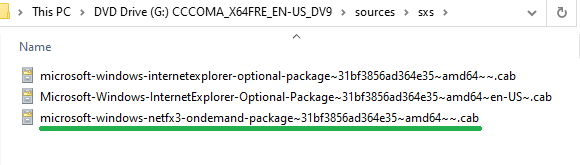
Open an admin Command Prompt window and run the following command:
DISM /Online /Add-Package /PackagePath:G:\Sources\SxS\microsoft-windows-netfx3-ondemand-package~31bf3856ad364e35~amd64~~.cab
The above command should add the .NET Framework 3.5 package to the computer.
Once done, run the following command to install .NET Framework 3.5.
DISM /Online /Enable-Feature /FeatureName:NetFX3 /All /Source:G:\sources\sxs /LimitAccess
The above examples assume the ISO drive letter is G:. Make sure you use the correct drive letter for your computer.
One small request: If you liked this post, please share this?
One "tiny" share from you would seriously help a lot with the growth of this blog. Some great suggestions:- Pin it!
- Share it to your favorite blog + Facebook, Reddit
- Tweet it!
