Some users have asked how to block the 25H2 update on a Windows 11 23H2 or 24H2 system. Windows 11 24H2 and 25H2 share the same codebase, and their features are the same. So, if you’re already using 24H2, deferring the 25H2 update makes little sense. To defer the 25H2 update anyway, you can use the methods mentioned in this post.
How to Block the 25H2 update
Option 1: Use the InControl app from GRC.
Download InControl and run it.
Mention the target version/release. For example, if you want to remain on Windows 11 24H2 or upgrade to Windows 11 24H2 from an earlier version, type the target version and release # accordingly in that dialog.
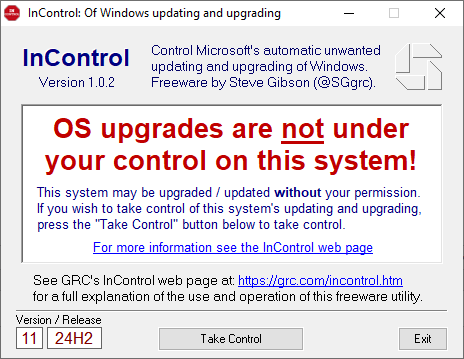
Click Take Control.
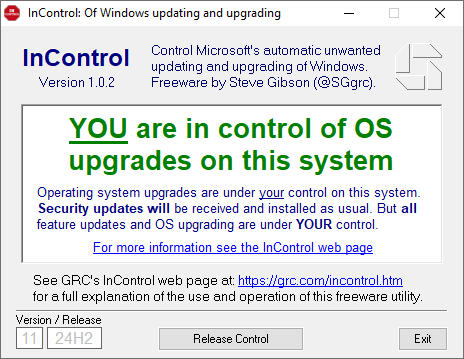
That’s it. The app enables the registry-based policies needed to block the 25H2 Feature update.
Option 2: Enable the policies manually
You can use the Registry Editor to add the following registry settings manually to block the 25H2 Feature update.
HKEY_LOCAL_MACHINE\SOFTWARE\Policies\Microsoft\Windows\WindowsUpdate
Value Name: TargetReleaseVersion
Value Type: REG_DWORD
Value Data: 1

HKEY_LOCAL_MACHINE\SOFTWARE\Policies\Microsoft\Windows\WindowsUpdate
Value Name: TargetReleaseVersionInfo
Value Type: REG_SZ
Value Data: 24H2

HKEY_LOCAL_MACHINE\SOFTWARE\Policies\Microsoft\Windows\WindowsUpdate
Value Name: ProductVersion
Value Type: REG_SZ
Value Data: Windows 11

HKEY_LOCAL_MACHINE\SOFTWARE\Policies\Microsoft\Windows\WindowsUpdate
Value Name: DisableOSUpgrade
Value Type: REG_DWORD
Value Data: 1
The above registry key doesn’t exist by default. The key and the values need to be created manually. If you’re using an older version of Windows 11 (e.g., 23H2) and want to upgrade to the target version (e.g., 24H2), do not create the DisableOSUpgrade registry value.
Restart Windows for the changes to take effect.
Additional Information
If you’re using Windows 11 23H2, Windows Update will offer 24H2 (instead of 25H2) for your device if it’s eligible for the upgrade. On the other hand, if you’re already using 24H2, Windows Update won’t offer 25H2 as long as the above policy setting is in effect. Windows 11 Version 24H2 will reach the end of servicing on Oct 13, 2026. After that date, you must undo the above registry settings to upgrade to 25H2 and receive security updates for your PC.
One small request: If you liked this post, please share this?
One "tiny" share from you would seriously help a lot with the growth of this blog. Some great suggestions:- Pin it!
- Share it to your favorite blog + Facebook, Reddit
- Tweet it!
