This article explains the different methods to create a bootable USB Windows Setup disk from a Windows 10 or 11 ISO image.
Follow one of the three methods in this article to create a USB Windows Setup Disk from the Windows ISO.
Create USB Bootable Windows Setup Disk from ISO:
- Using Rufus to create bootable USB drives (for BIOS/MGR and UEFI/GPT systems)
- Using built-in command-line — without 3rd party software (for legacy BIOS/MBR-based systems)
- Using the Windows USB/DVD Download Tool (Only for legacy BIOS/MBR-based systems)
- Media Creation Tool can download ISO and create a USB setup disk (opens another article page)
Create Bootable USB Flash Drive from ISO
Option 1: Using Rufus to create a bootable USB disk
Rufus is an advanced ISO/DVD to USB tool that can create bootable USB flash drives from an ISO.
Download and run Rufus.
Connect an empty USB stick to your computer.
(If you haven’t downloaded the ISO yet, first download it. You can use Rufus to download it. See How to Download Windows 10 or 11 ISO.)
If you’ve already downloaded the ISO and want to create a bootable USB disk from it, click the “Select” button.
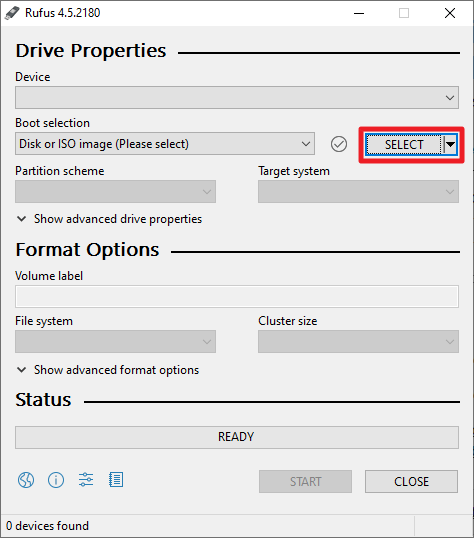
Browse to select the ISO you want to write to the USB disk.
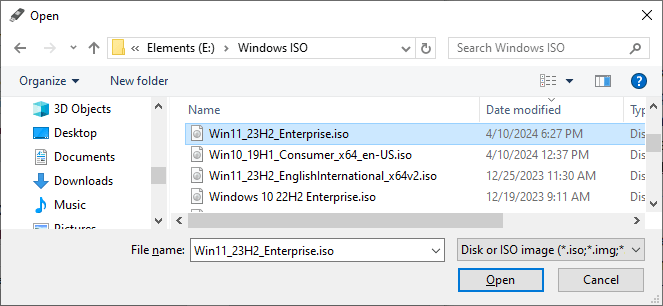
Select the file and click “Open“.
In the Rufus dialog, ensure the correct USB drive is selected. This is important if you have more than one USB disk installed on the computer.
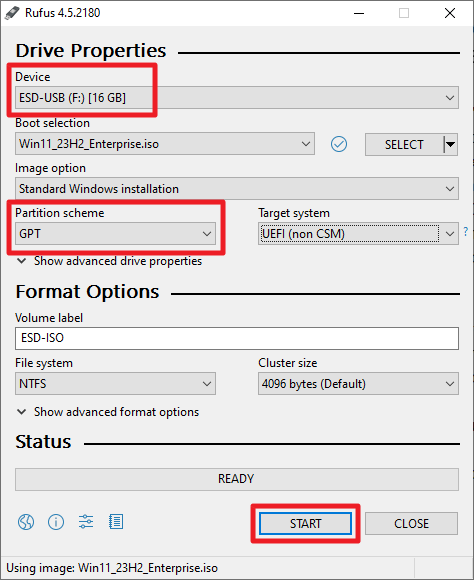
For UEFI-based computers, choose GPT in the Partition scheme. But if you want to use the setup disk on MBR-based systems, select MBR from the dropdown. See How to Find if a Disk Uses MBR or GPT.
Click “Start“.
In the following dialog, you can customize the installation source. For example, here are the options provided:
- Remove requirement for 4GB+ RAM, Secure Boot and TPM 2.0.
- Remove requirement for an online Microsoft account.
- Create a local account with user name __________.
- Set regional options to the same values as this user’s.
- Disable data collection (Skip privacy questions.)
- Disable BitLocker automatic device encryption.
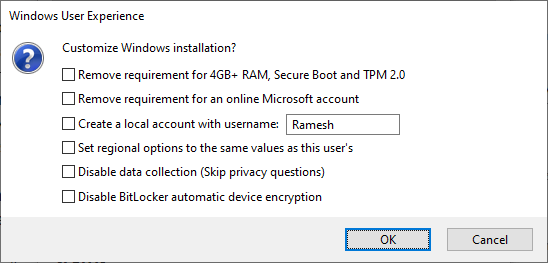
(For example, if you want to use this USB on a system that doesn’t meet the Windows 11 system requirements, enable the “Remove requirement for 4GB+ RAM, Secure Boot and TPM 2.0” checkbox.)
If you want the default settings, click OK without modifying any option in the above dialog.
Click OK when you see the confirmation window:
WARNING: ALL DATA ON DEVICE ‘ESD-USB (F:) (16 GB)’ WILL BE DESTROYED.
To continue with this operation, click OK. To quit, click CANCEL.
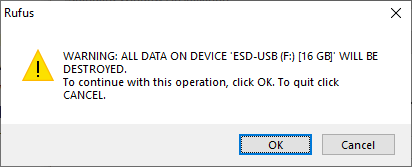
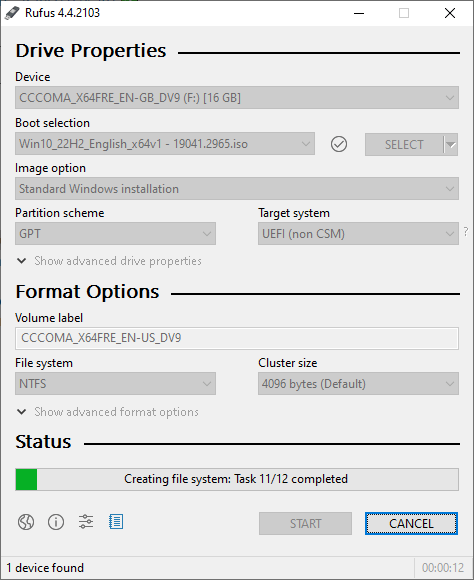
This starts the setup disk creation process.
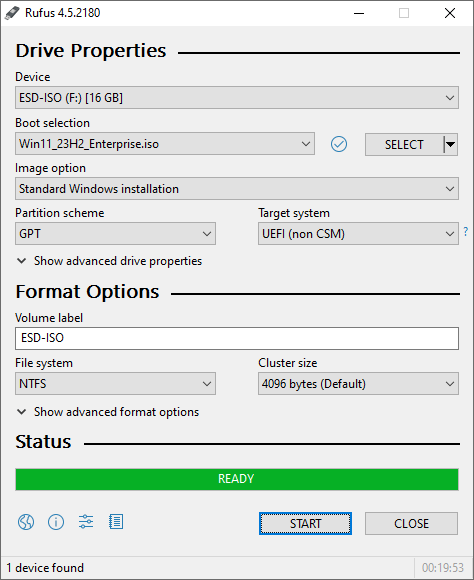
That completes the process. Here are the contents of the USB setup disk we created.
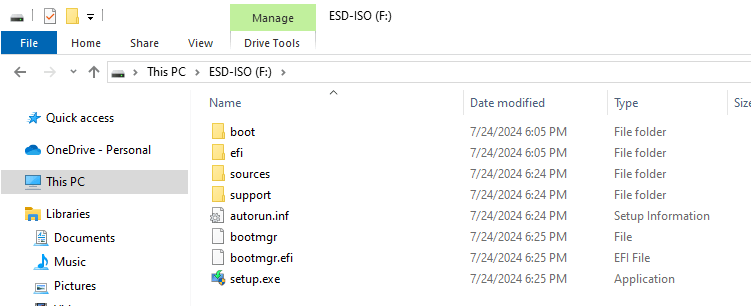
Additional note
Rufus creates a hidden FAT partition on the USB stick, which is not visible in File Explorer. The hidden partition contains the UEFI boot files. For more information, see the article Cannot boot from NTFS-formatted Windows USB Setup Disk.
Option 2: Create a USB Setup Disk without using any software – for MBR-based disks
For legacy (BIOS/MBR) systems, follow these instructions to create a Windows 10 Setup USB disk.
- Insert the USB flash disk into the drive.
- Open an admin Command Prompt and run the
diskpartcommand. - Run the
list diskcommand to see the list of drives. Carefully note down the disk # for your USB media. It’s better to disconnect additional external drives before running this command to make it easy to identify the correct USB stick. - In my case, disk 3 is the USB drive, so I type the following command to select the disk:
select disk 3
- Then, run the following command to completely erase the contents of the USB disk:
clean
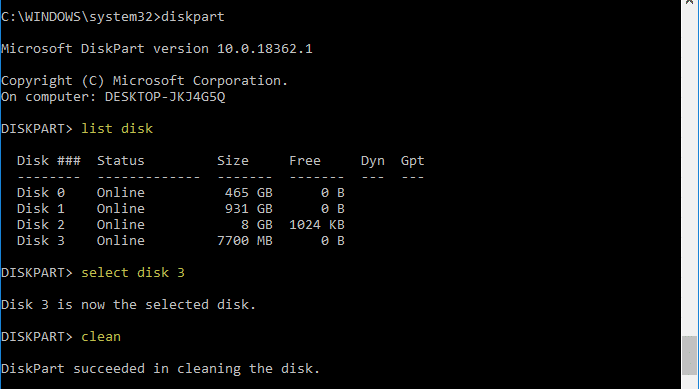
- Then run the following commands:
create partition primary
select partition 1
active
format fs=ntfs quick
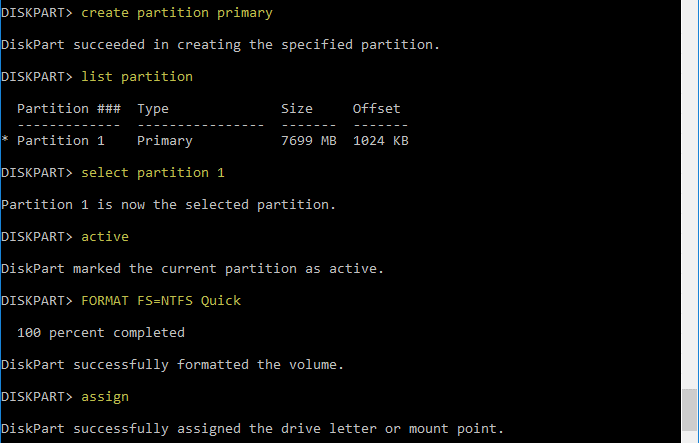
- Once done, run the
assigncommand, and then typeexitto come out of the Diskpart command environment. Now, Windows reassigns a drive letter (G:\in this example) for your USB drive. - Mount the Windows Setup ISO by double-clicking on it.

- Copy the entire contents of the mounted ISO drive (
H:\) to your USB flash drive (G:\)
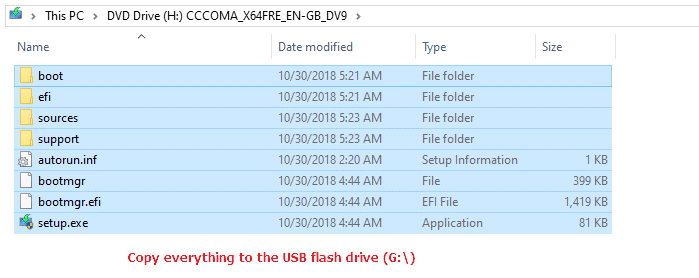
- Switch to the admin Command Prompt window and run the following commands, where
H:\is the drive letter of the mounted Windows ISO andG:\is the USB drive letter:H: cd\boot bootsect.exe /nt60 G:
You’ll see the following output:
Target volumes will be updated with BOOTMGR compatible bootcode.

G: (\\?\Volume{589fd5fb-bd84-11e8-a90e-1866da06b846})

    Successfully updated FAT32 filesystem bootcode.

Bootcode was successfully updated on all targeted volumes.
The
bootsect.execommand-line builds the boot sector code in the specified partition.
That’s it! The USB drive is now bootable, and you should be able to install Windows from it.
Option 3: Using Windows USB/DVD Download Tool
Microsoft’s Windows USB/DVD Download Tool takes an ISO image and creates a bootable USB device that can be used to install Windows on legacy (BIOS/MBR-based) systems. The utility can also create a Windows installation DVD from the ISO file.
Important: The Windows USB/DVD tool formats the disk as NTFS, meaning it will not work on UEFI-based systems. For UEFI-based systems, use Method 1 (Rufus)
Download the Windows USB/DVD Download Tool. To copy the ISO image to a USB flash drive, ensure that the drive has sufficient disk space. Different OSes have different ISO file sizes. Be sure to use a drive with a capacity of 8 GB minimum, as Windows 10/11 ISO file sizes grow every build/version; Windows 10 Fall Creators Update ISO size is 4.4 GB, and Windows 11 Build 10.0.22000 ISO is 5.12 GB.
Although the caption reads “Windows 7 USB/DVD Tool”, it works flawlessly on Windows 10/11.
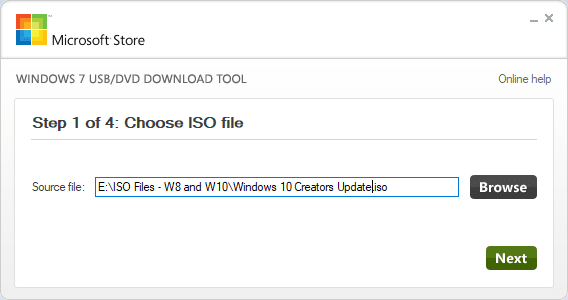
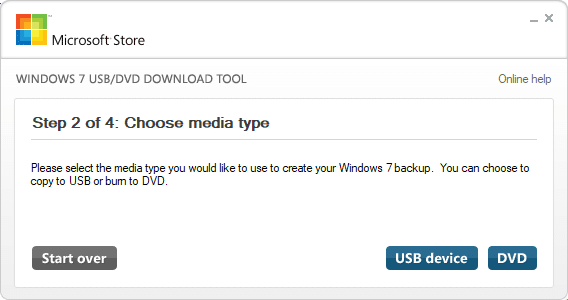
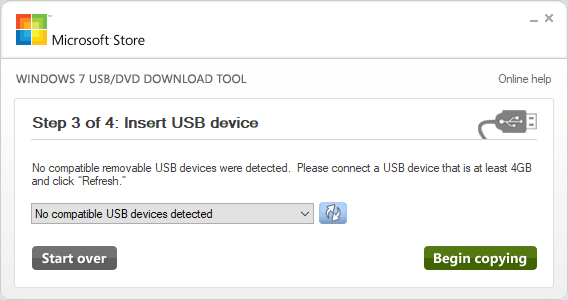
Please insert the USB flash drive (or DVD media) into the drive beforehand.
The alternate download link for the utility is here:
https://www.majorgeeks.com/files/details/microsoft_windows_7_usbdvd_download_tool.html
The tool works only for Windows ISO images downloaded from Microsoft.
I hope this guide proved helpful in creating a bootable USB Windows Setup disk using various methods.
One small request: If you liked this post, please share this?
One "tiny" share from you would seriously help a lot with the growth of this blog. Some great suggestions:- Pin it!
- Share it to your favorite blog + Facebook, Reddit
- Tweet it!

One exception:
Windows 7 USB/DVD Tool formats the USB drive as NTFS and for that reason it may not be bootable on a UEFI machine which requires FAT32. (Some older PC’s may accept both, but the UEFI only machines only boot from FAT32 as for specification)
To make a USB windows installation media UEFI compliant you can format the USB device as FAT32 with windows 10, then open the windows.iso with file explorer and copy all files and folders from the mounted windows.iso directly to the USB flash drive.
Hi. There is one catch – the setup iso file contains install.wim file which is greater than 4GB so does not fit into fat32 filesystem.
and that is the very reason a genuine iso (not for testing purposes like using in virtual machines etc) is always below 4 gb in size
Thank you, it help me a lot.
The info was very helpful. Thanks alot