Frequently experience application crashes, blue screen errors, or sudden reboot problems? For every crash, a memory dump file will be generated by Windows, which can be analyzed using a debugger in order to determine the root cause of the crash.
For those who don’t know how to use a debugger, use WhoCrashed Home Edition, a free Crash Dump Analyzer program from Resplendence Software.
WhoCrashed
WhoCrashed checks for drivers which have been crashing your computer. If your computer has displayed a blue (or black) screen of death, suddenly rebooted or shut down then this program might help you find the root cause of the problem and a solution.
Whenever a computer suddenly reboots without displaying any notice or blue (or black) screen of death, the first thing that is often thought about is a hardware failure. In reality, on Windows, a lot of system crashes are caused by malfunctioning device drivers and kernel modules. In case of a kernel error, many computers do not show a blue or black screen unless they are configured for this. Instead, these systems suddenly reboot without any notice.
This program will analyze your crash dumps with the single click of a button. It will tell you what drivers are likely to be responsible for crashing your computer. It will report a conclusion which offers suggestions on how to proceed in any situation while the analysis report will display internet links that will help you further troubleshoot any detected problems.
To analyze the crash dump, download WhoCrashed Home Edition from https://www.resplendence.com and install it.
Run WhoCrashed and click the Analyze button. It analyzes the C:\Windows\Memory.dmp crash-dump file.
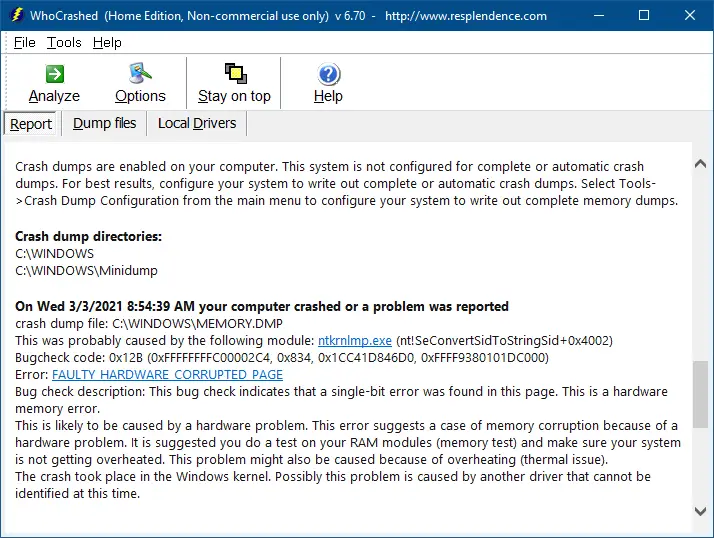
If the system is not configured for complete or automatic crash dumps, it suggests you enable complete crash dumps. To do so, select Tools → Crash Dump Configuration from the main menu to configure your system to write out complete memory dumps.
This is also a Professional version of WhoCrashed available, which can be purchased if you need to use this software in a commercial environment. The professional edition of WhoCrashed also allows analysis of crashdumps on remote drives and computers on the network and offers more detailed analysis.
One small request: If you liked this post, please share this?
One "tiny" share from you would seriously help a lot with the growth of this blog. Some great suggestions:- Pin it!
- Share it to your favorite blog + Facebook, Reddit
- Tweet it!
