As you type a path in the File Explorer or Windows Explorer address bar, the Run dialog or in the Create New Task dialog in Task Manager, the file or folder name suggestions are shown in a list box.
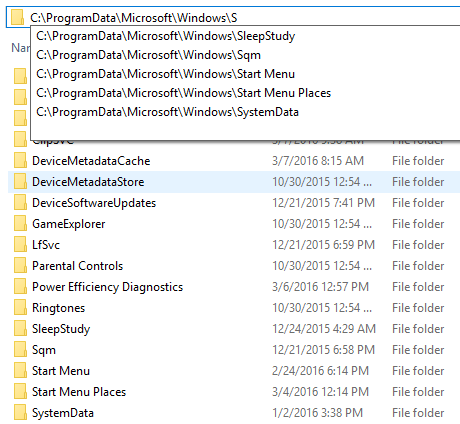
When you type a letter in the Run dialog, the AutoComplete feature may not work (the drop-down box may not be displayed). However, when you hold the Alt key and press the Down arrow, the Run history is displayed correctly in a drop-down box. The same applies to the File Explorer address bar.
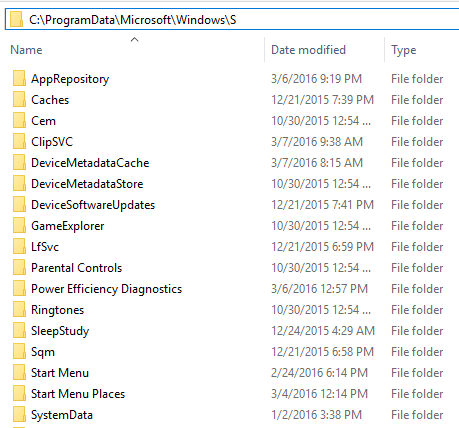
In case if the auto-suggest and/or the append completion (auto-fill) features don’t work, or if you want to disable one or both features, this post tells how to do that.
Enable or Disable Auto-Suggest (Auto-complete drop-down)
- Click Start, type Regedit.exe and go to the following branch:
HKEY_CURRENT_USER\SOFTWARE\Microsoft\Windows\CurrentVersion\Explorer\AutoComplete
- Double-click AutoSuggest and set its data to
yes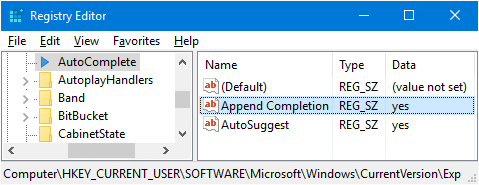
(Setting it to no disables auto-suggestions on the Run dialog and Explorer address bar.)
- Exit the Registry Editor.
The above registry setting corresponds to the following Internet Options setting.
On older Windows 10/11 builds, you can use Internet Options to configure the above setting. However, in the recent builds, Microsoft removed the following option.
- Launch Internet Explorer, click Tools and click Internet Options:
- Select the Content tab
- Click the Settings button under the AutoComplete category.
- Under “Use AutoComplete for”, enable Address bar
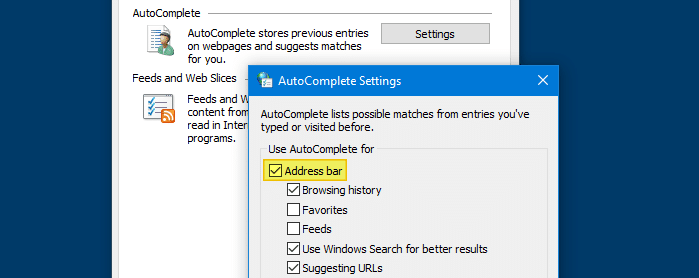
If the above option is disabled, run dialog AutoComplete drop-down feature does not work.
- Close the Internet Options dialog.
Enable or Disable inline Auto-Complete (Append completion or Auto-fill)
To enable inline auto-complete in the address bar and in Run dialog:
- Open Internet Explorer Options (
inetcpl.cpl) - Click on the Advanced tab.
- Enable the setting Use inline AutoComplete in File Explorer and Run Dialog.
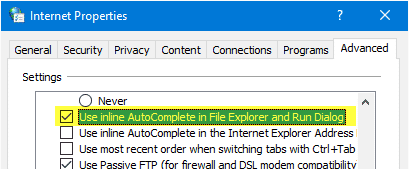
- Exit the Internet Options dialog.
This enables inline auto-complete (or append completion or auto-fill) in the address bar and Run dialog.
Equivalent registry setting
- Click Start, type Regedit.exe and go to the following branch:
HKEY_CURRENT_USER\SOFTWARE\Microsoft\Windows\CurrentVersion\Explorer\AutoComplete
- Double-click Append Completion and set its data to
yes
- Exit the Registry Editor.
After enabling auto-suggest and inline Autocomplete in the Run dialog and Explorer, here is how it now looks:
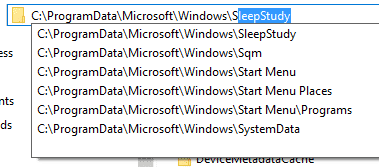
.
One small request: If you liked this post, please share this?
One "tiny" share from you would seriously help a lot with the growth of this blog. Some great suggestions:- Pin it!
- Share it to your favorite blog + Facebook, Reddit
- Tweet it!

Autofill doesn’t work on the Open dialog box. It works in the File Explorer though
you are a legend! the autocomplete suggestion in the run dialog was doing my head in! you just helped end about 2 hours of frustration. thankyou!
Its awesome, thanks for the help!