Summary: “Pin to Start” Option missing and “Show more tiles” Option Locked in Personalize window, due to Policy settings.
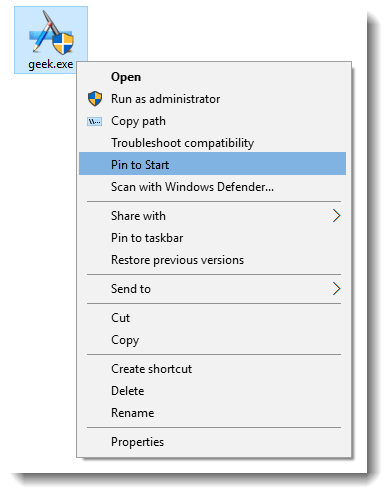
In Windows 10, when you right-click on a folder, .exe file, or a shortcut to a .exe file, the option Pin to Start may be missing. Also, when you right-click an item in the Start menu, Pin to Start menu or Unpin from Start options go missing. Here are two possible reasons why this happens, and followed by a fix.
The two Policy settings NoChangeStartMenu and LockedStartLayout if set (via Group Policy or Registry-based), would remove the Pin to Start right-click menu option. If your system is connected to a domain, your network administrator may have set these policies, and you may have to contact them to relax the settings. If that’s not the case, the registry-based settings may have been enabled by 3rd party tool.
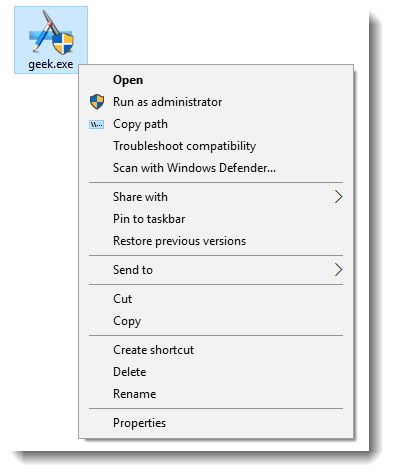
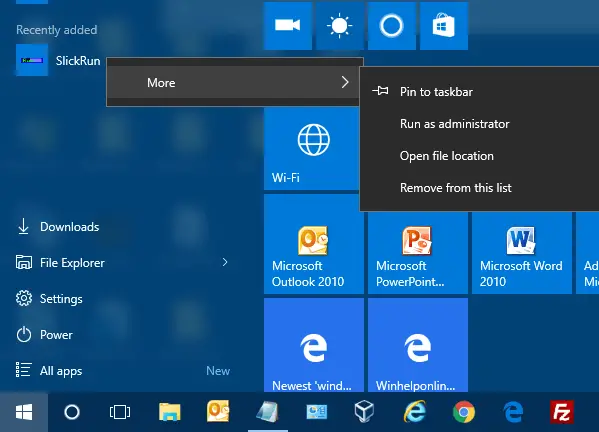
Restore Pin to Start context menu
If the “Pin to Start” right-click option is missing, you need to remove the NoChangeStartMenu and LockedStartLayout policy settings from the registry.
- Download w10_pin_to_start.zip, unzip, and run the enclosed REG file.
Here are the contents of the registry file:
Windows Registry Editor Version 5.00

;Restore Pin to Start right-click menu option in Windows 10
;Ramesh Srinivasan, https://www.winhelponline.com

[HKEY_CLASSES_ROOT\Folder\shellex\ContextMenuHandlers\PintoStartScreen]
@="{470C0EBD-5D73-4d58-9CED-E91E22E23282}"

[HKEY_CLASSES_ROOT\exefile\shellex\ContextMenuHandlers\PintoStartScreen]
@="{470C0EBD-5D73-4d58-9CED-E91E22E23282}"

[HKEY_CURRENT_USER\SOFTWARE\Microsoft\Windows\CurrentVersion\Policies\Explorer]
"NoChangeStartMenu"=-

[HKEY_LOCAL_MACHINE\SOFTWARE\Microsoft\Windows\CurrentVersion\Policies\Explorer]
"NoChangeStartMenu"=-

[HKEY_CURRENT_USER\SOFTWARE\Policies\Microsoft\Windows\Explorer]
"LockedStartLayout"=-

[HKEY_LOCAL_MACHINE\SOFTWARE\Policies\Microsoft\Windows\Explorer]
"LockedStartLayout"=-
More Information
The registry file removes the two Policy settings (listed below), which restores the Pin to Start context menu handler entry in the registry.
NoChangeStartMenu registry value which corresponds to the following GPO:
Administrative Templates > Start Menu and Taskbar > Prevent users from customizing their Start Screen
LockedStartLayout registry value which corresponds to the following GPO:
Administrative Templates > Start Menu and Taskbar > Start Layout
(For Windows 10 Start Menu Policies list, check out Personalize – Some settings are managed by your organization.)
Pin to Start Context Menu Handler
Another possibility is that the reference to the Pin to Start context menu handler is missing in the registry.
HKEY_CLASSES_ROOT\exefile\shellex\ContextMenuHandlers\PintoStartScreen

HKEY_CLASSES_ROOT\folder\shellex\ContextMenuHandlers\PintoStartScreen
The registry fix restores the handler if it’s missing.
For Windows Vista or Windows 7 version of this fix, see Pin to Taskbar and Pin to Start Menu Options Missing in Windows 7
If the “Pin to Taskbar” option is missing in Windows 10, check out the article Restore Missing “Pin to Taskbar” Option in Windows 10 for a similar fix.
One small request: If you liked this post, please share this?
One "tiny" share from you would seriously help a lot with the growth of this blog. Some great suggestions:- Pin it!
- Share it to your favorite blog + Facebook, Reddit
- Tweet it!

You have no idea how many sites I have searched to find this answer!
Thank you so much, you amazing person, you!
You are a legend my Friend!!
Like Dono above, I too have been searching the internet and microsoft forums. I have sfc and dism my registry which yielded no solutions as it found problems.
I have downloaded gpedit and installed it in my Win 10 Home and turned 0 to 1; 1 to 0; signed out, rebooted over and over. I am currently downloading the tool from Microsoft’s Win 10 update to begin a fresh install tomorrow, I only bought this brand new laptop 6 weeks ago and am so angry Microsoft have allowed this to happen without providing a CLEAR solution.
OMFG, I’ve uninstalled all antivirus, malware and spyware software and am down to bare bones on Win 10 and still I cannot access any of the policies set by my organization ‘which is NOT existent’ as I’m a single laptop user.
WinHelp Online Blog, I wish you good health, luck and great fortune this year. You are a LEGEND!
BAMMMMMMMMMMMMMM!
I went to read your other articles hoping you’d be able to help me get access to ‘show more tiles’. However beyond listing the relevant paths on reg and gp, which I simply cannot understand, you have not provided any information.
Can you please create a zip file for the rest of the settings that are grayed out in:
settings/start/show more tiles
I cannot find a solution that explains what I need to do in plain language. I have set all the values to 0
Changing the privacy collection from Basic to Full or Enanched is useless and does not work.
I am searching for a fix to allow me to add Tiles to my start menu, move the tiles in my start menu, and drop and drag item in my start menu.
**del.Intellimenus
**del.LockTaskbar
**del.NoChangeStartMenu
**del.NoCloseDragDropBands
**del.NoMovingBands
**del.NoSetTaskbar
**del.NoSimpleStartMenu
**del.NoSMConfigurePrograms
**del.NoSMMyPictures
**del.NoStartMenuPinnedList
**del.NoToolbarsOnTaskbar
**del.NoTrayContextMenu
And in the last week my bluetooth stereo speaker system has not been able to connect. I’ve disconnected and reinstalled – nothing. It says it cannot connect to it. It’s paired, but just won’t connect.
At laaast! It worked! You are so *ing awesome, thank you sooo much!
Perfect! It worked perfectly!
My Start Menu is still locked though. i cannot move tiles, nor resize them. Although this greatly helped me! THanks so much!
@Anthony: Try the fix at https://www.winhelponline.com/blog/personalize-some-settings-managed-organization/
thank you so much for desktop icon getting that pin to start option, but , i’m disappoint for not getting any better situation in start, they don’t have anything except that more on right click.
Thank you A LOT!!!!!!!!! I can sleep well again!!! 🙂
thank you mate… been searching for this solution…
Right click at Start button > click Command Prompt (Admin) > in the flashing prompt, type powershell > press Enter.
Now copy and paste the following command. To avoid typo, please do use copy/paste method.
Get-AppXPackage | Foreach {Add-AppxPackage -DisableDevelopmentMode -Register “$($_.InstallLocation)\AppXManifest.xml”}
> press Enter.
When finished, restart computer.
See if that makes any difference.
thank you so much the followoing solution works well.
Right click at Start button > click Command Prompt (Admin) > in the flashing prompt, type powershell > press Enter.
Now copy and paste the following command. To avoid typo, please do use copy/paste method.
Get-AppXPackage | Foreach {Add-AppxPackage -DisableDevelopmentMode -Register “$($_.InstallLocation)\AppXManifest.xml”}
> press Enter.
When finished, restart computer.
See if that makes any difference.
Thank you so much..
After updating to Windows 10 1511 (10586), some start menu items disappear and I couldn’t edit anything (add/remove/sort/resize) from the start menu.
I tried a lot of solutions and non worked for me, only this one.
Thank you again.
Oh my god…… I cannot thank you enough, I’ve been having this problem for months. Looked through a lot of forums, couldn’t find any, until I found yours. Finally I can rest in peace. I wish I could you coffee or something.
For anyone having this issue, download the file, run it, and don’t forget to RESTART your computer.
thank you,,my issue solved with your .reg file
Elegant solution. And YES it works.
You sir are THE MAN! Worked like a charm (12.5.2018). Thank you!
This seems like it would be a fairly uncommon solution, as it would require the Group Policy option to be disabled to begin with. (Perhaps on some workplace computers managed by overly authoritarian [tyrannical] sys admins.)
The issue that affected me was that the shortcut I wanted to pin seemed to have been deemed “ineligible,” for lack of a better word. In my case, it was a shortcut to an application deployed via ClickOnce. Windows would allow me to pin the shortcut to the taskbar, but the option for “Pin to Start Menu” was missing. The solution was to move (or copy) the shortcut into the start menu folder. On Windows 10, this should be located at: “%UserProfile%\AppData\Roaming\Microsoft\Windows\Start Menu\Programs”
This will make the program appear in the programs section of the start menu (which also means it can be easily launched by typing the name, like all other programs). And more to the point, right-clicking it now presents the option for the program to be pinned.
Your solution worked for me…really did not want to download a file adjusting the registry. Thanks!
I found a work around. I was trying to pin a simple text file to the start menu, so I changed the file extension to exe, now ‘pin to start’ will appear in the context menu when you right click on the file. I pinned it to start, then changed the file extension back to txt. When you click on the file in the start menu, it will fail but that leads you to the short cut it created in the programs folder, just right click on the shortcut and change that from exe to txt or whatever your original file extension was and now it should work.
Remember, to see the file’s extension you need go to Control panel\folder option\veiw tab\ and uncheck “Hide extensions for known file types”…. hope this helps someone! Cheers
I am using this file for windows 8.1 and very good work. tanxxxx
Lost recycle bin icon. How can I find it and get it back.
@Elba: See How to Restore Missing Recycle Bin Desktop icon in Windows 10
wow! I didn’t actually expect the .reg to make any difference, but it actually worked after a reboot!
Thank you so much sir, you’re a hero 🙂
I usually don’t comment, but this really helped, I was thinking to reinstall windows but you saved me from that!